How to Get a CVS Prescription Receipt
Ready to create your own? Use our free receipt generator — no account needed.
Browse Receipt Templates →On this page
If you need a CVS prescription receipt, start with the pharmacy, not the front-store receipt tab. Prescription documentation is usually handled separately from regular CVS shopping receipts, and that difference matters if you need the record for FSA, HSA, insurance, or medical expense tracking.
Quick Answer
To get a CVS prescription receipt, ask the pharmacist for the receipt at pickup or request a prescription purchase summary. For reimbursement or medical recordkeeping, this is usually more useful than a regular CVS store receipt.
Important
A front-store CVS receipt and a pharmacy prescription receipt are not the same thing. If you need documentation for a prescription cost, copay, or insurance adjustment, use the pharmacy record instead of the general store receipt.
What a CVS Prescription Receipt Actually Is
A CVS prescription receipt is the pharmacy-side record of a filled prescription. It is different from the long retail receipt you get for front-of-store purchases.
In practice, the prescription receipt or purchase summary is the document people usually need when they are trying to:
- prove how much they paid for a medication
- document a copay for reimbursement
- keep records for FSA or HSA submissions
- track medical spending for taxes or insurance
- save a pharmacy purchase history for personal records
If your purchase included both pharmacy and retail items, the regular CVS receipt may show the overall transaction, but the pharmacy record is still the better source for prescription-specific details.
CVS Prescription Receipt vs. CVS Store Receipt
The two documents serve different purposes.
CVS Receipt Types
| Feature |
|---|
If you searched for “CVS prescription receipt,” you almost certainly want the pharmacy document, not the general shopping receipt.
How to Get a CVS Prescription Receipt
Method 1: Ask at Pickup
The easiest time to get the prescription receipt is when you pick up the medication.
At the pharmacy counter:
- Pick up your prescription as usual
- Ask for the printed receipt or prescription summary
- Check that it shows the medication and amount paid
- Save it immediately if you need it for reimbursement or records
This is the cleanest option because the transaction is current and easy to retrieve.
Method 2: Ask for a Prescription Purchase Summary
If you already picked up the medication and no longer have the paperwork, ask the pharmacist for a prescription purchase summary.
This is usually the best option when:
- you lost the original paperwork
- you need a record for a prior month
- you are gathering medical receipts for FSA or HSA
- you want a pharmacy history printout for taxes or insurance
Bring as much identifying detail as possible:
- your full name
- approximate fill date
- pharmacy location
- medication name if you know it
The more specific you are, the faster the request is handled.
Method 3: Use Digital Store Receipt History Only for Retail Purchases
The CVS app is excellent for ordinary store receipts linked to ExtraCare, but it is not the main source for prescription-specific documentation.
Use the app if you need:
- front-store item history
- digital retail receipts
- coupon, savings, or ExtraCare details
Use the pharmacy counter or summary request if you need:
- prescription receipt details
- copay amount
- medication name
- pharmacy transaction records
Related: CVS Receipt Lookup: Get Your Digital Receipt or Reprint
What Information Should a CVS Prescription Receipt Include?
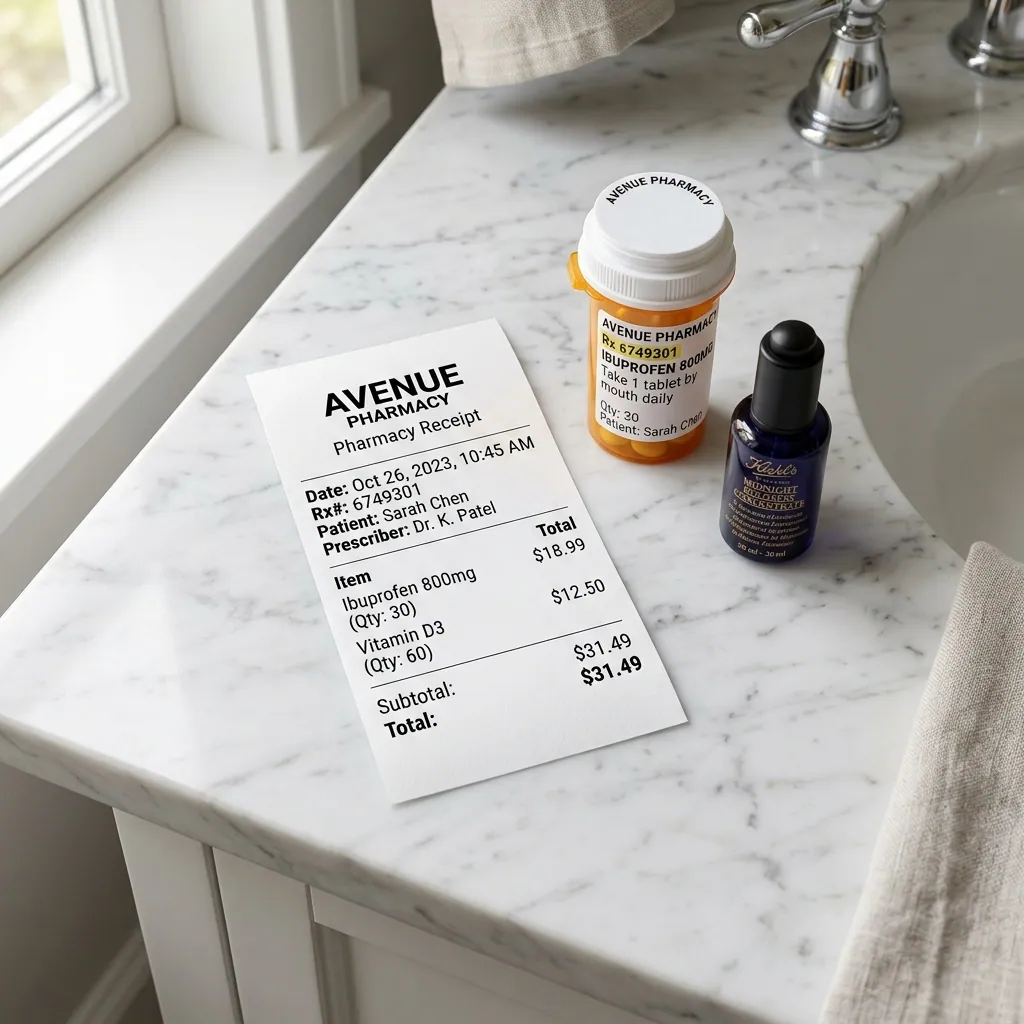
The most useful CVS prescription receipt usually includes:
- CVS pharmacy name and location
- date of purchase or pickup
- Rx number
- medication name
- quantity or days supply
- amount you paid
- insurance-adjusted patient responsibility, if relevant
For reimbursement and documentation, item-level clarity matters. A record that only shows a total amount is weaker than one that clearly identifies the prescription expense.
CVS Prescription Receipt for FSA and HSA
A prescription receipt is one of the most useful medical documents to keep because prescription expenses are commonly eligible for FSA and HSA reimbursement.
When saving a CVS prescription receipt for FSA or HSA:
- Make sure the medication and date are visible
- Keep the amount you paid after insurance
- Save a digital copy as PDF or image
- Store it with your other medical expense records
If you are also buying non-prescription items, keep the general CVS receipt too, especially if it shows eligible OTC items.
Related: Pharmacy Receipt for FSA & HSA: What Your Form Needs
Official References
For CVS pharmacy documentation and health-plan recordkeeping, these primary references are the clearest sources:
- IRS Publication 969: Health Savings Accounts and Other Tax-Favored Health Plans
- CVS Help: Help with ExtraCare
What If You Need a CVS Prescription Record for Insurance or Taxes?
For insurance or tax-related documentation, the key issue is clarity.
The record should make it obvious:
- what was purchased
- when it was purchased
- what you actually paid
If you are tracking medical expenses over time, a prescription purchase summary can be easier to organize than individual retail receipts because it focuses on the pharmacy transactions that matter.
If you are rebuilding your own documentation set, keep these records organized by:
- year
- pharmacy
- prescription name
- amount paid
That makes later reimbursement or audit prep much easier.
What to Do If You Can’t Find the Original CVS Prescription Receipt
If the original paper copy is gone:
- Check whether you still have any pharmacy paperwork from pickup
- Ask the pharmacist for a prescription purchase summary
- Use your bank or card statement only as supporting evidence, not as the main record
- Save the replacement documentation immediately once you get it
A bank statement can help confirm the date and amount, but it usually does not contain enough prescription detail to replace the pharmacy document on its own.
Need a Backup CVS Receipt Template?
If you need a clean personal record for your own files after verifying the purchase details, you can use the CVS Receipt Generator to organize the information into a structured receipt-style document.
Use the official pharmacy document first whenever possible. A backup template is best treated as a personal recordkeeping tool, not a substitute for official pharmacy-issued documentation.
Create a CVS Receipt Backup
Use the CVS receipt template to organize verified purchase details into a clean record for your files.
Related CVS and Pharmacy Guides
- CVS Receipt Lookup: Get Your Digital Receipt or Reprint
- Pharmacy Receipt for FSA & HSA: What Your Form Needs
- How to Make a Receipt for Taxes: Complete IRS Guide
- CVS Receipt Generator
- Rx Receipt Template
- Medical Invoice Generator
Final Takeaway
If you need a CVS prescription receipt, go to the pharmacy side first. The CVS app and regular receipt history are useful for store purchases, but prescription records are a separate documentation layer. For FSA, HSA, insurance, and medical recordkeeping, the pharmacy-issued receipt or summary is usually the document that matters most.
FAQ
Ask at the CVS pharmacy counter when you pick up the prescription or request a prescription purchase summary from the pharmacist.
For recent front-of-store purchases, the CVS app may show a digital receipt, but prescription documentation is usually handled separately through the pharmacy.
No. A prescription receipt is pharmacy-specific and typically includes the Rx number, drug name, quantity, copay, and insurance adjustment details.
A normal CVS store receipt covers front-store items like OTC products, snacks, cosmetics, and household goods.
Yes. Prescription expenses are generally eligible for FSA and HSA reimbursement.
Keep the receipt or prescription summary showing the medication, date, and amount you paid.
In many cases, yes. Ask the pharmacist for a prescription purchase summary or history printout.
Bring identifying details such as your name, approximate fill date, and the pharmacy location if possible.
The most useful version includes the pharmacy name, date, Rx number, medication name, quantity or days supply, and the amount you paid after insurance.
For reimbursement or tax records, item detail matters more than just the total charged.
The CVS app is strongest for digital store receipts tied to ExtraCare.
Prescription-specific documentation is usually obtained from the pharmacy counter or a prescription history summary.