Free AutoZone Receipt Generator
Create Free AutoZone Auto Parts Receipts Online - Add Parts, Core Charges & Rewards. Preview free; watermark-free PDF export requires a paid plan.
Create an AutoZone-style receipt with parts, taxes, rewards, and payment details. Download a PDF for maintenance records or reimbursement.

Choose
AutoZone Receipt selected

Customize
Fill in your details

Download
Save or share receipt
Edit the details once and the preview updates instantly.
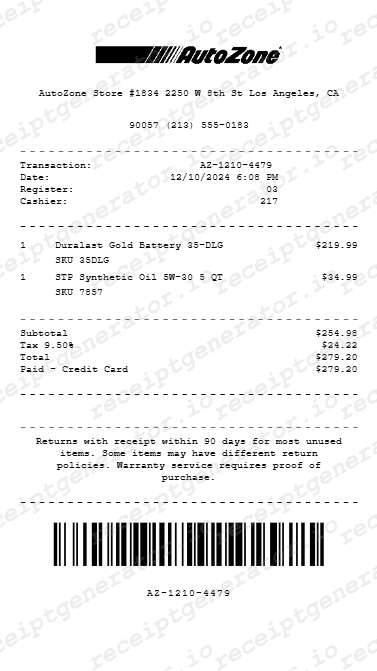
Design options
Choose an AutoZone receipt design
Choose a layout to open it in the editor and customize your AutoZone receipt.
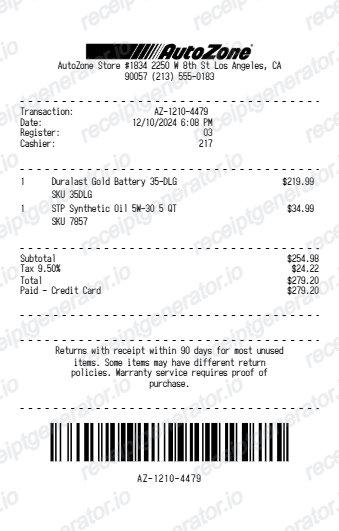
Quick summary
AutoZone receipt template overview
Create AutoZone Auto Parts Receipts Online - Add Parts, Core Charges & Rewards. Preview the layout before choosing a PDF export plan.
Fields in the autozone receipt template
AutoZone register receipts follow a consistent structure across its US stores. Knowing what the original contains helps you rebuild an accurate record - and helps a finance reviewer trust it.
Store number and transaction details
The header shows the store number, address, and phone, and the receipt carries a transaction or register number with the date and time. AutoZone uses these identifiers to locate a purchase in its system for returns and warranty claims.
Part numbers on every line
Each item prints with its part number and brand - a Duralast battery or brake pad line reads as a SKU plus description, not just a product name. DIY records and insurance claims are stronger when the part numbers are present.
Core charges as separate lines
Rebuildable parts like batteries, alternators, starters, and brake calipers carry a core charge - a deposit printed as its own line under the part. AutoZone refunds it when you return the old part with the receipt, so the core line matters for the math.
AutoZone Rewards summary
If a phone number or 16-digit loyalty ID was given at checkout, the receipt reflects the Rewards account, including credits earned toward the program's reward threshold. This is also what makes later receipt lookup by phone number possible.
Warranty notes on parts
Many AutoZone parts carry a limited warranty, and the receipt is the proof-of-purchase document for it - battery and Duralast warranty terms are tied to the purchase date printed on the receipt.
Tax and payment breakdown
The footer shows the subtotal, sales tax based on the store's location, the total, and the payment method with the last 4 digits for card payments. Returns are refunded to the original payment method, so this line gets checked.
How to Create an AutoZone Receipt
Follow these steps to build an AutoZone-style receipt with the real transaction fields.
- 1
Add the store number and transaction details
Enter the store number and transaction date/time shown at the top.
- 2
List parts with part numbers
Add each part with its part number, quantity, and price.
- 3
Add core charges if applicable
For returnable parts, list the core charge as its own line separate from the part price.
- 4
Add AutoZone Rewards details
If the purchase was tied to an AutoZone Rewards account, note it in the summary.
- 5
Add tax and payment breakdown
Enter the subtotal, sales tax, and payment method with the last 4 digits for card payments.
- 6
Download as PDF
Review the live preview, then export the finished AutoZone receipt for warranty or expense records.
Print-ready AutoZone receipts
Edit the layout, watch it update live, then print, download PDF, or email.
Live AutoZone receipt preview
Watch the receipt update as you add parts and charges.
One-click print
Print your AutoZone receipt from the browser.
Download as PDF
Export a clean auto parts receipt PDF for vehicle records.
Mobile-friendly editor
Create AutoZone receipts from any device.
Get Your Original AutoZone Receipt First
If you are an AutoZone Rewards member and gave your phone number at checkout, any store can pull up the purchase in the system - and swiping the same credit or debit card you paid with often finds the transaction too. AutoZone customer support (1-800-288-6966) can also locate transaction information for a purchase. Use this template when the original is unavailable - a cash purchase with no Rewards account, a faded thermal slip, or an old transaction the store can no longer retrieve.
Vehicle maintenance records
Track AutoZone parts purchases for vehicle maintenance history.
Fleet expense tracking
Document AutoZone parts for fleet vehicle expense reimbursement.
DIY mechanic billing
Create AutoZone receipts to document parts for DIY repair billing.
Insurance repair documentation
Document auto parts purchases for vehicle insurance repair claims.
AutoZone Receipt Types
Choose the AutoZone receipt format for your auto parts purchase.
Auto Parts Receipt
AutoZone receipt for individual part purchases.
Core Return Receipt
AutoZone receipt with core charge and core return credit.
Fleet Parts Receipt
AutoZone receipt for fleet vehicle maintenance parts.
Related Guides
Explore related guides to understand the receipt details, lookup steps, and documentation workflows.
Related vehicle services and repairs templates
More free receipt templates for gas & fuel and retail expense records.
AutoZone Receipt FAQ - Auto Parts Documentation & Vehicle Expense Records
Questions about editing the autozone receipt template, reviewing its fields and obtaining the original transaction record.
Choose the AutoZone receipt template, add part names, part numbers, core charge, AutoZone Rewards, taxes, and payment method. Preview and download as PDF.
Yes. Add AutoZone Rewards earned and redeemed as line items - matching the AutoZone receipt rewards summary format.
Yes. Download a clean PDF for vehicle maintenance records, insurance documentation, or DIY mechanic expense tracking.
A real AutoZone receipt shows the store number, address, and phone at the top, the date and time, each part with its part number and brand, any core charge as a separate line under the part, a Rewards summary if a loyalty account was used, sales tax, the total, and the payment method with the last 4 digits for cards.
Yes. Add a core charge as a line item and core return credit when the old part is returned - totals update automatically.
Yes. DIY mechanics and fleet managers use AutoZone receipts to document parts purchases for vehicle maintenance expense tracking or reimbursements.
If you are an AutoZone Rewards member and gave your phone number at checkout, a store associate can look up the purchase on your account. If you paid by card, bring the same card - stores can often find the transaction by scanning it. Otherwise, AutoZone customer support at 1-800-288-6966 can help locate the transaction information.
Often, yes. AutoZone's return policy allows returns within 90 days, and without a paper receipt the store can look up the transaction by scanning the card you paid with or by checking your AutoZone Rewards purchase history. Core charge refunds are stricter - AutoZone generally requires the receipt showing you paid the core deposit.
Receipt Generator · Receipt Maker · 300+ Free Templates
Create your AutoZone receipt
Use the editable AutoZone receipt generator to add items, tax totals, and payment details, then export a clean PDF.