Free Lyft Receipt Generator
Create Free Lyft Ride Receipts Online - Add Pickup, Drop, Prime Time & Tip. Preview free; watermark-free PDF export requires a paid plan.
Create a Lyft-style ride receipt with trip details, fare, fees, tip, and payment info. Download a PDF for travel records or reimbursement.

Choose
Lyft Receipt selected

Customize
Fill in your details

Download
Save or share receipt
Edit the details once and the preview updates instantly.
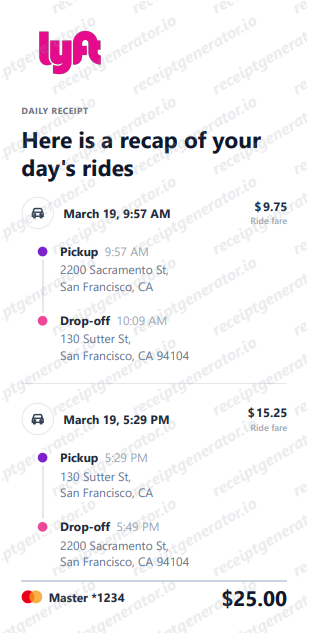
Quick summary
Lyft receipt template overview
Create Lyft Ride Receipts Online - Add Pickup, Drop, Prime Time & Tip. Preview the layout before choosing a PDF export plan.
Fields in the lyft receipt template
Before you rebuild a Lyft receipt, it helps to know exactly what the original contains. Lyft receipts follow a consistent structure across ride types, and a credible replacement copy should match it line for line.
Upfront 'Lyft fare' line
In most markets Lyft quotes an upfront price before the ride, and the receipt shows it as a single 'Lyft fare' line that bundles the ride fare, service fee, and expected tolls - not a per-mile meter breakdown. Lyft retired its old Prime Time surge multiplier in favor of this upfront pricing.
Service fee built into the price
Every ride includes a flat service fee that varies by region, covering costs like insurance and background checks. On upfront-priced rides it is folded into the Lyft fare rather than shown as a separate line.
Airport fees and third-party charges
The app detects airport pickups and dropoffs and adds the airport's access fee, and local rideshare taxes and surcharges pass through as third-party charges. The full airport fee is visible in the ride receipt after the trip and is nonrefundable.
Tip as a separate line
Tips added during or after the ride appear as their own line, and 100% goes to the driver. If the tip is added later, the emailed receipt updates to include it.
Route, ride type, and driver
Real receipts show pickup and dropoff addresses with timestamps, a route map, the ride type booked (Lyft, Lyft XL, Lux), and the driver's first name - the details expense reviewers check first.
Emailed ride report
Lyft emails a receipt after each ride, and the Ride History export produces a Ride Report covering multiple trips - with pickup and dropoff addresses, mileage, duration, and the fare breakdown in PDF and CSV formats.
How to Create a Lyft Receipt
Follow these steps to build a Lyft-style ride receipt with a real fare breakdown.
- 1
Add ride type, route, and driver
Enter the ride type, pickup and drop-off addresses, and the driver's name.
- 2
Add the upfront Lyft fare and service fee
Enter the upfront fare Lyft quotes plus the service fee built into the price.
- 3
Add airport or third-party fees
If the ride included an airport fee or other third-party charge, list it as its own line.
- 4
Add the tip as a separate line
Enter any tip separately from the fare, matching how Lyft's own receipts break it out.
- 5
Review the live preview
Check the fare breakdown and total before exporting.
- 6
Download as PDF
Export the finished Lyft receipt for expense reports or personal records.
Print-ready Lyft ride receipts
Edit the layout, watch it update live, then print, download PDF, or email.
Live Lyft receipt preview
Watch the receipt update as you add ride details.
One-click print
Print your Lyft receipt from the browser.
Download as PDF
Export a clean Lyft ride receipt PDF.
Mobile-friendly editor
Create Lyft receipts from any device.
Get Your Original Lyft Receipt First
If the ride still shows in your account, the original is always better: open Ride History in the Lyft app, select the trip, and view the receipt - or tap Export (iOS) or the download icon (Android) to select multiple rides and have Lyft email you a Ride Report. On lyft.com you can download individual trip PDFs or a CSV of your full history. Use this template when the original is unavailable - a deleted account, a ride on someone else's profile, or a receipt email that never arrived.
Corporate travel expense claim
Submit Lyft receipts for corporate travel expense reimbursements.
Conference transport documentation
Record Lyft rides to events and conferences for expense claims.
Airport transfer receipt
Create Lyft receipts for airport transfer billing.
Personal ride records
Archive Lyft trip receipts for personal spending records.
Lyft Receipt Types
Choose the Lyft receipt format for your ride documentation.
Standard Lyft Ride Receipt
Lyft receipt for a regular ride with fare and breakdown.
Lyft XL or Lux Receipt
Lyft receipt for premium ride types with upgrade pricing.
Corporate Lyft Receipt
Lyft receipt for corporate expense reimbursement submission.
Receipt Guides
Read the supporting Lyft guides to recover receipts, handle reimbursement records, and create cleaner ride documentation.
Receipt guide
How to Get a Lyft Receipt
Learn the fastest ways to recover a Lyft receipt from the app, email, and ride history.
Explore How to Get a Lyft ReceiptReceipt guide
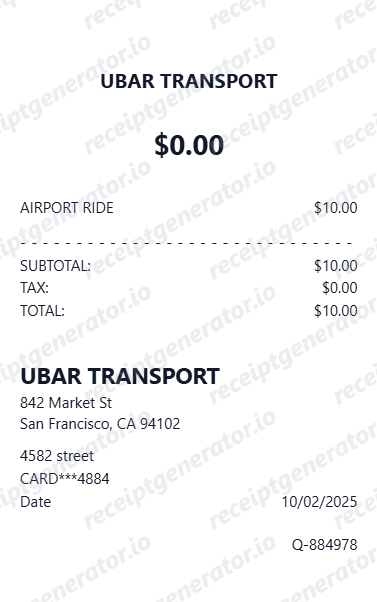
Uber Receipt for Reimbursement
Learn which trip details finance teams usually need from a rideshare receipt.
Explore Uber Receipt for ReimbursementReceipt guide
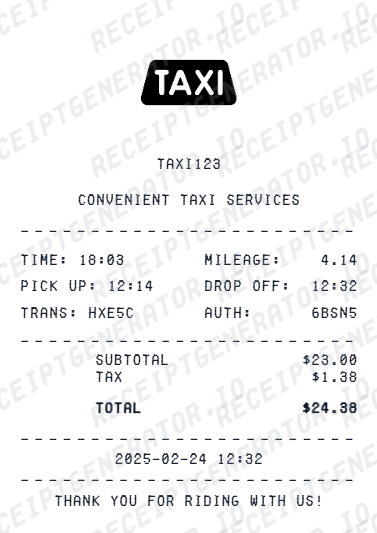
Taxi Receipt Generator Guide
Explore the difference between taxi, rideshare, and airport-transfer receipt records.
Explore Taxi Receipt Generator GuideBrowse our collection of receipt templates for various purposes.
Lyft Receipt FAQ - Ride Expense & Corporate Travel Documentation
Questions about editing the lyft receipt template, reviewing its fields and obtaining the original transaction record.
Choose the Lyft receipt template, add pickup address, dropoff address, distance, duration, base fare, Prime Time, Lyft fee, tip, and payment. Preview and download as PDF.
Yes. Business travelers submit Lyft ride receipts for corporate travel expense claims - add trip details and payment for complete documentation.
Yes. Download a clean PDF for business expense reimbursement, corporate travel billing, or personal ride records.
A real Lyft receipt shows the ride date, pickup and dropoff addresses with times, a route map, the ride type (Lyft, Lyft XL, Lux), the driver's first name, and the charges. In most markets the fare appears as one 'Lyft fare' line - the upfront price bundling the ride fare, service fee, and expected tolls and airport fees - followed by separate lines for tip and any third-party charges, plus the payment method.
Yes. Add base fare, Lyft fee, Prime Time charge, tip, and taxes as separate line items - matching Lyft receipt format.
Yes. Add driver name and Lyft ride type (Lyft, LyftXL, Lyft Lux) for a complete trip receipt.
Open the Lyft app and go to Ride History, select the ride, and view the receipt. To pull multiple rides at once, tap Export in the top right (iOS) or the download icon (Android), select the rides, and Lyft emails you a Ride Report. On lyft.com you can also download individual trip PDFs or a CSV of your ride history. Lyft emails a receipt automatically after every ride as well. See our full guide for a complete step-by-step walkthrough.
The upfront price holds only if the ride goes as quoted. The final charge can change if you added a stop, changed the destination, kept the driver waiting past the free window, or took a route with different tolls. Also note that pending transactions can show a temporary authorization hold that is higher than the final fare - the receipt in Ride History reflects the actual amount charged.
Receipt Generator · Receipt Maker · 300+ Free Templates
Create your Lyft receipt
Use the editable Lyft receipt generator to add items, tax totals, and payment details, then export a clean PDF.