BP Receipt Generator
Create a BP-style gas receipt with station details, multiple fuel items, gallons, price per gallon, tax, mobile payment, loyalty rewards, and transaction metadata. Preview it live and export a PDF.
Create a BP-style fuel receipt with station address, fuel items, gallons, price per gallon, tax, totals, mobile payment, loyalty rewards, and transaction details.

Choose
BP Receipt selected

Customize
Fill in your details

Download
Save or share receipt
Edit the details once and the preview updates instantly.
Quick summary
BP receipt template overview
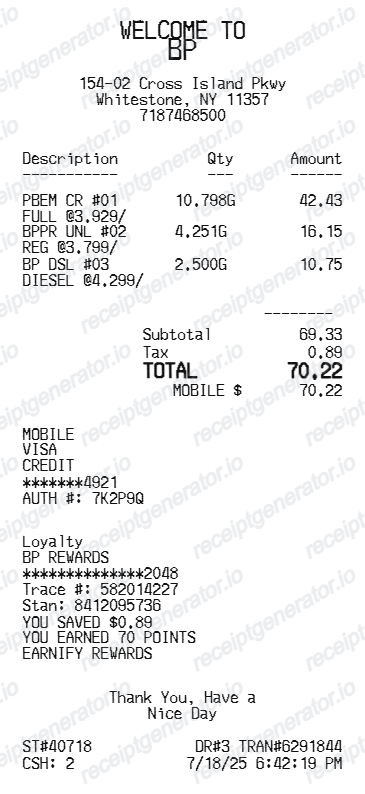
Use this BP-style receipt template to build a compact fuel receipt with station information, itemized fuel rows, payment details, loyalty rewards, totals, and footer text.
What Is on a Real BP Gas Receipt?
Before you rebuild a BP receipt, it helps to know what a US BP pump actually prints. Gas station receipts follow a tight structure, and a credible replacement copy should match it line for line.
Gallons to three decimals and price per gallon
The fuel line shows the grade - Regular, Silver, or Ultimate with Invigorate at BP sites, or Amoco grades at Amoco-branded stations - with gallons printed to three decimal places and the per-gallon price. The line amount is gallons times price, to the penny.
Pump number and station identity
The header carries the station address, city, state, ZIP, and phone, and the body notes which pump dispensed the fuel. Expense reviewers use the station line to match a fill-up to a route or trip.
earnify rewards lines
BP's earnify app replaced BPme Rewards in the US, offering an always-on 5-cents-per-gallon saving and 1 point per $1 on fuel. Loyalty transactions print the savings applied and points activity, with trace numbers tying the discount to the account.
Card block with masked account and auth code
Pay-at-pump receipts print the card network, the masked account number (last 4 digits), the payment type, and an authorization code - the fields used to reconcile the receipt against a card statement.
Fuel taxes hidden in the per-gallon price
Federal and state fuel taxes are built into the advertised price per gallon, so most US fuel lines show no separate tax. A separate sales tax line usually means convenience store items were on the same ticket.
Transaction metadata in the footer
The footer carries the date, time, and transaction or invoice number the station uses to look the sale up later - the details you need if you ever ask for a reprint.
Preview a BP-style fuel receipt before export
Edit the layout, watch it update live, then print, download PDF, or email.
Live BP receipt preview
Watch the receipt update as you edit store, fuel, totals, payment, loyalty, footer, and transaction details.
Fuel-specific item controls
Use dedicated fields for fuel type, fuel description, gallons, unit quantity, and price per gallon.
Removable totals lines
Add or remove subtotal, adjustment, tax, total, and tender rows without losing saved label text.
Downloadable PDF
Export a print-ready BP-style fuel receipt after the live preview looks right.
Get Your Original BP Receipt First
If you use BP's earnify app, your fuel receipts are saved automatically in the app and can be pulled up any time. For pay-at-pump purchases without the app, the station attendant can usually reprint a recent transaction from the register if you provide the date, time, pump number, and card. Use this template when the original is unavailable - a pump printer that was out of paper, a skipped receipt prompt, or a faded thermal slip.
Fuel expense records
Prepare a readable BP-style fuel purchase record for reimbursement or bookkeeping workflows.
Mileage and fleet logs
Document gallons, price per gallon, tax, payment, rewards, and transaction identifiers for vehicle records.
Missing receipt backup
Recreate a clean BP-style layout when you need a backup based on verified transaction details.
BP, Fuel & Rewards Receipt Support
Create a BP-style gas receipt with station, fuel, rewards, payment, tax, total, footer, and transaction details in one editable layout.
BP Gas Receipt
A compact gas station receipt with fuel items, gallons, per-gallon pricing, tax, and total.
BP Rewards Receipt
Includes loyalty account, saved amount, earned points, trace number, and rewards program details.
Fuel Payment Receipt
Shows mobile payment, masked card number, authorization code, tender amount, and transaction time.
Fuel Receipt Guides
Read supporting guides for gas receipts, reimbursement records, and tax documentation.
Related Other Receipt Templates
Browse our collection of receipt templates for various purposes.
BP Receipt FAQ
Answers about creating, editing, and exporting a BP-style gas station receipt.
Yes. Use the BP receipt generator to edit station details, fuel line items, gallons, price per gallon, tax, payment, loyalty rewards, and transaction metadata.
Yes. After editing the receipt, preview it live and download a clean PDF for your records.
If you pay through BP's earnify app, receipts are saved automatically in the app, so past fuel purchases are always retrievable. For pay-at-pump card purchases where the printer failed or you skipped the receipt, the station attendant can usually reprint recent transactions from the register - bring the date, time, pump number, and card used.
In most US states, federal and state fuel taxes are built into the advertised per-gallon price rather than added at the register, so the fuel line usually shows no separate tax. Convenience store items on the same receipt do show sales tax, which is why mixed fuel-and-shop receipts often carry a tax line that applies only to the shop items.
Both. You can use these templates for reimbursements, bookkeeping prep, and internal documentation workflows.
Yes. You can edit the loyalty program, account mask, trace number, stan number, saved amount, earned points, rewards name, and optional custom loyalty text.
No. This is an editable BP-style template for documentation workflows. It is not issued by BP or a BP point-of-sale system.
A real BP gas receipt shows the station address and phone in the header, the pump number, the fuel grade (Regular, Silver, or Ultimate with Invigorate, or Amoco grades at Amoco-branded sites), gallons to three decimals, price per gallon, the total, a card block with the network, masked account number, and authorization code, and loyalty text if a rewards account was attached.
Add the store name, purchase date, line items, totals, tax, payment method, and any optional notes you need on your BP template.
This tool creates an editable BP style layout for documentation. It is not issued by the original merchant or brand system.
Receipt Generator · Receipt Maker · 300+ Free Templates
Create your BP-style receipt
Use the editable BP receipt generator to preview fuel, totals, payment, loyalty, and footer details, then export a PDF for your records.