Free Parking Meter Receipt Generator
Create Free Parking Meter Receipts Online - Add Location, Duration, Zone & Fee. Preview free; watermark-free PDF export requires a paid plan.
Create a parking meter receipt with zone, street address, duration, rate, and payment details. Download a PDF for expense or parking records.

Choose
Parking Meter Receipt selected

Customize
Fill in your details

Download
Save or share receipt
Edit the details once and the preview updates instantly.
Quick summary
Parking Meter receipt template overview
Create Parking Meter Receipts Online - Add Location, Duration, Zone & Fee. Preview the layout before choosing a PDF export plan.
What Is on a Real Parking Meter Receipt?
Street (meter) parking is identified by zone and space, not by a gate ticket - and most cities have shifted from coin meters to pay-by-phone apps, which changes what the receipt actually looks like.
Zone number and space number identify the spot
Modern meters and pay-by-phone apps (ParkMobile, Passport, meterUP) key each parking session to a zone number and a specific space or meter number printed on a decal at the curb - enforcement checks payment against that exact zone-and-space pairing, not just the street name.
Most cities have moved to app-based payment with emailed receipts
Where meters once printed a paper stub, most metro pay-by-phone systems now text or email a digital receipt automatically, or let you request one by enabling a receipt notification in the app's settings - no physical paper changes hands.
Session time, not a fixed transaction time
A meter receipt shows the start time you paid for and the paid-through end time (or an auto-extendable session if the app supports remote top-ups) - it is a rate for a time window at that space, not a single point-in-time purchase like a retail transaction.
Pay-and-display still issues a dash ticket
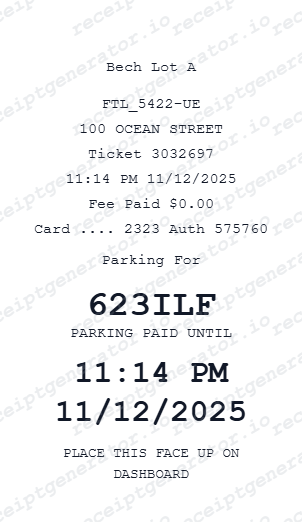
Cities that still use pay-and-display kiosks print a paper ticket showing the space or zone, amount paid, and expiry time, meant to be displayed on the dashboard - that ticket is the receipt in areas without app-based enforcement.
Time limits vary by zone and time of day
Many metered zones cap the maximum stay (commonly 1-2 hours) regardless of how much is paid, and rates often step up for longer sessions or vary by time of day - a receipt reflecting a payment beyond the zone's posted maximum would not match real enforcement rules.
License plate ties payment to enforcement, not the receipt itself
Pay-by-phone systems record the vehicle's license plate against the zone and space paid for; parking officers check the plate electronically rather than looking for a paper receipt on the dash, which is the key difference from older meter and pay-and-display systems.
Print-ready parking meter receipts
Edit the layout, watch it update live, then print, download PDF, or email.
Live meter receipt preview
Watch the receipt update as you add meter and parking details.
One-click print
Print your meter receipt from the browser.
Download as PDF
Export a clean parking meter receipt PDF.
Mobile-friendly editor
Create meter receipts from any device.
Get Your Original Parking Meter Receipt First
If you paid with a pay-by-phone app (ParkMobile, Passport, meterUP, or your city's app), check the app's trip or payment history, or your email if receipt notifications are enabled - most apps keep a full session log. For a pay-and-display kiosk, the printed dash ticket is your only receipt, so once it's gone the transaction usually cannot be reprinted. Use this template when the original is unavailable.
Corporate street parking claim
Submit meter receipts for street parking expense reimbursements.
Client meeting parking receipt
Document meter parking for client-billable business meetings.
Court or government building parking
Create meter receipts for government parking expense documentation.
Personal street parking records
Archive meter receipts for monthly parking expense tracking.
Parking Meter Receipt Types
Choose the parking meter receipt for your street or zone documentation.
Street Meter Receipt
On-street parking meter receipt with zone and start/end time.
Pay & Display Receipt
Pay-and-display parking receipt with ticket number and expiry.
Zone Parking Receipt
Zone-based parking receipt for regulated parking zones.
Related Guides
Explore related guides to understand the receipt details, lookup steps, and documentation workflows.
More free receipt templates for parking and retail expense records.




Parking Meter Receipt FAQ - Street Parking & Zone Documentation
Learn how to create parking meter receipts with meter ID, zone, start/end time, and PDF export for business expense reimbursement.
Choose the parking meter receipt template, add meter ID, zone, street address, start and end time, hourly rate, and payment. Download as PDF in seconds.
Yes. Add the exact street address, block, and nearest intersection for where the vehicle was parked.
Yes. Add pay-and-display ticket number, expiry time, and payment method for complete on-street parking receipt.
For app-based payment, it's a digital confirmation showing the zone number, space number, license plate, the paid time window (start and paid-through end time), and the amount charged. For pay-and-display, it's a printed ticket showing the zone or space, amount paid, and expiry time, meant for the dashboard.
Yes. Add the parking meter number, zone code, and parking district for complete street parking documentation.
Yes. Add start time, end time, and parking duration - total fee auto-calculates based on hourly rate.
If you paid with a pay-by-phone app, check the app's payment or trip history, or your email if receipt notifications are turned on. If you used a pay-and-display kiosk, the printed dash ticket was your only receipt - once it's discarded, most cities have no way to reissue it.
It depends on your employer's expense policy - some accept a bank or card statement line showing the charge and merchant name (the parking app or city) as sufficient proof, especially for small amounts. Reconstructing the zone, date, and duration from your own memory or the app's trip history is the more defensible approach when the original receipt is gone.
Receipt Generator · Receipt Maker · 300+ Free Templates
Create your Parking Meter receipt
Use the editable Parking Meter receipt generator to add items, tax totals, and payment details, then export a clean PDF.