Amazon Receipt Generator
Create an editable Amazon order receipt with item details, ASIN, shipping, Prime savings, tax, and payment summary. Export a clean PDF in minutes.
Create an Amazon-style order receipt with ASIN, shipping, tax, and payment details. Download a PDF for expense or purchase records.

Choose
Amazon Receipt selected

Customize
Fill in your details

Download
Save or share receipt
Edit the details once and the preview updates instantly.
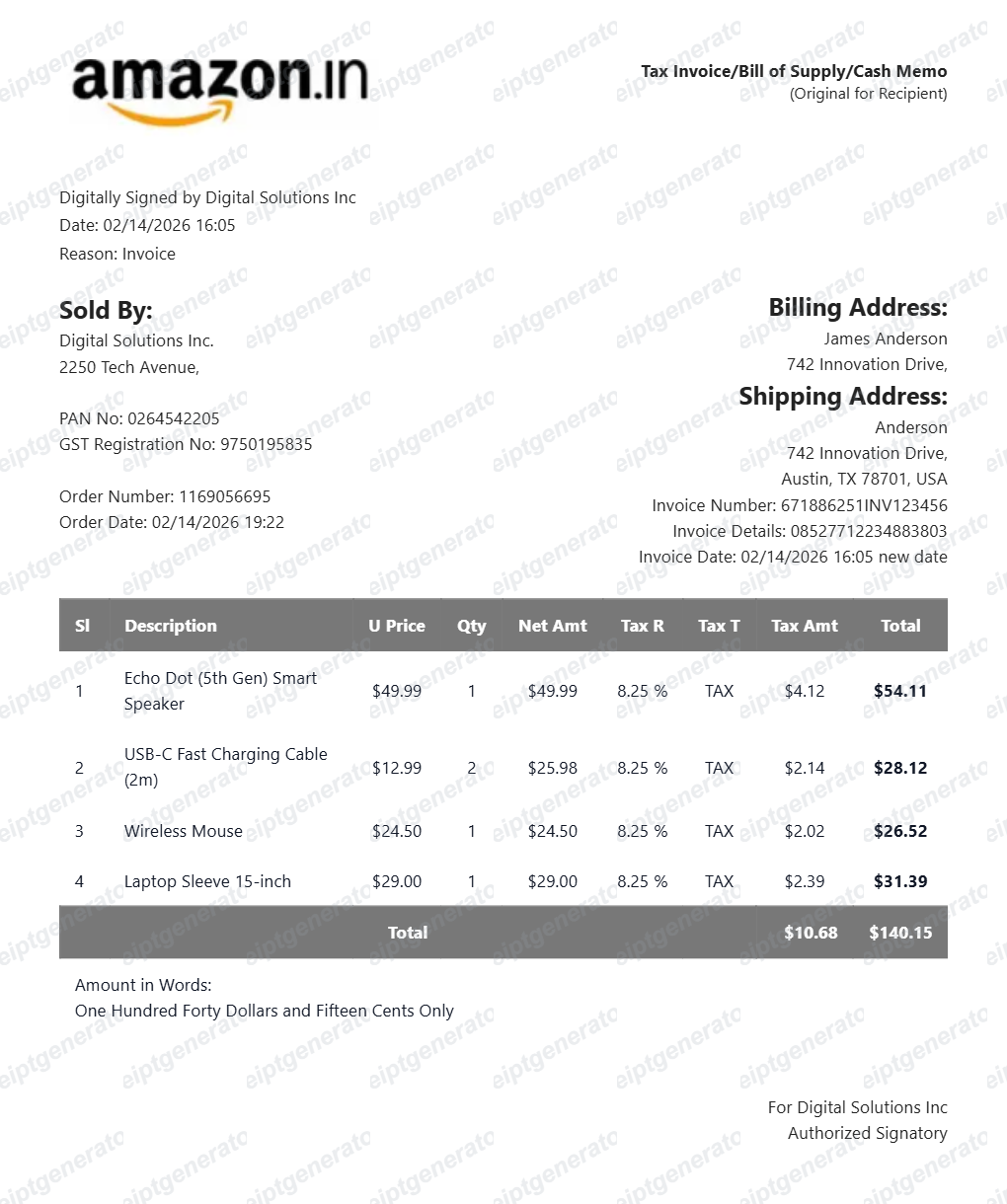
Quick summary
Find the official Amazon receipt before recreating one
Open Your Orders and use Invoice for the original order document. Use this editable template only when the original record is unavailable and label recreated records accurately.
What Is on a Real Amazon Order Receipt?
Before you rebuild an Amazon receipt, it helps to know exactly what the original contains. Amazon order receipts follow a consistent structure, and a credible replacement copy should match it field for field.
Order number in 3-7-7 format
Every Amazon order ID follows the XXX-XXXXXXX-XXXXXXX pattern, like 114-1234567-1234567. Physical orders usually start with 111-114 in the US; digital purchases start with D01. A receipt without a correctly formatted order number will not match Amazon records.
ASIN on every item line
Each product carries a 10-character ASIN (most start with B0). Amazon prints the product title as listed at purchase time, so item names on a real receipt often include size, color, and pack-count details.
Shipping and Prime savings lines
Real order summaries show shipping as its own line, with FREE Shipping or Prime savings displayed as a discount rather than simply omitted. If the order used Subscribe & Save, that discount appears separately too.
Tax based on the ship-to address
Amazon calculates sales tax from the delivery address, not your billing address, and lists it as one combined line on US orders. Business orders in India and Europe get a separate GST or VAT invoice with the tax registration number.
Payment breakdown, not just a total
The payment section shows the card type with the last 4 digits, and splits amounts if a gift card, promotional credit, or multiple cards covered the order. Grand total always appears after these splits.
Order date vs. invoice date
The order summary shows the date you placed the order; the shipment invoice shows when items actually shipped. Expense reviewers usually expect the shipment invoice date.
How to Create an Amazon Receipt
Follow these steps to build an Amazon-style order receipt with all the details a real order summary includes.
- 1
Enter your Amazon order ID
Add the order number in XXX-XXXXXXX-XXXXXXX format, plus the order date.
- 2
Add each item with ASIN and price
List the product title, ASIN, seller, quantity, and per-item price for every line.
- 3
Add shipping, Prime savings, and tax
Enter shipping cost or FREE Shipping, any Prime savings as a separate discount line, and sales tax based on the delivery address.
- 4
Add the payment method
Enter the card type and last 4 digits, or split the total across a gift card and card if needed.
- 5
Review the live preview
Check the layout and totals update correctly as you edit each field.
- 6
Download as PDF or PNG
Export the finished Amazon receipt for records, reimbursement, or warranty documentation.
Create a print-ready Amazon order receipt
Edit the layout, watch it update live, then print, download PDF, or email.
Live Amazon receipt preview
Watch the receipt update as you add order and item details.
One-click print
Print your Amazon receipt from the browser.
Download as PDF or PNG
Export a clean Amazon order receipt as a print-ready PDF or a shareable PNG image.
Mobile-friendly editor
Create Amazon receipts from any device.
Get Your Original Amazon Receipt First
If the order still exists in your account, the original is always better: go to Your Orders, find the order, and click Invoice to download Amazon's official PDF. Digital purchases live under Digital Orders, and Amazon Business accounts can bulk-download VAT or GST invoices. Use this template when the original is unavailable - a closed account, a deleted archive, or a purchase made by someone else.
Business purchase records
Use Amazon receipts to document office supplies, equipment, and reimbursable purchases.
Reimbursement support
Keep a structured Amazon receipt PDF ready when finance teams ask for purchase details.
Insurance documentation
Record Amazon orders for proof-of-purchase reference during insurance or warranty workflows.
Personal order tracking
Store itemized Amazon receipts for budgeting, purchase history, and household recordkeeping.
Warranty claims
Recreate the purchase date and order details a manufacturer or Amazon needs when the original receipt is lost and a product needs warranty service.
Design mockups
Build a sample Amazon-style layout for presentations, tutorials, or UI/UX mockups that need realistic placeholder content.
Amazon Receipt Formats
Choose the Amazon-style receipt layout that best matches your order and documentation needs.
Standard Amazon order receipt
A product order receipt with item lines, shipping, and tax details.
Amazon Prime-style receipt
A receipt layout that highlights member savings, discounts, and delivery details.
Amazon business purchase receipt
A cleaner format for office, operations, and reimbursement-oriented purchase records.
Receipt Guides
Read the supporting Amazon guides to recover order details, understand invoice differences, and keep purchase records cleaner.
Receipt guide
How to Get an Amazon Receipt
Learn where Amazon order receipts and invoices usually come from and which details matter most.
Explore How to Get an Amazon ReceiptReceipt guide
Amazon Order Screenshot Guide
See what an Amazon order screenshot should include and how to rebuild the order details cleanly.
Explore Amazon Order Screenshot GuideReceipt guide
How to Print an Amazon Receipt
Learn which Amazon order view is best for printing and how to save a cleaner PDF first.
Explore How to Print an Amazon ReceiptReceipt guide
Amazon Order Receipt
See which order details matter most when you need a complete Amazon purchase record.
Explore Amazon Order ReceiptReceipt guide
Amazon Return Receipt Guide
Learn how to find an Amazon return receipt, save proof of return, and troubleshoot missing refunds after a return.
Explore Amazon Return Receipt GuideReceipt guide
How to Download Your Amazon India GST Invoice
How to download a GST invoice from Amazon.in — open Your Orders, select the order, and download the tax invoice with the seller's GSTIN for business and reimbursement records.
Explore How to Download Your Amazon India GST InvoiceReceipt guide
Retail Receipt for Expense Reports
See which fields a store receipt needs to qualify for expense report or reimbursement submission.
Explore Retail Receipt for Expense ReportsRelated Templates
Browse our collection of receipt templates for various purposes.
Amazon Receipt FAQ
Common questions about creating an Amazon-style order receipt for records, reimbursement support, and purchase documentation.
Choose the Amazon receipt template, add order ID, item names, ASIN, quantities, prices, Amazon Prime savings, shipping, taxes, and payment. Preview and download as PDF.
Yes. Add ASIN (Amazon product ID), product title, seller name, quantity, and price for complete item documentation.
Yes. Download a clean PDF for business expense submissions, FSA/HSA documentation, insurance claims, or personal purchase records.
A real Amazon order receipt shows the order number in XXX-XXXXXXX-XXXXXXX format, the order date, each item with its full listing title, the seller name, shipping and any Prime savings as separate lines, sales tax based on the delivery address, the payment method with the last 4 digits, and the grand total.
Yes. Add your Amazon order ID in the format '###-#######-#######' for complete order documentation.
Yes. Amazon receipts are commonly needed for home office expense reimbursement, business purchase documentation, and insurance claims.
Sign in to Amazon, open Your Orders, locate the order, and click Invoice (or Order Details, then Invoice). Amazon keeps order history indefinitely, so even years-old orders usually have a downloadable PDF invoice. For Kindle, app, and other digital purchases, check Digital Orders instead. See our full guide for a complete step-by-step walkthrough.
The order summary (receipt) confirms what you ordered and paid; the invoice is the formal document Amazon issues per shipment, with an invoice date and, for business orders, tax registration details. Expense and accounting teams usually want the invoice - it is the Invoice link in Your Orders.
Receipt Generator · Receipt Maker · 300+ Free Templates
Create your Amazon receipt
Use the editable Amazon receipt generator to add items, tax totals, and payment details, then export a clean PDF.