CVS Receipt Generator
Create an editable CVS-style record with prescription, OTC, ExtraCare, tax, and payment fields. For claims or returns, retrieve the CVS-issued receipt first.
Create a CVS-style personal record with prescription, OTC, ExtraCare, tax, and payment fields after checking for the merchant-issued receipt.

Choose
CVS Receipt selected

Customize
Fill in your details

Download
Save or share receipt
Edit the details once and the preview updates instantly.
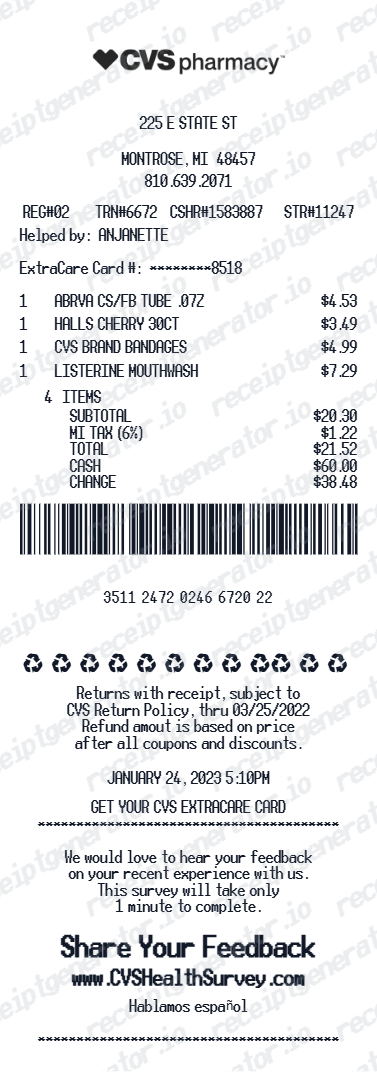
Get Your Original CVS Receipt First
Start with CVS Digital Receipts or the order history tied to your CVS account. Prescription documentation may follow a different pharmacy workflow, so ask the pharmacy when a retail receipt is not enough. Use this editable template only for personal organization based on verified details; it is not CVS-issued proof for a return, claim, or reimbursement.
Official receipt retrieval
Eligible-item organization
Organize verified prescription and OTC details before locating the CVS-issued record required by an FSA or HSA administrator.
Prescription cost tracking
Track known Rx copays and drug costs for personal review; use pharmacy-issued documentation for insurance.
Medical expense tracking
Track known CVS prescription costs for personal budgeting while retaining merchant and pharmacy records for tax purposes.
ExtraCare savings documentation
Record CVS ExtraBucks rewards and savings for personal finance tracking.
CVS Pharmacy Receipt Types
Choose the CVS Pharmacy receipt format for your pharmacy visit.
Prescription Rx Receipt
CVS Pharmacy receipt for prescription drug copay and insurance details.
Full Pharmacy Visit Receipt
CVS receipt with OTC products, prescriptions, and ExtraBucks savings.
Pharmacy Purchase Record
A clearly labeled personal record for organizing verified CVS Pharmacy purchase details.
CVS Receipt Guides
Read the supporting CVS guides to understand receipt lookup, prescription records, ExtraCare reprints, and printable PDF workflows.
CVS Receipt Lookup
Find digital CVS receipts, recover older purchases, and understand which lookup method to use first.
Explore CVS Receipt LookupHow to Get a CVS Prescription Receipt
Learn where prescription receipts come from and how to retrieve a pharmacy-specific record.
Explore How to Get a CVS Prescription ReceiptCVS Prescription Receipt vs Store Receipt
Understand which CVS receipt type is best for prescriptions, OTC purchases, returns, and reimbursement.
Explore CVS Prescription Receipt vs Store ReceiptWhat a CVS Pharmacy Receipt Should Include
Check the fields that matter most for medical records, reimbursement, and pharmacy documentation.
Explore What a CVS Pharmacy Receipt Should IncludePrintable CVS Pharmacy Receipt PDF
See what a printable pharmacy PDF should include and how to keep the file readable and useful.
Explore Printable CVS Pharmacy Receipt PDFCVS Prescription History
Understand what CVS prescription history usually shows and when it is more useful than a retail receipt.
Explore CVS Prescription HistoryFSA and HSA Receipt Requirements
Review the itemized fields benefit administrators usually expect before submitting a health-expense record.
Explore FSA and HSA Receipt RequirementsQuick summary
CVS receipt template overview
Use this CVS Pharmacy template to organize verified prescription, OTC, ExtraCare, store, tax, and payment details after checking for the original CVS receipt.
What Is on a Real CVS Receipt?
CVS retail and pharmacy records contain different store, prescription, rewards, tax, and payment fields. Use these details to understand the layouts and organize verified information without presenting a personal record as CVS-issued proof.
Store number and register number at the top
Every CVS receipt prints the store number, register (till) number, and cashier ID near the header, along with the store address and phone number. These identifiers are what CVS customer service uses to look up a transaction.
ExtraCare Rewards line items
ExtraCare members see ExtraBucks Rewards earned and redeemed printed as their own lines, separate from the item list and the coupon section, alongside any current savings total for the ExtraCare card used.
Rx and front-store receipts print separately
A prescription fill produces its own pharmacy receipt with the Rx number, drug name, quantity, days supply, copay, and insurance adjustment. It does not combine with the front-store receipt for OTC and retail items bought in the same visit - CVS prints two separate slips.
FSA/HSA eligible item marker
CVS flags FSA/HSA-eligible items on the receipt (commonly with an "F" or asterisk next to the line) and totals them in a summary line near the bottom, such as "FSA/HSA ELIGIBLE TOTAL," so the eligible amount doesn't have to be calculated by hand.
Long thermal receipt with coupons
CVS receipts are famously long because ExtraCare coupons, manufacturer offers, and promotional messages print below the transaction total - often extending the receipt well beyond the item list itself.
Tax and payment summary
Sales tax is calculated per item based on local rules (prescriptions and many FSA/HSA-eligible items are typically non-taxed), and the payment section shows the tender type with the last 4 card digits and the change or approval status.
Print-ready CVS Pharmacy receipts
Edit the layout, watch it update live, then print, download PDF, or email.
Live CVS receipt preview
Watch the receipt update as you add prescriptions and ExtraBucks.
One-click print
Print your CVS Pharmacy receipt from the browser.
Download as PDF
Export a clearly labeled CVS-style PDF for personal organization or layout testing.
Mobile-friendly editor
Create CVS Pharmacy receipts from any device.
Related Other Receipt Templates
Browse our collection of receipt templates for various purposes.
CVS Pharmacy Receipt FAQ - Prescription & ExtraCare Documentation
Learn how to find CVS digital receipts, distinguish retail and pharmacy records, and organize verified prescription, OTC, ExtraCare, tax, and payment details.
Choose the CVS Pharmacy receipt template, add store address, items (prescriptions, OTC products, beauty), ExtraBucks, taxes, and payment method. Preview and download as PDF.
Yes. Add ExtraBucks Rewards earned and redeemed - matching the CVS Pharmacy ExtraCare receipt format.
Use the CVS-issued itemized receipt or pharmacy documentation for an FSA or HSA claim. This editable template can help organize known details, but it is not merchant-issued proof and should not be submitted as a claim receipt.
For front-store purchases, sign in to the CVS app or CVS.com and check Digital Receipts if you used your ExtraCare card at checkout, or call the store with the date and approximate total for a manual lookup. For prescriptions, use Prescription History in the CVS app or CVS.com, which lists every fill with Rx number, drug name, and copay - this is separate from the retail purchase history. See our full guide for a complete step-by-step walkthrough.
A CVS-issued itemized receipt may support an eligible claim when it contains the information your plan administrator requires. Requirements vary, so keep the original receipt and check with the administrator; a generated template is not acceptable claim evidence.
Yes. Add prescription drug name, copay amount, insurance savings, and days supply as individual line items.
Yes. Add over-the-counter medications, vitamins, cosmetics, and household items as receipt line items.
Yes. Download a clearly labeled PDF for personal medical-expense organization or layout testing. Use CVS-issued documentation for claims, insurance, returns, or reimbursement.
A real CVS receipt shows the store number and register number at the top, each item with its price, an "F" or asterisk marker next to FSA/HSA-eligible items, an ExtraBucks Rewards earned/redeemed line, sales tax, the payment method with last 4 card digits, and a long tail of ExtraCare coupons and promotional offers printed below the total.
Add the store name, purchase date, line items, totals, tax, payment method, and any optional notes you need on your CVS template.
Receipt Generator · Receipt Maker · 300+ Free Templates
Create your CVS receipt
Use the editable CVS receipt generator to add items, tax totals, and payment details, then export a clean PDF.