Airbnb Receipt: Download or Editable Template
Get the official receipt from Airbnb Past trips first. If it is unavailable, create a clearly labeled backup from verified reservation and payment details.
Find and download an official Airbnb receipt, or create an editable backup for a real stay when the platform-issued record is unavailable.

Choose
Airbnb Receipt selected

Customize
Fill in your details

Download
Save or share receipt
Edit the details once and the preview updates instantly.
Get Your Original Airbnb Receipt First
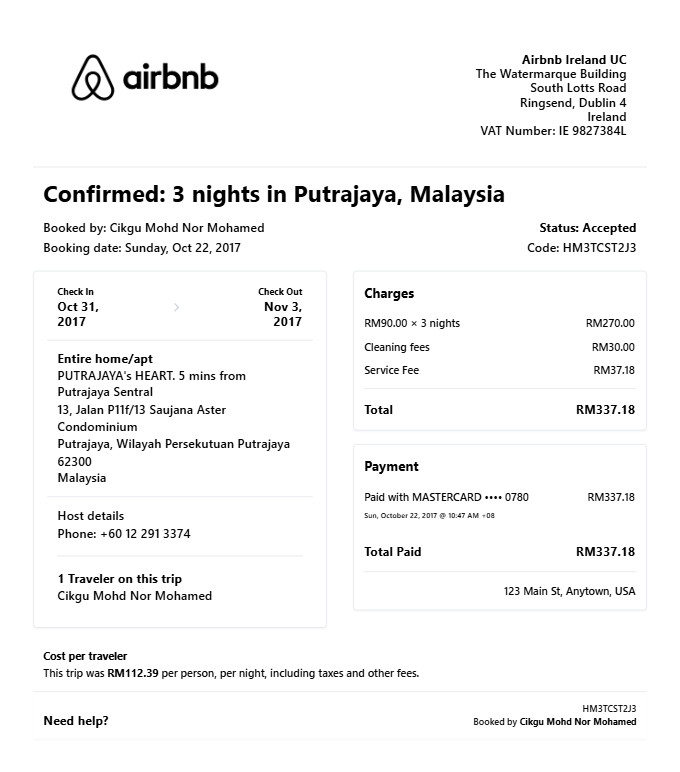
Airbnb's Help Center says guests can download, print, or email a receipt from Past trips. Select the completed reservation, open its listing, and choose Get receipt under Reservation details. Use that platform-issued receipt for reimbursement or tax documentation whenever possible. The editor below is only for organizing verified details from a real stay when the original cannot be recovered; it is not an Airbnb-issued receipt.
Receipt retrieval and source guidance
Source guidance
Official Airbnb Past-Trip Receipt Guide
Follow Airbnb's current steps to download, print, or email a receipt for a completed reservation.
Open Official Airbnb Past-Trip Receipt GuideSource guidance
Official Airbnb Receipt Management Guide
Review when Airbnb issues a new receipt and why an issued receipt cannot simply be edited.
Open Official Airbnb Receipt Management GuideBusiness stay cost review
Organize verified nightly rates, fees, and taxes for an internal travel-cost review; submit Airbnb's official receipt.
Stay cost reconstruction
Reconstruct known reservation costs for personal bookkeeping while retaining Airbnb-issued records for taxes.
Fee and tax comparison
Compare verified accommodation, service-fee, and tax lines for personal review, not as claim evidence.
Personal travel budget tracking
Track Airbnb booking costs for personal travel budget records.
Airbnb Receipt Types
Choose the Airbnb receipt format for your vacation rental booking.
Standard Booking Receipt
Airbnb receipt for a standard vacation rental with nightly rate and fees.
Business Travel Receipt
Airbnb receipt formatted for corporate travel expense documentation.
Long-Stay Receipt
Airbnb receipt for extended stay with weekly or monthly discount.
Related Guides
Explore related guides to understand the receipt details, lookup steps, and documentation workflows.
Editable template
Travel Receipt template
Explore this editable receipt layout and its fields before opening the editor.
Explore Travel Receipt templateReceipt guide
Hotel Folio vs Receipt
Understand when a folio is stronger than a simple hotel receipt for reimbursement.
Explore Hotel Folio vs ReceiptEditable template
Hotel Receipt template
Explore this editable receipt layout and its fields before opening the editor.
Explore Hotel Receipt templateQuick summary
Airbnb receipt template overview
Use this Airbnb-style template to organize verified stay dates, rates, fees, tax, and payment details in an editable printable PDF.
What Is on a Real Airbnb Receipt?
Airbnb issues the authoritative payment receipt. Use these fields to understand its itemized structure and organize verified reservation details without presenting a personal template as platform-issued proof.
Reservation reference
The platform-issued record identifies the reservation so the guest, support team, and expense reviewer can match the receipt to the correct stay.
Nightly rate times nights breakdown
The accommodation line shows the nightly price multiplied by the number of nights. Weekly or monthly stay discounts appear as their own negative line rather than a quietly lowered rate.
Cleaning fee as its own line
If the host charges a cleaning fee, it shows as a single flat line item. It is set per stay, not per night, and is never bundled into the room rate.
Airbnb service fee
The guest service fee Airbnb charges for the platform appears as a separate line. It goes to Airbnb, not the host - one reason only Airbnb can issue the payment receipt.
Occupancy taxes listed separately
In jurisdictions where Airbnb collects lodging taxes, they appear as their own line - usually labeled occupancy taxes - instead of being blended into the total. Amounts vary by city and state.
Issued by Airbnb, not the host
Guests can retrieve the platform-issued payment receipt from Past trips. Hosts can separately print reservation details for their records and guests.
Print-ready Airbnb receipts
Edit the layout, watch it update live, then print, download PDF, or email.
Live Airbnb receipt preview
Watch the receipt update as you add booking details and fees.
One-click print
Print your Airbnb receipt from the browser.
Download as PDF
Export a clean vacation rental receipt PDF for expense records.
Mobile-friendly editor
Create Airbnb receipts from any device.
More free receipt templates for travel and retail expense records.




Airbnb Receipt FAQ - Vacation Rental Documentation & Travel Expense Records
Learn how to download the official Airbnb receipt and organize verified stay dates, nightly rates, fees, taxes, and payment details in a personal template.
Choose the Airbnb receipt template, add listing name, check-in and check-out dates, nightly rate, cleaning fee, service fee, taxes, and payment method. Preview and download as PDF.
Use the official receipt from Airbnb Past trips for a business travel expense report. This editable template can organize verified stay details for personal review, but it is not platform-issued proof.
Yes. Download a clearly labeled PDF for personal trip budgeting, stay-cost organization, or layout testing. Use Airbnb's official receipt for reimbursement, insurance, or taxes.
An Airbnb receipt can show the reservation reference, listing and stay dates, price breakdown, applicable fees and taxes, total charged, and payment details. Use the platform-issued version from Past trips as the authoritative record.
Yes. Add the cleaning fee and Airbnb service fee as separate line items - matching the standard Airbnb booking breakdown.
Yes. Include guest name, host name, property address, and Airbnb confirmation number for complete booking documentation.
Airbnb's current Help Center steps are to open Profile, select Past trips, choose the completed reservation and listing, then select Get receipt under Reservation details.
Use the official Airbnb receipt whenever possible and check the reviewing organization's travel-expense policy. The guest, stay dates, and totals should match the real reservation and expense report.
Receipt Generator · Receipt Maker · 300+ Free Templates
Create your Airbnb receipt
Use the editable Airbnb receipt generator to add items, tax totals, and payment details, then export a clean PDF.