Dollar Tree Receipt Generator
Create a Dollar Tree receipt with store number, items, cashier details, tax, and payment. Download a free PDF for returns, expense claims, or records.
Create a Dollar Tree-style receipt with store details, item prices, tax, and payment info. Download a PDF for records, returns, or reimbursement.

Choose
Dollar Tree Receipt selected

Customize
Fill in your details

Download
Save or share receipt
Edit the details once and the preview updates instantly.
Quick summary
Dollar Tree receipt template overview
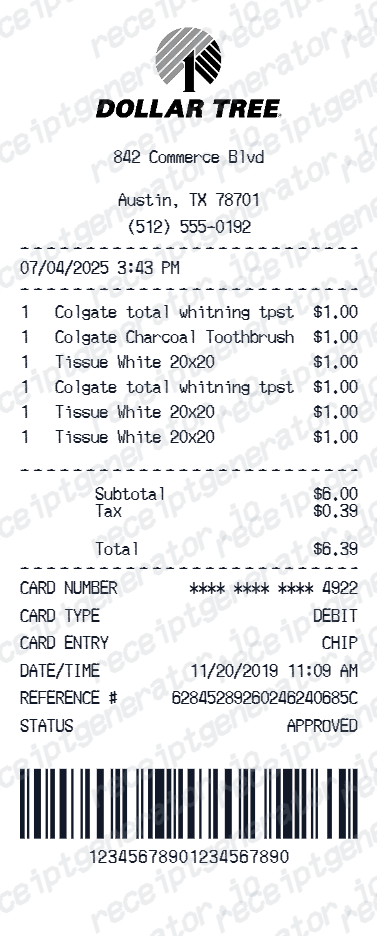
Use this Dollar Tree receipt template to create a dollar store receipt with store number, $1.25 items, cashier details, tax, and payment summary.
What Is on a Real Dollar Tree Receipt?
Before you rebuild a Dollar Tree receipt, it helps to know what the register actually prints. Dollar Tree receipts follow a consistent structure, and a credible replacement copy should match it field for field.
Store number in the header
The top of the receipt shows the Dollar Tree store number with the street address, city, and state - the store number is the reference used when a location reprints a duplicate receipt.
Flat $1.25 price lines
Most items ring up at Dollar Tree's flat $1.25 price point, so real receipts show long runs of identical prices, with higher price points appearing only for Dollar Tree Plus assortment items.
Cashier, register, and timestamp
The receipt records the cashier, register number, and the transaction date and time, which is how the store matches a card payment to a specific transaction for a reprint.
Tax only on non-food items
Sales tax prints as its own line and generally applies to non-food merchandise; in many states basic grocery items are tax-exempt, so identical $1.25 items can be taxed differently.
Survey code in the star box
The bottom of a Dollar Tree receipt carries a survey code printed inside a star box, inviting customers to enter the feedback sweepstakes at DollarTreeFeedback.com for a chance at a cash prize.
Print-ready Dollar Tree store receipts
Edit the layout, watch it update live, then print, download PDF, or email.
Live Dollar Tree receipt preview
Watch the receipt update as you add items and store details.
One-click print
Print your Dollar Tree receipt from the browser.
Download as PDF
Export a clean dollar store receipt PDF for records.
Mobile-friendly editor
Create Dollar Tree receipts from any device.
Get Your Original Dollar Tree Receipt First
If you paid by card, return to the Dollar Tree store where you shopped - staff can often locate the transaction and reprint a duplicate receipt if you bring the payment card and know the approximate purchase date. Cash purchases cannot be reprinted, and there is no online lookup for in-store receipts. Use this template when the original is unavailable - a cash purchase, a discarded receipt, or a transaction the store can no longer retrieve.
Dollar Tree return documentation
Create Dollar Tree receipts for product return at any Dollar Tree.
Expense reimbursement
Submit Dollar Tree receipts for office supply or event expense claims.
Party supply purchase records
Document party and event supply purchases from Dollar Tree.
Classroom supply documentation
Create Dollar Tree receipts for teacher classroom supply expense claims.
Dollar Tree Receipt Types
Choose the Dollar Tree receipt format for your purchase documentation.
Dollar Tree Standard Receipt
Dollar Tree store receipt with items at $1.25 and sales tax.
Dollar Tree Party Supplies Receipt
Dollar Tree receipt for bulk party supply purchases.
Dollar Tree Return Receipt
Dollar Tree receipt for product return documentation.
Dollar Store Receipt Guides
Read the supporting guides on dollar store receipts, retail receipt management, and expense documentation.
Related Other Receipt Templates
Browse our collection of receipt templates for various purposes.

Dollar Tree Receipt FAQ - Dollar Store Purchase Documentation
Learn how to create Dollar Tree receipts with store number, $1.25 items, cashier details, and PDF export for return and expense documentation.
Choose the Dollar Tree receipt template, add store number, city, state, items at $1.25 each, cashier name, register number, taxes, and payment. Download as PDF in seconds.
Yes. Add items at Dollar Tree's standard price - each item defaults to $1.25 to match Dollar Tree pricing format.
Yes. Download a clean PDF for expense reimbursement, product return documentation, or personal purchase records.
A real Dollar Tree receipt shows the store number and address at the top, item lines mostly at the flat $1.25 price point, sales tax on taxable non-food items, the payment method and total, the cashier and register details with the date and time, and a survey code printed in a star box at the bottom that invites you to enter Dollar Tree's customer feedback sweepstakes at DollarTreeFeedback.com.
Add the store name, purchase date, line items, totals, tax, payment method, and any optional notes you need on your Dollar Tree template.
Yes. Add Dollar Tree store number, street address, city, state, and ZIP code for a complete authentic dollar store receipt.
Yes. Dollar Tree allows returns within 30 days - create a Dollar Tree receipt PDF to document your purchase for store return.
Dollar Tree has no online receipt lookup for in-store purchases, but if you paid by card, the store where you shopped can often reprint the receipt - bring the payment card and the approximate purchase date so they can locate the transaction. Cash purchases cannot be reprinted, and DollarTree.com order confirmations arrive by email. See our full guide for a complete step-by-step walkthrough.
Not for a refund. Dollar Tree's in-store policy allows items without a receipt to be exchanged only, at the current scanned price, and the merchandise should be unused and preferably in its original packaging. With the original receipt, the store can exchange the item or refund the original form of payment. All DollarTree.com online orders are final sale.
Receipt Generator · Receipt Maker · 300+ Free Templates
Create professional receipts online in seconds
Use the Receipt Generator editor with ready-made templates. Compare pricing or start generating print-ready PDF receipts in your browser no account required.