Chevron Receipt Generator
Create a Chevron-style gas receipt with station details, pump number, gallons, price per gallon, rewards, discounts, payment totals, and footer text. Preview it live and export a PDF.
Create a Chevron-style fuel receipt with station address, pump number, gallons, price per gallon, rewards, discounts, totals, and payment details.

Choose
Chevron Receipt selected

Customize
Fill in your details

Download
Save or share receipt
Edit the details once and the preview updates instantly.
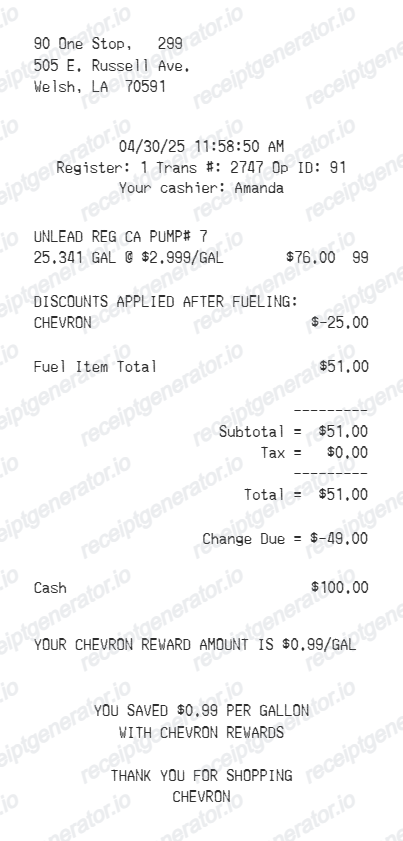
Quick summary
Chevron receipt template overview
Use this Chevron-style receipt template to build a compact fuel receipt with station information, pump details, reward savings, discounts, payment total, and footer messages.
What Is on a Real Chevron Receipt?
Chevron pump and register receipts follow a consistent thermal-slip structure, and the rewards and card-discount lines are what make them recognizable. A credible replacement copy should match these details.
Station header with address and site details
The slip opens with the station name and street address. Chevron stations are independently owned and operated, so the header reflects the local operator's site, followed by the date, time, and a transaction or register number.
Pump number and Techron fuel grade
Fuel lines identify the pump number and the grade - Regular, Plus, or Supreme, all sold with Techron additive - with gallons dispensed printed to three decimal places and the price per gallon alongside.
Chevron Texaco Rewards savings line
Members who redeem rewards at the pump select YES on the pump screen, and the cents-per-gallon discount is applied before fueling. The receipt shows the discounted per-gallon price, and app payments also store a digital receipt in the Chevron app.
Techron Advantage Card instant fuel discounts
At participating stations, paying with a Techron Advantage Card applies the cents-off-per-gallon discount at the dispenser before you pump. When the pump cannot apply it, the discount is issued as a statement credit, so it never appears on that receipt.
Taxes built into the per-gallon price
US fuel receipts normally show no separate sales tax line for gasoline - federal and state excise taxes are included in the posted price per gallon. A tax line appears only when the transaction includes taxable convenience store items.
Payment block with masked card data
Pay-at-pump receipts print the card brand, the last four digits, and an authorization code. Cash transactions handled inside show amount tendered and change due instead.
Preview a Chevron-style fuel receipt before export
Edit the layout, watch it update live, then print, download PDF, or email.
Live Chevron receipt preview
Watch the receipt update as you edit station, fuel, reward, discount, payment, and footer details.
Fuel-specific layout
Use dedicated fields for pump number, gallons, per-gallon price, fuel item code, and total.
Reward and discount controls
Add reward text, multiple discounts, and pre-tax adjustment rows without changing the receipt structure.
Downloadable PDF
Export a print-ready Chevron-style fuel receipt after the preview looks right.
Get Your Original Chevron Receipt First
If you paid with the Chevron or Texaco app, your digital receipt is saved automatically in the app's transaction history. For pay-at-pump card purchases, the station cashier can usually reprint the transaction from the register the same day, and your card statement confirms the amount afterward. Use this template when the original is unavailable - a pump that ran out of paper, a faded thermal slip, or a station you cannot return to.
Fuel expense records
Prepare a clean fuel purchase record for reimbursement or bookkeeping workflows.
Mileage and fleet logs
Document pump number, gallons, fuel price, rewards, discounts, and payment details for vehicle records.
Missing receipt backup
Recreate a readable Chevron-style layout when you need a backup based on verified transaction details.
Chevron, Fuel & Rewards Receipt Support
Create a Chevron-style gas receipt with station, fuel, reward, discount, total, payment, and footer details in one editable layout.
Chevron Gas Receipt
A compact gas station receipt with pump number, gallons, price per gallon, rewards, and total.
Chevron Rewards Receipt
Includes reward savings, discount rows, and footer messages for loyalty savings.
Fuel Payment Receipt
Shows fuel totals, cash or card payment, and change due in a thermal receipt layout.
Fuel Receipt Guides
Read supporting guides for gas receipts, reimbursement records, and tax documentation.
Related Other Receipt Templates
Browse our collection of receipt templates for various purposes.
Chevron Receipt FAQ
Answers about creating, editing, and exporting a Chevron-style fuel receipt.
Yes. Use the Chevron receipt generator to edit station details, transaction lines, pump number, gallons, price per gallon, rewards, discounts, totals, and payment information.
Yes. You can switch the payment section between cash and card, edit the paid amount, and preview the updated total and change due.
Yes. After editing the receipt, preview it live and download a clean PDF for your records.
If you paid through the Chevron or Texaco app, a digital receipt is saved in the app automatically - open your transaction history to view or share it. For pay-at-pump card purchases, the pump prints the only copy, but the station cashier can usually reprint the transaction from the register the same day. Chevron stations are independently operated, so older transactions generally have to be matched against your card statement instead.
Chevron Texaco Rewards members who redeem at the pump see the per-gallon discount applied before fueling, so the receipt shows the reduced price per gallon along with the savings message. Techron Advantage Card fuel discounts work the same way at participating stations - the dispenser applies the cents-off rate before you pump, and if the instant discount is not applied it arrives later as a statement credit instead of appearing on the receipt.
Yes. The template supports editable reward messaging and multiple discount rows, so you can show fuel savings clearly on the receipt.
Yes. The footer supports repeatable text sections with individual text and spacing controls.
No. This is an editable Chevron-style template for documentation workflows. It is not issued by Chevron or a Chevron point-of-sale system.
A real Chevron fuel receipt is a narrow thermal slip showing the station name and address, the date and time, the pump number, the fuel grade (Regular, Plus, or Supreme with Techron), gallons dispensed to three decimals, the price per gallon, and the fuel total. Pay-at-pump receipts add the masked card number and an authorization code, and Chevron Texaco Rewards transactions show the cents-per-gallon savings as a discount line.
Add the store name, purchase date, line items, totals, tax, payment method, and any optional notes you need on your Chevron template.
Receipt Generator · Receipt Maker · 300+ Free Templates
Create your Chevron-style receipt
Use the editable Chevron receipt generator to preview fuel, reward, discount, payment, and footer details, then export a PDF for your records.