Dollar Tree Receipt Example
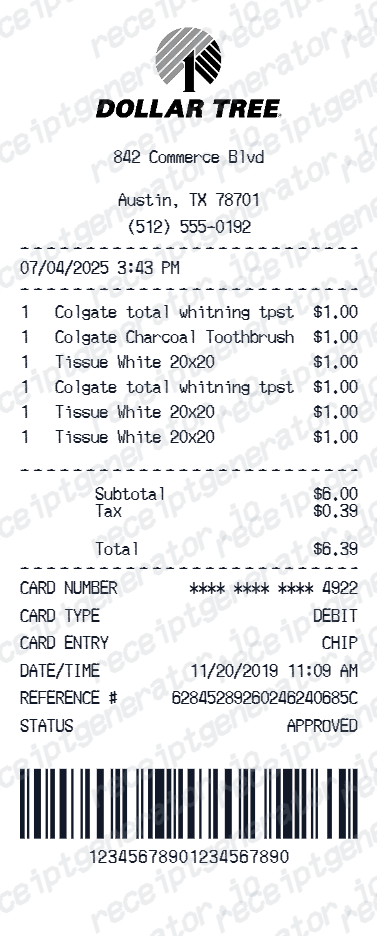
See exactly what a Dollar Tree receipt looks like — store number, item rows at fixed price, tax, total, card payment, and barcode. Use the editable template to recreate or customize one.
See what a real Dollar Tree receipt looks like with all fields explained — store number, item rows, tax, total, and card payment. Use the editable template to recreate a Dollar Tree receipt.

Choose
Dollar Tree Receipt Example selected

Customize
Fill in your details

Download
Save or share receipt
Edit the details once and the preview updates instantly.
Quick summary
Dollar Tree receipt example overview
A standard Dollar Tree receipt includes the store name and number, cashier ID, item rows at fixed price, item count, subtotal, tax, total, card payment with approval code, and a transaction barcode.
What's on a Dollar Tree Receipt?
A Dollar Tree receipt uses a simple thermal format reflecting the fixed-price store model. Understanding each field helps you verify a purchase or recreate a receipt when the original is missing.
Store header
Dollar Tree store name, address, city, state, zip, phone, and store number.
Transaction details
Cashier ID, register number, transaction date, and time.
Item rows at fixed price
Each item listed with a short description and price (typically $1.25 each). Item count shown at the end of the item list.
Subtotal and tax
Subtotal for all items, applicable tax at the local rate, and total charged.
Payment block and barcode
Card type, masked card number, approval code, transaction reference, and a barcode encoding the transaction ID at the bottom.
See what a Dollar Tree receipt looks like
Edit the layout, watch it update live, then print, download PDF, or email.
See a real Dollar Tree receipt format
Preview a complete Dollar Tree receipt layout with store header, fixed-price item rows, tax, payment approval, and barcode.
Editable field-by-field
Edit any field in the Dollar Tree receipt example — store number, item rows, tax, and payment — to match your actual purchase.
Download as PDF
Export the completed Dollar Tree receipt example as a clean PDF for purchase records or expense documentation.
Mobile-friendly editor
View and edit the Dollar Tree receipt example from desktop, tablet, or phone.
Looking for a Dollar Tree Receipt Example?
This Dollar Tree receipt example shows the standard format — store header, fixed-price item rows, tax, payment approval, and barcode. Use the generator to build your own editable Dollar Tree receipt.
Verify a receipt format
Use this Dollar Tree receipt example to check that a receipt has correct fixed-price item rows, payment approval code, and barcode.
Understand receipt fields
Learn what the item count, tax lines, and transaction barcode mean on a Dollar Tree receipt.
Recreate a lost Dollar Tree receipt
Use the receipt example as a reference to fill in the generator with your store, items, and payment details when the original is missing.
Budget and household expense records
Use a Dollar Tree receipt example as a reference when documenting household and party supply purchases for budgeting.
Dollar Tree Receipt Formats
Dollar Tree receipts follow the same compact fixed-price format for all transactions, with cash or card payment differences at the bottom.
Standard Dollar Tree Receipt
A Dollar Tree receipt with fixed-price item rows, subtotal, tax, card payment approval, and transaction barcode.
Dollar Tree Cash Receipt
A Dollar Tree receipt for cash transactions showing amount tendered and change given.
Dollar Tree Party Supply Receipt
A Dollar Tree receipt for bulk party or holiday supply purchases with multiple item rows.
Grocery Receipt Guides
Read supporting guides for discount store receipts, reimbursement records, and lost receipt recovery.
Grocery Receipt for Reimbursement
See what expense teams require from a receipt for reimbursement approval.
Read guideLost Grocery Receipt
How to recover or recreate a receipt when the original is lost or not saved.
Read guidePrintable Grocery Receipt PDF
Tips for exporting and using printable receipts for records and expense reports.
Read guideHow to Get a Grocery Receipt
Learn where grocery receipts usually come from and which details matter most for budgeting or reimbursement.
Read guideGrocery Receipt Template
Use the right fields and structure when organizing a cleaner grocery purchase record.
Read guideRelated Other Receipt Templates
More receipt examples showing the format, fields, and layout of popular dollar and discount store receipts.
Dollar Tree Receipt Example FAQ
Common questions about what a Dollar Tree receipt looks like, the fixed-price format, and how to recover or recreate one.
A Dollar Tree receipt shows the store name, address, and store number at the top, followed by a cashier ID, register number, date and time, item rows (most at $1.25 fixed price), subtotal, tax, total, and card payment details with a transaction barcode at the bottom.
A Dollar Tree receipt includes the store name and number, cashier ID, register number, date and time, item descriptions with prices, item count, subtotal, tax, total, payment method with approval code, and a transaction barcode.
Dollar Tree does not offer a self-service receipt lookup. Purchases can be identified by the amount and date on your bank or card statement. Contact Dollar Tree customer service for assistance.
Add the store name, purchase date, line items, totals, tax, payment method, and any optional notes you need on your Dollar Tree Receipt Example template.
Dollar Tree operates as a fixed-price store where most items are priced at $1.25. The receipt shows each item on its own row at $1.25 with the item description. Some stores carry higher-priced items which show their actual price.
The item count at the bottom of the item list shows the total number of items purchased in the transaction. Since most items are the same price, this count helps verify the purchase total.
Use the Dollar Tree Receipt Generator to enter store details, cashier ID, item rows, tax, and payment information. Preview and export a PDF that matches the standard Dollar Tree receipt format.
Both. You can use these templates for reimbursements, bookkeeping prep, and internal documentation workflows.
Receipt Generator · Receipt Maker · 100+ Free Templates
Need to recreate a Dollar Tree receipt?
Use the editable Dollar Tree Receipt Generator to enter store details, item rows, tax, and payment information, then export a clean PDF.