Dollar General Receipt Generator
Create a Dollar General-style receipt with store details, item rows, item codes, tax, total, card approval details, barcode, and footer metadata. Preview live and export a PDF.
Create a Dollar General-style receipt with editable store details, item rows, item codes, subtotal, tax, total, card payment approval, barcode, and footer information. Download a clean PDF for purchase records or expense documentation.

Choose
Dollar General Receipt selected

Customize
Fill in your details

Download
Save or share receipt
Edit the details once and the preview updates instantly.
Quick summary
Dollar General receipt template overview
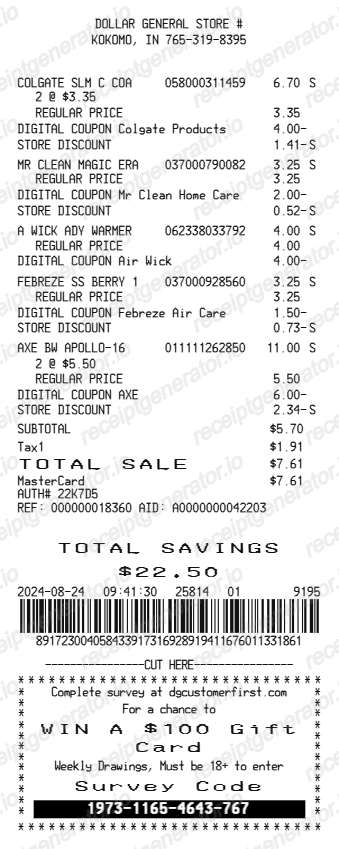
Use this Dollar General-style receipt template to build a compact retail receipt with store details, item rows, product codes, subtotal, tax, card approval block, barcode, and footer metadata.
What Is on a Real Dollar General Receipt?
Dollar General receipts follow a compact discount-retail format with a few DG-specific fixtures. A credible recreation should match these fields.
Store number in the header
Every DG receipt opens with the store number and full street address of the roughly 20,000 US locations, plus the phone number - the store number is the reference DG uses for returns and survey entries.
Item lines with product codes and tax flags
Each item prints a numeric product code with a short description and a taxable marker, since state and local sales tax applies to some items and not others depending on the state - DG operates in states with wildly different grocery tax rules.
Card approval block
Card payments print a mini approval section: card type, masked number, approval status, auth code, and sequence or invoice number - a block cash purchases do not have.
Store, register, and transaction footer
The footer line encodes the store number, register number, transaction number, cashier ID, date, and time - the exact trio (store/register/transaction) DG asks for when verifying a purchase.
15-digit DGCustomerFirst survey code
Real DG receipts print a 15-digit survey invitation code for DGCustomerFirst.com, valid for 7 days, with sweepstakes entry for a gift card - one of the most recognizable fixtures on a genuine DG receipt.
DG Cash and digital coupon savings
When a myDG account is used at checkout, digital coupon savings and any DG Cash Back rewards redeemed appear as discount lines, and the receipt can be saved digitally in the DG app.
Create a print-ready Dollar General receipt
Edit the layout, watch it update live, then print, download PDF, or email.
Live Dollar General receipt preview
Watch the receipt update instantly as you edit item rows, product codes, totals, card approval details, and footer text.
Item code editor
Keep product codes separate from item names for a receipt layout that matches the Dollar General format.
Download as PDF
Export a clean Dollar General-style receipt PDF for purchase records or expense documentation.
Mobile-friendly editor
Create and edit Dollar General receipts from desktop, tablet, or phone.
Get Your Original Dollar General Receipt First
If you checked out with your myDG account - by entering your phone number or scanning the DG app - your receipts can be stored digitally in the app. For unlinked purchases, DG stores have no self-serve receipt archive, so bring your card statement to the store where you shopped and staff may verify the transaction. Use this template when the original is unavailable - a cash purchase, an unlinked checkout, or a faded thermal slip.
Personal purchase records
Document a Dollar General shopping trip with item details, tax, total, and payment information.
Lost receipt recovery
Recreate a Dollar General receipt when the original was lost or not saved at checkout.
Expense documentation
Prepare a retail receipt record for reimbursement or personal bookkeeping.
Receipt mockups
Use the Dollar General-style layout for demos, training materials, or presentation mockups.
Dollar General Receipt Formats
Choose the Dollar General-style receipt layout that best matches your retail purchase, discount, or expense documentation needs.
Standard Dollar General Receipt
A compact Dollar General-style retail receipt with item codes and card approval text.
Item Code Receipt
A receipt format with editable item names, product codes, taxable markers, and totals.
Discount Purchase Receipt
A Dollar General receipt with discount rows, adjusted totals, and card payment details.
Grocery & Retail Receipt Guides
Read supporting guides for retail receipts, dollar store records, and expense documentation.
Related Other Receipt Templates
More free receipt templates for dollar stores, discount retail, and grocery purchase records.
Dollar General Receipt FAQ
Common questions about creating, editing, and downloading a Dollar General-style receipt for purchase records, expense documentation, and receipt examples.
Open the Dollar General receipt generator, edit the store details, item rows, item codes, subtotal, tax, total, card payment approval lines, barcode, and footer metadata, then preview and download as a PDF.
Yes. You can update the card type, card number ending, approval status, auth code, sequence number, and invoice number in the payment block.
A real DG receipt shows the store number and address in the header, item lines with product codes and taxable markers, subtotal, state and local sales tax, and total, then a card approval block with the auth code. The footer prints the store, register, and transaction numbers, a barcode, and a 15-digit survey code inviting you to DGCustomerFirst.com.
Add the store name, purchase date, line items, totals, tax, payment method, and any optional notes you need on your Dollar General template.
Yes. The Dollar General template keeps product codes separate from item names so each code and item description can be edited independently.
If your purchase was linked to your myDG account (by entering your phone number or scanning the DG app at checkout), digital receipts can be found in the Dollar General app. Otherwise, DG stores cannot easily reprint old receipts - bring your card statement to the store where you shopped, and staff may be able to verify the transaction for a return or exchange.
It is a 15-digit invitation code for Dollar General's DGCustomerFirst customer satisfaction survey. Entering the code and the receipt time at DGCustomerFirst.com within 7 days of purchase enters you into a sweepstakes for a Dollar General gift card - the code expires after that window.
Both. You can use these templates for reimbursements, bookkeeping prep, and internal documentation workflows.
Receipt Generator · Receipt Maker · 300+ Free Templates
Create your Dollar General receipt
Use the editable Dollar General receipt generator to add item rows, product codes, tax, card approval details, and barcode, then export a clean PDF for your records.