Safeway Receipt Example
See exactly what a Safeway receipt looks like — store number, Club Card savings, Just for U digital offers, fuel points earned, item count, subtotal, tax, total, and payment. Use the editable template to recreate or customize one.
See what a real Safeway receipt looks like with all fields explained — store number, Club Card member savings, Just for U personalized digital offers, fuel reward points earned, item count, subtotal, tax, and payment. Use the editable template to recreate a Safeway receipt.

Choose
Safeway Receipt Example selected

Customize
Fill in your details

Download
Save or share receipt
Edit the details once and the preview updates instantly.
Quick summary
Safeway receipt example overview
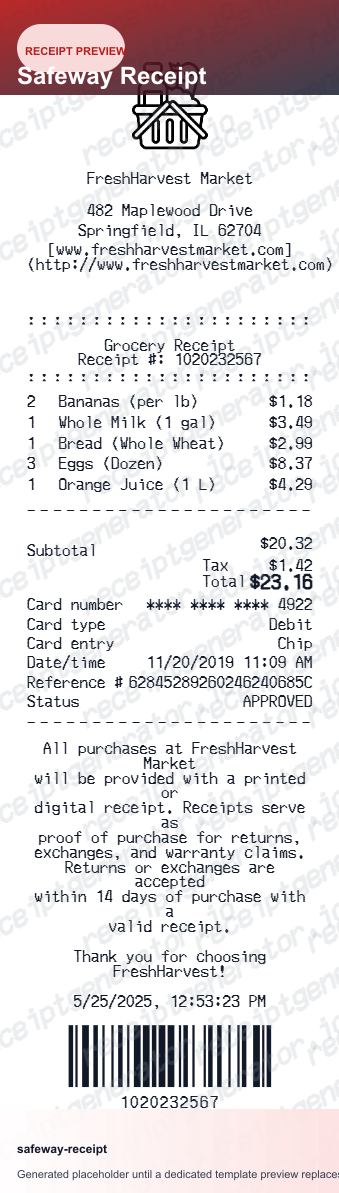
A standard Safeway receipt includes the store name and number, cashier ID, date and time, item rows with Club Card savings lines, Just for U digital offer deductions, fuel points earned, item count, subtotal, tax, total, and card payment approval code.
What's on a Safeway Receipt?
A Safeway receipt uses a grocery thermal format with dedicated sections for Club Card member savings, Just for U personalized digital offers, and fuel reward points. Understanding each field helps you verify all discounts were applied, track fuel points, or document grocery expenses for reimbursement.
Store header
Safeway store name, full address, city, state, zip, phone number, and store number printed at the top of the receipt.
Transaction details
Cashier ID, register number, transaction date, and time. The receipt may also include a transaction reference number for customer service and return lookups.
Item rows with Club Card savings
Each product shows the description, quantity, regular price, and a Club Card savings line below for any discounted items. The savings line shows the exact amount deducted and may reference the weekly ad promotion.
Just for U digital offer deductions
Personalized Just for U offer savings are listed as separate deduction lines after the item section, each labeled with the specific offer name and discount amount. A total Just for U savings line summarizes all digital offer deductions.
Fuel points, subtotal, tax, and payment
Fuel reward points earned on the transaction and the cumulative points balance available for redemption are printed before the subtotal. Subtotal, applicable tax, total amount charged, and payment method with masked card number and approval code close out the receipt, along with a total savings summary.
See what a Safeway receipt looks like
Edit the layout, watch it update live, then print, download PDF, or email.
See a real Safeway receipt format
Preview a complete Safeway receipt layout with store header, Club Card savings lines, Just for U offer deductions, fuel points earned, item count, tax, and payment details.
Editable field-by-field
Edit any field in the Safeway receipt example — store number, item rows with Club Card and Just for U savings, fuel points, tax, and payment — to match your actual purchase.
Download as PDF
Export the completed Safeway receipt example as a clean PDF for grocery expense records, FSA or HSA reimbursement, or household budget documentation.
Mobile-friendly editor
View and edit the Safeway receipt example from desktop, tablet, or phone without any app download required.
Looking for a Safeway Receipt Example?
This Safeway receipt example shows the standard grocery format — store header, item rows with Club Card savings, Just for U digital offer deductions, fuel points earned, item count, subtotal, tax, and payment approval code. Use the generator to build your own editable Safeway receipt.
Verify a receipt format
Use this Safeway receipt example to check that a receipt has the correct store number, Club Card savings lines, Just for U offer deductions, fuel points, and payment approval code.
Understand receipt fields
Learn what Club Card savings, Just for U offers, and fuel reward points mean on a standard Safeway receipt.
Recreate a lost Safeway receipt
Use the receipt example as a reference to fill in the generator with your store, item rows, Club Card savings, Just for U deductions, and payment details when the original receipt is missing.
Grocery expense records
Use a Safeway receipt example as a reference when documenting grocery purchases for household budgets, FSA reimbursements, or employer grocery stipend claims.
Safeway Receipt Formats
Safeway receipts follow the same grocery thermal format for all purchases, with additional Club Card savings lines, Just for U offer deductions, and fuel reward point totals for loyalty members.
Standard Safeway Receipt
A Safeway receipt with item rows, Club Card member savings lines, subtotal, tax, and card payment approval code.
Safeway Just for U Receipt
A Safeway receipt for app users showing personalized Just for U offer deductions as separate line items after the main item list.
Safeway Fuel Rewards Receipt
A Safeway receipt showing fuel reward points earned on the transaction, cumulative points balance, and the current per-gallon discount available for redemption.
Grocery Receipt Guides
Read supporting guides for grocery receipts, loyalty savings documentation, and food expense reimbursement.
Grocery Receipt for Reimbursement
See what expense teams require from a grocery receipt for reimbursement approval.
Read guideLost Grocery Receipt
How to recover or recreate a grocery receipt when the original is lost or not saved.
Read guidePrintable Grocery Receipt PDF
Tips for exporting and using printable receipts for records and expense reports.
Read guideHow to Get a Grocery Receipt
Learn where grocery receipts usually come from and which details matter most for budgeting or reimbursement.
Read guideGrocery Receipt Template
Use the right fields and structure when organizing a cleaner grocery purchase record.
Read guideRelated Other Receipt Templates
More receipt examples showing the format, fields, and layout of popular grocery and retail store receipts.
Safeway Receipt Example FAQ
Common questions about what a Safeway receipt looks like, how Club Card savings and Just for U offers appear, what fuel points mean on a receipt, and how to recover or recreate a lost receipt.
A Safeway receipt shows the store name, address, store number, and phone number at the top, followed by the cashier ID, register number, date and time, and item rows with descriptions, quantities, and prices. Club Card savings appear as discount lines below qualifying items, and Just for U digital offer deductions are listed separately. The receipt footer shows fuel points earned, total Club Card savings, subtotal, tax, and payment details.
A Safeway receipt includes the store name and number, cashier ID, register number, date and time, item rows with descriptions, quantities, prices, and Club Card savings lines, Just for U personalized offer deductions, fuel reward points earned on the transaction, total item count, subtotal, applicable tax, total amount charged, and payment method with masked card number and approval code.
Fuel reward points earned on the current transaction are printed near the bottom of the Safeway receipt, showing both the points earned during the visit and the running total of points available toward a fuel discount at Safeway fuel stations or partner gas stations. Generally, every dollar spent on eligible groceries earns 1 fuel point, and 100 points equals a 10-cent per gallon discount. The receipt shows the current fuel discount per gallon available to redeem.
Add the store name, purchase date, line items, totals, tax, payment method, and any optional notes you need on your Safeway Receipt Example template.
Club Card savings are the discounts Safeway applies to weekly sale prices for Club Card members, shown as a savings line directly beneath each qualifying item on the receipt. These discounts are automatically applied when you scan your Club Card or enter your linked phone number at checkout. The receipt also prints a total Club Card savings summary near the bottom so you can see the full amount saved on the shopping trip.
Just for U is Safeway's personalized digital deals program that offers customized discounts and bonus savings based on your purchase history, accessible through the Safeway app or website. Just for U savings appear as separate deduction lines on the receipt after the item list, labeled with the offer name and discount amount. You must load Just for U offers to your Club Card account before shopping for them to appear on your receipt.
Use the Safeway Receipt Generator to enter the store number, item rows with Club Card savings and Just for U offer deductions, fuel points earned, tax, and payment details. Preview the result and export a PDF that matches the standard Safeway receipt format. Safeway Club Card members can also view digital receipts for recent purchases in the Safeway app under Purchase History.
Both. You can use these templates for reimbursements, bookkeeping prep, and internal documentation workflows.
Receipt Generator · Receipt Maker · 100+ Free Templates
Need to recreate a Safeway receipt?
Use the editable Safeway Receipt Generator to enter store details, item rows, Club Card savings, Just for U offers, fuel points, and payment information, then export a clean PDF.