Safeway Receipt Generator
Create a Safeway-style grocery receipt with Club Card savings, Gas Rewards, tax, and payment details. Export a clean PDF quickly.
Create a Safeway-style receipt with Club Card pricing, savings, taxes, and payment details. Download a PDF for grocery or budget records.

Choose
Safeway Receipt selected

Customize
Fill in your details

Download
Save or share receipt
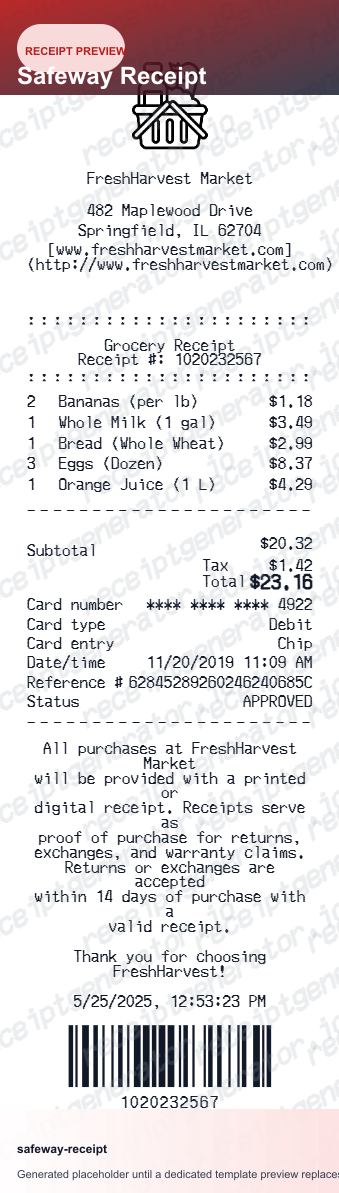
Edit the details once and the preview updates instantly.
Quick summary
Safeway receipt template overview
Use this Safeway receipt generator to create authentic itemized receipts with editable products, tax calculations in $, and printable PDF export.
What Is on a Real Safeway Receipt?
Safeway receipts follow the standard Albertsons Companies register format, so the same layout appears at Safeway, Albertsons, Vons, and Jewel-Osco. A credible replacement copy should match these details.
Store number and address header
The header prints the store's street address, city, phone number, and the internal store number. The same store number repeats in the transaction line at the bottom alongside the register, cashier or operator ID, and time stamp.
Member Price savings under each item
When a Safeway for U member discount applies, the item shows the shelf price with the discount printed directly beneath it as a Member Savings line. Shoppers who do not enter a phone number or scan the for U barcode pay full price, and no savings lines appear.
Your Savings summary
Near the total, Safeway prints a savings recap that totals Member Price discounts and digital coupon savings for the trip - a signature feature of Albertsons-family receipts that many other grocers omit.
Points footer for gas and grocery rewards
The footer shows Safeway for U Points earned on the transaction and the running balance. Members earn 1 point per dollar on eligible groceries, and 100 points converts to a Reward - such as 10 cents per gallon off at participating Safeway, Chevron, and Texaco fuel stations.
Tax split by taxability
Most staple groceries are exempt from sales tax in many Safeway states, so taxable items carry a code next to the price and tax is calculated only on that subgroup. The tax line appears between subtotal and total.
Digital copy in the Safeway app
Transactions tied to a Safeway for U account also appear as digital receipts in the app's purchase history, which is why the paper receipt reminds shoppers to link their phone number at checkout.
Create a print-ready Safeway grocery receipt
Edit the layout, watch it update live, then print, download PDF, or email.
Live Safeway receipt preview
Watch the receipt update as you add items and savings.
One-click print
Print your Safeway receipt from the browser.
Download as PDF
Export a clean grocery receipt PDF for expense or budget tracking.
Mobile-friendly editor
Create Safeway receipts from any device.
Get Your Original Safeway Receipt First
If the trip was tied to your Safeway for U account, the original is retrievable: open the Safeway app or safeway.com, go to your purchase history, and view or save the digital receipt - delivery and pickup orders also arrive by email. For trips without a linked account, the store's customer service desk may be able to locate the transaction by card and date. Use this template when the original is unavailable - a purchase made without your for U number, a faded thermal slip, or a receipt someone else kept.
Grocery expense tracking
Track Safeway grocery spending with itemized receipts.
Gas Rewards documentation
Record Safeway Gas Rewards earned per shopping trip.
Household budgeting
Create weekly grocery receipts for household budget records.
Return documentation
Generate a Safeway receipt for return or exchange processing.
Safeway Receipt Formats
Choose the Safeway-style receipt layout that best matches your shopping and documentation needs.
Standard Grocery Receipt
Safeway receipt for a regular grocery shopping trip.
Club Card Savings Receipt
Safeway receipt including Club Card pricing and Just4U deals.
Gas Rewards Receipt
Safeway receipt with Gas Rewards earned and points summary.
Related Guides
Explore related guides to understand the receipt details, lookup steps, and documentation workflows.
Related Other Receipt Templates
More free receipt templates for store and retail expense records.




Safeway Receipt FAQ
Common questions about creating a Safeway-style grocery receipt for records, budget tracking, and reimbursement support.
Choose the Safeway receipt template, add item names, Club Card prices, Just4U savings, Gas Reward points, taxes, and payment method. Preview and download as PDF.
Yes. Add Gas Rewards points earned and running balance - matching Safeway receipt formatting at the footer.
Yes. Download a clean PDF for budget records, expense submissions, or return documentation.
A real Safeway receipt shows the store address and store number in the header, each item with any Member Price discount printed beneath it, a Your Savings summary near the total, sales tax, the payment method with card last 4 digits, and a Points footer showing Safeway for U points earned this trip plus your running balance toward gas and grocery rewards.
Add the store name, purchase date, line items, totals, tax, payment method, and any optional notes you need on your Safeway template.
Yes. Add Club Card savings and Just4U personalized deals as discount line items - totals update automatically.
Yes. Add items, taxes, and payment method to create a Safeway receipt for business meal or household expense submissions.
Open the Safeway app or sign in at safeway.com with your Safeway for U account, then check your purchase history - in-store trips are captured when you enter your phone number or scan your for U barcode at checkout. Online and delivery orders keep emailed receipts under Order History. For a trip made without your for U account, ask the store's customer service desk whether they can locate the transaction by card and date.
Usually yes, within limits. Safeway stores can look up purchases tied to your Safeway for U phone number, and without any record they typically offer a store credit or exchange at the current price at the manager's discretion. A receipt with the transaction details makes refunds to the original payment method much faster.
Both. You can use these templates for reimbursements, bookkeeping prep, and internal documentation workflows.
Receipt Generator · Receipt Maker · 300+ Free Templates
Create your Safeway receipt
Use the editable Safeway receipt generator to add items, tax totals, and payment details, then export a clean PDF.