Home Depot Receipt Example
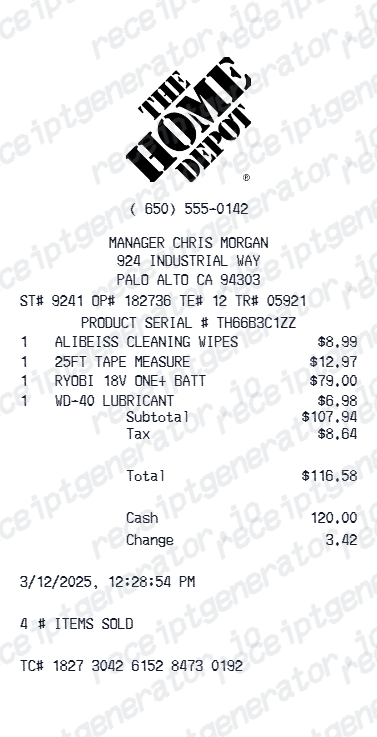
See exactly what a Home Depot receipt looks like — store number, SKU and model numbers, item rows, Pro Xtra savings, tax, total, and payment details. Use the editable template to recreate or customize one.
See what a real Home Depot receipt looks like with all fields explained — store number, SKU codes, item rows, Pro Xtra savings, tax, and payment. Use the editable template to recreate a Home Depot receipt.

Choose
Home Depot Receipt Example selected

Customize
Fill in your details

Download
Save or share receipt
Edit the details once and the preview updates instantly.
Quick summary
Home Depot receipt example overview
A standard Home Depot receipt includes store name and number, cashier ID, date and time, item rows with SKU and model numbers, subtotal, tax, total, and card payment approval code.
What's on a Home Depot Receipt?
A Home Depot receipt uses a thermal format with clear sections for store info, product details, and payment. Knowing each field helps you verify a purchase, process returns, or document home improvement expenses.
Store header
Home Depot store name, address, city, state, zip, phone, and store number.
Transaction details
Cashier ID, register number, transaction date, and time.
Item rows with SKU and model numbers
Each item shows the description, SKU number (Home Depot's internal code), manufacturer model number, quantity, unit price, and line total.
Subtotal and tax
Subtotal before tax, applicable tax at the local rate, and total charged. Rental and installation items may show separate service tax lines.
Payment and approval code
Payment method, masked card number, approval code, and transaction reference number for card payments.
See what a Home Depot receipt looks like
Edit the layout, watch it update live, then print, download PDF, or email.
See a real Home Depot receipt format
Preview a complete Home Depot receipt layout with store header, SKU and model numbers, tax, and payment details.
Editable field-by-field
Edit any field in the Home Depot receipt example — store number, SKU codes, item rows, tax, and payment — to match your actual purchase.
Download as PDF
Export the completed Home Depot receipt example as a clean PDF for home improvement expense records or reimbursement.
Mobile-friendly editor
View and edit the Home Depot receipt example from desktop, tablet, or phone.
Looking for a Home Depot Receipt Example?
This Home Depot receipt example shows the standard format — store header, SKU and model numbers, item rows, tax, and payment approval code. Use the generator to build your own editable Home Depot receipt.
Verify a receipt format
Use this Home Depot receipt example to check that a receipt has correct SKU numbers, model numbers, cashier ID, and payment approval code.
Understand receipt fields
Learn what SKU numbers, model numbers, and the approval code mean on a Home Depot receipt.
Recreate a lost Home Depot receipt
Use the receipt example as a reference to fill in the generator with your store, items, and payment details when the original is missing.
Home improvement expense records
Use a Home Depot receipt example as a reference when documenting renovation or repair purchases for contractor billing or tax records.
Home Depot Receipt Formats
Home Depot receipts follow the same thermal format for all purchases, with Pro Xtra savings lines added for pro members.
Standard Home Depot Receipt
A Home Depot receipt with SKU codes, model numbers, item rows, tax, and card payment approval details.
Pro Xtra Member Receipt
A Home Depot receipt for Pro Xtra members showing Pro savings applied to qualifying tool and material purchases.
Contractor Supply Receipt
A Home Depot receipt for large material orders with multiple item rows, bulk pricing, and project reference details.
Retail Receipt Guides
Read supporting guides for hardware store receipts, home improvement expense records, and reimbursement documentation.
Grocery Receipt for Reimbursement
See what expense teams require from a retail receipt for reimbursement approval.
Read guideLost Grocery Receipt
How to recover or recreate a purchase receipt when the original is lost or not saved.
Read guidePrintable Grocery Receipt PDF
Tips for exporting and using printable receipts for records and expense reports.
Read guideHow to Make a Receipt for Taxes
Review the fields that make a purchase receipt easier to use for business recordkeeping.
Read guideStore Receipt Generator Guide
Compare standard, itemized, and barcode-style receipt formats for everyday store records.
Read guideRelated Other Receipt Templates
More receipt examples showing the format, fields, and layout of popular hardware and retail store receipts.

Home Depot Receipt Example FAQ
Common questions about what a Home Depot receipt looks like, what SKU and model numbers mean, and how to recover or recreate one.
A Home Depot receipt shows the store name, address, and store number at the top, followed by cashier ID, register number, date and time, item rows with SKU and model numbers, subtotal, tax, total, and payment method with approval code.
A Home Depot receipt includes the store name and number, cashier ID, register number, transaction date and time, item names with SKU and model numbers, quantities, prices, subtotal, applicable tax, total, and payment details including approval code.
Yes. Home Depot can look up purchases made with a credit or debit card at the customer service desk or via the Home Depot app. Pro Xtra members can view full purchase history in their account.
Add the store name, purchase date, line items, totals, tax, payment method, and any optional notes you need on your Home Depot Receipt Example template.
Each item on a Home Depot receipt shows a unique SKU (Stock Keeping Unit) number and a manufacturer model number. The SKU is Home Depot's internal product code, while the model number is the manufacturer's identifier used for warranties and returns.
Most Home Depot items can be returned within 90 days of purchase with the original receipt. Major appliances have a 30-day return window. Pro Xtra members can look up purchases in their account without the physical receipt.
Use the Home Depot Receipt Generator to enter store details, cashier ID, item rows with SKU and model numbers, tax, and payment details. Preview and export a PDF that matches the standard Home Depot receipt format.
Both. You can use these templates for reimbursements, bookkeeping prep, and internal documentation workflows.
Receipt Generator · Receipt Maker · 100+ Free Templates
Need to recreate a Home Depot receipt?
Use the editable Home Depot Receipt Generator to enter store details, SKU codes, model numbers, and payment information, then export a clean PDF.