Lowe's Receipt Example
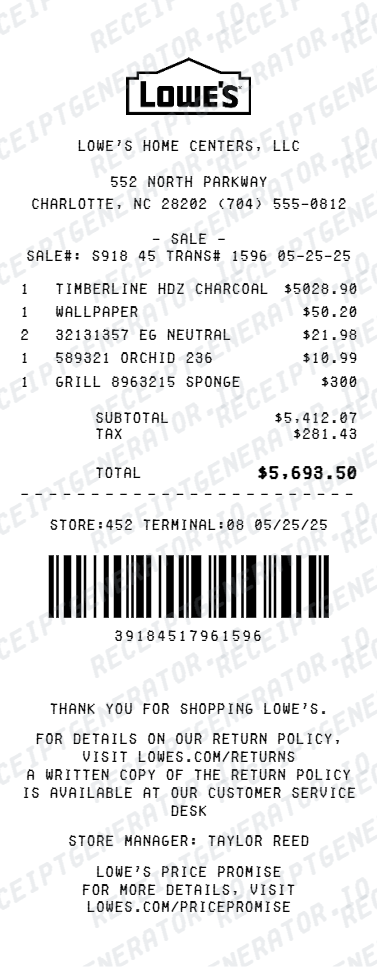
See exactly what a Lowe's receipt looks like — store number, transaction number, SKU and item numbers, lumber and hardware line items, Lowe's Advantage Card discounts, MyLowe's rewards, tax, and payment. Use the editable template to recreate or customize one.
See what a real Lowe's receipt looks like with all fields explained — store number, transaction number, SKU codes, item rows for lumber and hardware, Lowe's Advantage Card savings, MyLowe's rewards balance, tax, and payment. Use the editable template to recreate a Lowe's receipt.

Choose
Lowe's Receipt Example selected

Customize
Fill in your details

Download
Save or share receipt
Edit the details once and the preview updates instantly.
Quick summary
Lowe's receipt example overview
A standard Lowe's receipt includes the store name and number, transaction number, cashier ID, date and time, item rows with SKU and item numbers, Lowe's Advantage Card savings, MyLowe's rewards earned, subtotal, tax, total, and card payment approval code.
What's on a Lowe's Receipt?
A Lowe's receipt uses a standard thermal format with clear sections for store information, product line items, savings, and payment. Knowing each field helps you verify a purchase, process a return, or document home improvement expenses.
Store header
Lowe's store name, full address, city, state, zip, phone number, and store number printed at the top of the receipt.
Transaction details
Transaction number, cashier ID, register number, purchase date, and time of sale — all required for returns and price adjustments.
Item rows with SKU and item numbers
Each product shows the item description, SKU number (Lowe's internal product code), item number, quantity purchased, unit price, and line total. Lumber and building materials often include dimensional descriptions such as length and grade.
Savings lines
Lowe's Advantage Card 5% discount appears as a savings line after the item list. MyLowe's rewards points earned on the transaction are also shown, along with any promotional or special-order discounts applied.
Subtotal, tax, and payment
Subtotal before tax, applicable sales tax at the local rate, and total amount charged. Payment method, masked card number, and card approval code are printed at the bottom along with the return policy notice.
See what a Lowe's receipt looks like
Edit the layout, watch it update live, then print, download PDF, or email.
See a real Lowe's receipt format
Preview a complete Lowe's receipt layout with store header, transaction number, SKU and item numbers, Advantage Card savings, MyLowe's rewards, tax, and payment details.
Editable field-by-field
Edit any field in the Lowe's receipt example — store number, transaction number, item SKUs, discount lines, tax, and payment — to match your actual purchase.
Download as PDF
Export the completed Lowe's receipt example as a clean PDF for home improvement expense records, contractor billing, or reimbursement documentation.
Mobile-friendly editor
View and edit the Lowe's receipt example from desktop, tablet, or phone without any app download required.
Looking for a Lowe's Receipt Example?
This Lowe's receipt example shows the standard format — store header, transaction number, SKU and item numbers, item rows with lumber and hardware details, Advantage Card savings, MyLowe's rewards, tax, and payment approval code. Use the generator to build your own editable Lowe's receipt.
Verify a receipt format
Use this Lowe's receipt example to check that a receipt has the correct transaction number, SKU codes, Advantage Card discount, and payment approval code.
Understand receipt fields
Learn what SKU numbers, item numbers, MyLowe's rewards, and the Advantage Card discount mean on a standard Lowe's receipt.
Recreate a lost Lowe's receipt
Use the receipt example as a reference to fill in the generator with your store, transaction number, items, and payment details when the original receipt is missing.
Home improvement expense records
Use a Lowe's receipt example as a reference when documenting renovation, repair, or construction material purchases for contractor billing or tax records.
Lowe's Receipt Formats
Lowe's receipts follow the same thermal format for all purchases, with additional savings and rewards lines printed for Advantage Card holders and MyLowe's members.
Standard Lowe's Receipt
A Lowe's receipt with SKU and item numbers, item rows for hardware and building materials, subtotal, tax, and card payment approval code.
Lowe's Advantage Card Receipt
A Lowe's receipt for Advantage Card holders showing the 5% off savings line applied to eligible purchases before tax.
MyLowe's Rewards Receipt
A Lowe's receipt for MyLowe's members showing rewards points earned on the transaction and cumulative balance for future purchases.
Retail Receipt Guides
Read supporting guides for hardware store receipts, home improvement expense records, and reimbursement documentation.
Grocery Receipt for Reimbursement
See what expense teams require from a retail receipt for reimbursement approval.
Read guideLost Grocery Receipt
How to recover or recreate a purchase receipt when the original is lost or not saved.
Read guidePrintable Grocery Receipt PDF
Tips for exporting and using printable receipts for records and expense reports.
Read guideRelated Other Receipt Templates
More receipt examples showing the format, fields, and layout of popular hardware and retail store receipts.
Lowe's Receipt Example FAQ
Common questions about what a Lowe's receipt looks like, what SKU and transaction numbers mean, how Lowe's Advantage Card discounts appear, and how to recover or recreate a lost receipt.
A Lowe's receipt shows the store name, address, store number, and phone number at the top, followed by the transaction number, cashier ID, register number, date and time, and item rows with SKU and item numbers, quantities, and prices. The receipt then lists any Lowe's Advantage Card discounts, MyLowe's rewards earned, subtotal, tax, and payment details.
A Lowe's receipt includes the store name, store number, address, phone number, cashier ID, register number, transaction number, date and time, item rows with SKU numbers and descriptions, quantities, unit prices, line totals, Lowe's Advantage Card savings, MyLowe's rewards earned, subtotal, tax, total, and payment method with approval code.
The Lowe's Advantage Card is a store credit card that provides 5% off eligible purchases, which appears as a discount line on the receipt after the subtotal. Cardholders may also see special financing offer details at the bottom of the receipt. The discount is applied before tax is calculated.
Add the store name, purchase date, line items, totals, tax, payment method, and any optional notes you need on your Lowe's Receipt Example template.
The transaction number on a Lowe's receipt is a unique identifier for that specific purchase and is required for returns, exchanges, and price adjustments. It appears near the top of the receipt alongside the store number, date, and cashier ID. Keeping this number allows Lowe's to look up the purchase if the physical receipt is lost.
Most items purchased at Lowe's can be returned within 90 days of purchase with the original receipt. The return window is noted on the receipt footer, and some categories like appliances or outdoor power equipment may have shorter windows. MyLowe's members can look up past purchases without the physical receipt.
Use the Lowe's Receipt Generator to enter the store number, transaction number, item rows with SKU codes, Advantage Card discount, tax, and payment details. Preview the result and export a PDF that matches the standard Lowe's receipt format. MyLowe's members can also request a reprint at the customer service desk.
Both. You can use these templates for reimbursements, bookkeeping prep, and internal documentation workflows.
Receipt Generator · Receipt Maker · 100+ Free Templates
Need to recreate a Lowe's receipt?
Use the editable Lowe's Receipt Generator to enter store details, transaction number, SKU codes, Advantage Card savings, and payment information, then export a clean PDF.