How to Get an Instacart Receipt for Reimbursement
Ready to create your own? Use our free receipt generator — no account needed.
Generate Instacart Receipt →On this page
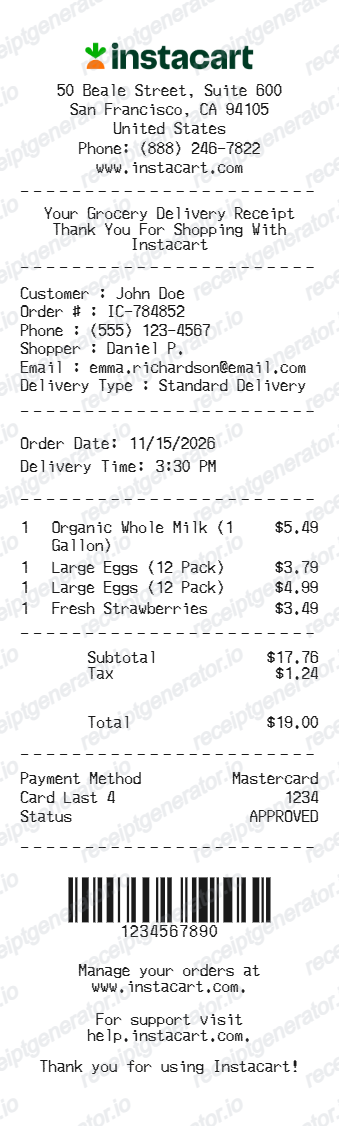
If you need an Instacart receipt, the itemized record lives in your order history. Unlike a single card charge, the Instacart receipt separates the store items from the service fee, delivery fee, and tip — which is exactly what reimbursement and budgeting need.
Quick Answer
Open the Instacart app or website, go to your order history, select the order, and view or download the receipt. It itemizes the groceries plus the service fee, delivery fee, and tip.
Where Instacart Receipts Usually Come From
- the digital receipt in your Instacart order history
- the order confirmation and "your order is complete" email
- the final charge summary after any item replacements or refunds
How to Recover an Instacart Receipt
1. Order history in the app or web. Sign in to Instacart, open Account → Your Orders, and select the order. You can view the full itemized receipt and usually download or email it.
2. Email confirmations. Instacart sends order and delivery emails that include the summary. Search your inbox for "Instacart."
3. Check the final total. Instacart may adjust the charge after replacements, out-of-stock refunds, or weight-based items. The receipt in your history reflects the final amounts, so use it rather than the initial authorization.
What a Useful Instacart Receipt Should Include
- the store the order was shopped from
- the delivery date
- each item with its price (and any replacements)
- the service fee, delivery fee, and tip, listed separately
- the subtotal, tax, and final total
Using an Instacart Receipt for Reimbursement
Instacart shows up in expense reports for office supplies, pantry stocking, and remote-work grocery stipends. Because finance teams often treat fees and tips differently from the grocery subtotal, the itemized receipt — not the card charge — is what gets approved.
Need a Structured Instacart Record?
If you've confirmed your final order details and want a cleaner version for your files, use the Instacart Receipt Generator.
Open the Instacart Receipt Generator
Create a structured Instacart-style receipt using the verified details from your order.
Related Guides
Final Takeaway
Start with the itemized receipt in your Instacart order history — it reflects the final totals after any replacements and separates the fees and tip. From there you can keep a clean copy for reimbursement or budgeting.
FAQ
Open the Instacart app or website, go to your account's order history, select the order, and view or download the digital receipt.
The receipt shows the items, any replacements, the service and delivery fees, and the tip.
Yes — the itemized receipt lists each item and price, plus Instacart's service fee, delivery fee, and tip separately.
That breakdown is what expense teams usually need for grocery or office reimbursement.