Veterinary Receipt Generator
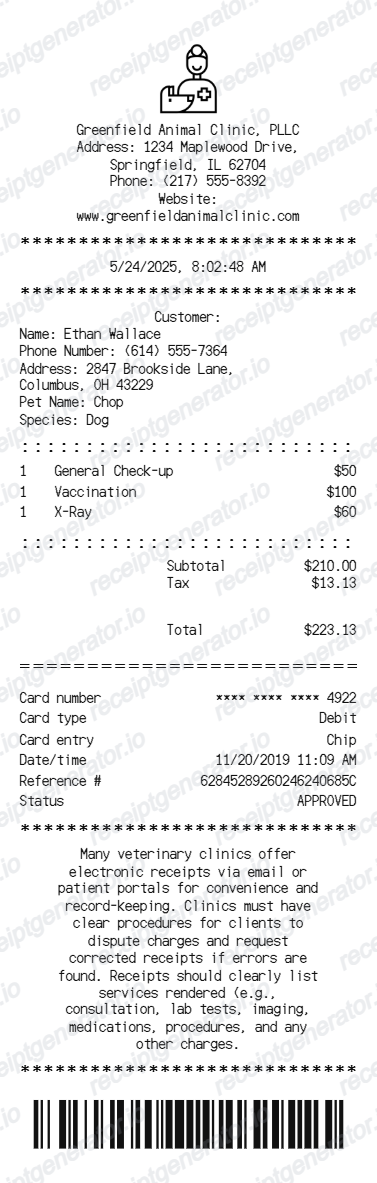
Create a veterinary clinic receipt with client details, pet information, procedures, totals, card payment details, notice text, barcode, and PDF export.
Create a veterinary receipt with editable clinic details, customer and pet information, procedure rows, totals, card payment details, and barcode.

Choose
Veterinary Receipt selected

Customize
Fill in your details

Download
Save or share receipt
Edit the details once and the preview updates instantly.
Quick summary
Veterinary receipt template overview
Create a veterinary clinic receipt with client details, pet information, procedures, totals, card payment details, notice text, barcode, and PDF export.
What Is on a Real Veterinary Receipt?
Veterinary receipts double as itemized invoices, and clinics format them to hold up for insurance claims and pharmacy recordkeeping, not just as a payment confirmation.
Itemized line items, not a single total
A real vet invoice breaks out every charge separately - exam fee, each vaccine by name, diagnostics, medication, and any procedure - rather than one lump sum. Pet insurers can only process a claim from an itemized invoice, so clinics keep this format even for routine visits.
Patient and diagnosis details next to charges
Alongside the owner's name and contact info, the invoice lists the pet's name and species, the date of service, the presenting diagnosis or reason for visit, and the treatment given for each line - the detail insurers and other vets need to make sense of the bill later.
Controlled-substance prescriptions get extra fields
When a visit includes a DEA-scheduled drug (opioids, sedatives, some anti-anxiety medications), the invoice or attached label shows the drug name, strength, and quantity dispensed, and clinics typically print the veterinarian's DEA registration number - required recordkeeping the clinic must retain for at least two years.
Vaccine lot numbers on rabies and core shots
Rabies certificates and many vaccine records reference a lot number and expiration date tied to the specific vial used, which clinics cross-reference against the invoice line for that vaccine - important for licensing and any adverse-reaction follow-up.
Totals and payment breakdown
Subtotal, any exam or emergency-visit surcharge, sales tax where applicable, and the total appear after the itemized services, followed by the payment method with masked card digits, reference number, and approval status.
A receipt is not the same as an insurance claim form
Most pet insurers require the itemized invoice plus their own claim form (or an online submission) - the receipt alone rarely satisfies a claim. Clinics that work with insurers often print 'itemized invoice' rather than 'receipt' on the document for this reason.
Create a print-ready veterinary receipt
Edit the layout, watch it update live, then print, download PDF, or email.
Live veterinary receipt preview
Watch the receipt update as you edit clinic details, client and pet information, services, totals, and payment fields.
Editable 80mm receipt layout
Use a narrow veterinary receipt format with divider lines, itemized services, totals, card details, notice text, and barcode.
Download as PDF
Export a clean veterinary receipt PDF for records, examples, or clinic receipt mockups.
Mobile-friendly editor
Create and edit veterinary receipts from desktop, tablet, or phone.
Get Your Original Veterinary Receipt First
If the visit was recent, the clinic's front desk can usually reprint or re-email the itemized invoice from their practice management system within minutes - just give them your pet's name and the visit date. Many clinics also run a client portal with downloadable past invoices and vaccine records. Use this template when the original is unavailable - a closed clinic, a lost email, or a visit from years ago.
Pet care records
Create a veterinary receipt for procedures, payments, and owner records.
Clinic billing examples
Build a veterinary clinic receipt layout for demos, samples, and internal examples.
Receipt mockups
Use the veterinary receipt format for training, UI mockups, or sample receipt previews.
Veterinary Receipt Template Types
Create veterinary receipts for pet care payments, clinic examples, service records, and receipt mockups.
Veterinary treatment receipt
A receipt for itemized veterinary procedures with subtotal, tax, total, and payment details.
Animal clinic receipt
A clinic-style receipt with animal care contact details, customer information, and barcode.
Pet service receipt
A compact receipt format for pet services, check-ups, vaccinations, and medical records.
Related Guides
Explore related guides to understand the receipt details, lookup steps, and documentation workflows.
Receipt guide
Repair Receipt for Insurance Claims
See which service and payment fields make a repair or service record easier to review.
Explore Repair Receipt for Insurance ClaimsEditable template
Repair Receipt template
Explore this editable receipt layout and its fields before opening the editor.
Explore Repair Receipt templateMore free receipt templates for service and retail expense records.

Veterinary Receipt FAQ
Common questions about creating, editing, and downloading a veterinary clinic receipt.
Open the veterinary receipt generator, edit the clinic details, customer and pet information, procedure rows, totals, payment details, and barcode, then preview and download as a PDF.
Yes. Update service rows such as general check-up, vaccination, X-ray, and any other veterinary procedure.
Call or email the clinic's front desk with your pet's name and the visit date - most veterinary practice management systems can reprint or re-email the itemized invoice within minutes. Many clinics also offer a client portal where past invoices, vaccine records, and prescription history are available for download.
Usually not. Most pet insurers explicitly require an itemized invoice showing every charge, diagnosis, and treatment - a simple payment receipt with just a total is typically rejected or sent back with a request for the full itemized version, so always ask the clinic for the itemized invoice, not just the payment receipt.
Yes. You can edit pet name, species, owner details, address, and phone number.
Yes. You can edit card number, card type, entry method, date and time, reference number, and approval status.
A real vet receipt is an itemized invoice: clinic name, address, and phone at the top, owner and pet details, the date of service and diagnosis, each exam, vaccine, test, and medication as a separate priced line, subtotal and tax, the payment method, and often the veterinarian's name and license number at the bottom.
Receipt Generator · Receipt Maker · 300+ Free Templates
Create your Veterinary receipt
Use the editable Veterinary receipt generator to add items, tax totals, and payment details, then export a clean PDF.