Dental Receipt Generator
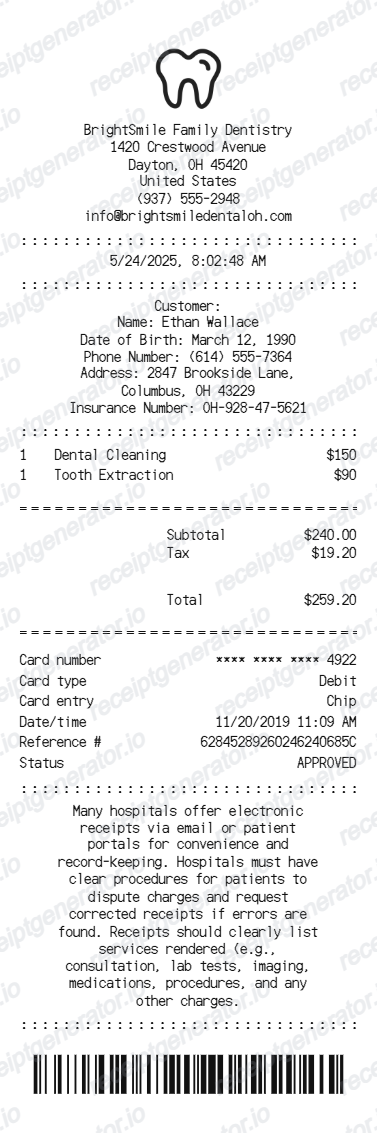
Create a dental clinic receipt with patient details, treatment items, subtotal, tax, payment card details, clinic message, barcode, and PDF export.
Create a dental receipt with editable clinic details, patient information, dental services, totals, card payment details, and barcode.

Choose
Dental Receipt selected

Customize
Fill in your details

Download
Save or share receipt
Edit the details once and the preview updates instantly.
Quick summary
Dental receipt template overview
Create a dental clinic receipt with patient details, treatment items, subtotal, tax, payment card details, clinic message, barcode, and PDF export.
What Is on a Real Dental Receipt?
Before you rebuild a dental receipt, it helps to know what a real patient statement contains. Dental receipts follow a consistent structure driven by insurance and IRS documentation rules, and a credible copy should match it field for field.
CDT procedure codes on each line
Itemized dental statements list a Current Dental Terminology (CDT) code next to each service - a standardized five-character code (like D0120 for a periodic exam or D1110 for an adult cleaning) that insurers and FSA/HSA administrators use to identify exactly what was performed.
Receipt vs. ADA Dental Claim Form
A patient receipt or statement is different from the ADA Dental Claim Form the practice submits to insurance. The claim form includes tooth numbers, diagnosis codes, and the dentist's National Provider Identifier (NPI) for adjudication; the patient receipt is a simpler summary of services and amounts paid.
Itemization needed for FSA/HSA reimbursement
For FSA/HSA reimbursement, a dental receipt generally needs the date of service, a description of each procedure (ideally with the CDT code), the amount charged, and the provider's name or NPI - a credit card slip alone is not sufficient documentation.
Typical treatment line items
Common lines include an oral exam, bitewing or full-mouth X-rays, a prophylaxis (cleaning), fluoride treatment, and procedure-specific codes for fillings, extractions, crowns, or root canals - each priced and taxed according to the clinic's fee schedule.
Patient responsibility vs. insurance-paid portion
Receipts typically break the total into what insurance paid (or is expected to pay), any plan adjustment or write-off, and the remaining patient responsibility - copay, deductible, or coinsurance - so the two amounts don't get confused during reimbursement.
Practice and patient identifiers
The header identifies the practice name, address, and phone number, while the patient section lists the patient's name, date of birth, and insurance member number so the receipt can be matched to a specific claim or plan.
Create a print-ready dental receipt
Edit the layout, watch it update live, then print, download PDF, or email.
Live dental receipt preview
Watch the receipt update as you edit clinic details, patient information, services, totals, and payment fields.
Editable 80mm receipt layout
Use a narrow dental receipt format with divider lines, itemized services, totals, payment details, message text, and barcode.
Download as PDF
Export a clean dental receipt PDF for records, examples, or clinic receipt mockups.
Mobile-friendly editor
Create and edit dental receipts from desktop, tablet, or phone.
Get Your Original Dental Receipt First
If you were treated recently, the original is always better: ask the practice's front desk or billing office to reprint or email an itemized statement, or check the clinic's patient portal if it offers online billing history. Use this template when the original is unavailable - a closed practice, a missing paper copy, or a generic example for records and mockups.
Patient records
Create a dental receipt for treatment documentation and payment records.
Clinic billing examples
Build a dental clinic receipt layout for demos, samples, and internal examples.
Receipt mockups
Use the dental receipt format for training, UI mockups, or sample receipt previews.
Dental Receipt Template Types
Create dental receipts for treatment payments, patient records, clinic examples, and receipt mockups.
Dental treatment receipt
A receipt for itemized dental services with subtotal, tax, total, and payment details.
Dental clinic receipt
A clinic-style receipt with practice contact details, patient information, and barcode.
Medical payment receipt
A compact healthcare receipt format for medical or dental payment records.
Related Guides
Explore related guides to understand the receipt details, lookup steps, and documentation workflows.
Receipt guide
Pharmacy Receipt for FSA & HSA
Learn which pharmacy receipt fields matter most for FSA or HSA documentation.
Explore Pharmacy Receipt for FSA & HSAReceipt guide
What a CVS Pharmacy Receipt Should Include
Review the fields that make pharmacy receipt records clearer for reimbursement and health-expense tracking.
Explore What a CVS Pharmacy Receipt Should IncludeReceipt guide
How to Get a CVS Prescription Receipt
See how pharmacy-side receipt retrieval differs from regular store receipt history.
Explore How to Get a CVS Prescription ReceiptMore free receipt templates for pharmacy and retail expense records.

Dental Receipt FAQ
Common questions about creating, editing, and downloading a dental clinic receipt.
Open the dental receipt generator, edit the clinic details, customer information, dental treatment rows, totals, payment details, and barcode, then preview and download as a PDF.
Yes. The template includes editable customer, date of birth, phone, address, and insurance number fields.
Ask the front desk to reprint or email an itemized statement from your patient record - most dental practice management systems can regenerate a statement for any past date of service. If insurance was billed, you can also request a copy of the submitted ADA Dental Claim Form or the insurer's Explanation of Benefits, which lists the same CDT codes and amounts.
FSA/HSA administrators typically want the date of service, a procedure description or CDT code, the amount charged, and the provider's name or NPI. A payment receipt alone (just a total and card number) is usually not enough - the itemized statement from the practice is the document to submit.
Yes. You can edit service names such as dental cleaning or tooth extraction and update each price.
Yes. You can update card number, card type, entry method, authorization, reference, and approval status fields.
A real dental receipt shows the practice name and contact details, the patient's name and insurance information, each procedure on its own line with a CDT code and description, the amount charged per line, the insurance-paid or adjusted amount, the remaining patient responsibility, and the payment method used.
Receipt Generator · Receipt Maker · 300+ Free Templates
Create your Dental receipt
Use the editable Dental receipt generator to add items, tax totals, and payment details, then export a clean PDF.