Airline Receipt Generator
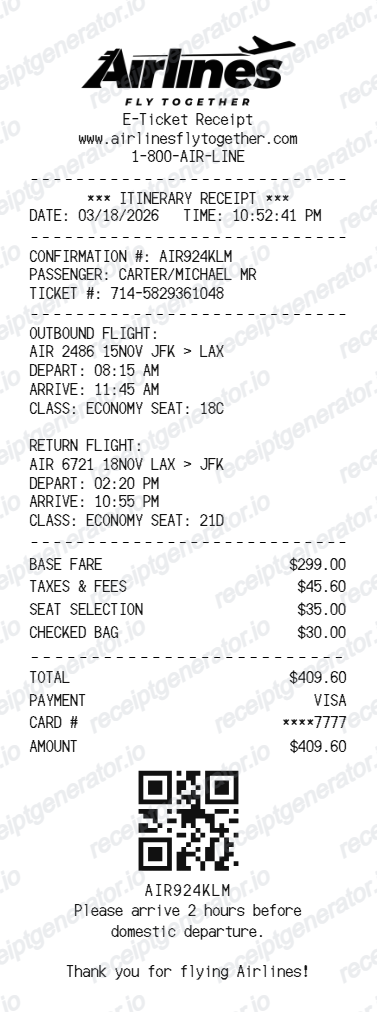
Create an airline e-ticket receipt with logo, flight itinerary, fare breakdown, payment details, QR code, and travel notes.
Create an editable airline receipt with passenger details, flight information, fare rows, total, payment method, QR code, and footer message.

Choose
Airline Receipt selected

Customize
Fill in your details

Download
Save or share receipt
Edit the details once and the preview updates instantly.
Quick summary
Airline receipt template overview
Create an airline e-ticket receipt with logo, flight itinerary, fare breakdown, payment details, QR code, and travel notes.
What Is on a Real Airline Receipt?
Airline e-ticket receipts follow a standard IATA structure across carriers, built around a record locator and an itemized fare - not a single lump-sum price.
PNR / record locator and e-ticket number
Every booking gets a 6-character alphanumeric PNR (also called a record locator, booking reference, or confirmation code) plus a separate 13-digit electronic ticket number issued once the fare is paid; the PNR identifies the reservation, the e-ticket number identifies the paid coupon.
Base fare separated from taxes and carrier fees
A real fare breakdown never shows one total - it itemizes the base fare, then government taxes (like the US transportation tax and September 11 security fee), airport passenger facility charges, and any carrier-imposed surcharges as their own lines.
Baggage fee as a distinct line item
Checked bag fees are charged and itemized separately from the ticket fare, since baggage is priced per bag and per route rather than bundled into the base fare on most tickets.
Seat selection and ancillary fees itemized
Paid seat selection, priority boarding, and other add-ons print as their own line items distinct from both the base fare and baggage charges.
Flight segment details
Each flight segment lists the carrier and flight number, origin and destination airport codes, departure and arrival times, cabin class, and fare basis code - return and connecting flights appear as separate segment blocks.
Form of payment and ticketing agent
The payment section shows the card type with masked digits or the ticketing method (airline direct, travel agency, or online travel agency), plus the ticketing date, which can differ from the booking date.
Create a print-ready airline receipt
Edit the layout, watch it update live, then print, download PDF, or email.
Live airline receipt preview
Watch the receipt update as you edit itinerary, fare rows, payment details, and QR code.
Editable e-ticket layout
Use a compact receipt layout with dashed dividers, flight blocks, totals, and payment rows.
Download as PDF
Export a clean airline receipt PDF for examples, travel records, demos, or mockups.
Mobile-friendly editor
Create and edit airline receipts from desktop, tablet, or phone.
Get Your Original Airline Receipt First
If the flight still exists in your booking history, the original is always better: most airlines let you pull up a past-flight receipt by entering the record locator (PNR) and passenger last name on their website, or by checking the confirmation email for a Receipt or Itinerary/Invoice link. Use this template when the original is unavailable - a booking made through a third party that no longer has the record, an old trip that has aged out of the airline's lookup window, or a receipt needed for expense reporting after the email was deleted.
Flight receipt examples
Create airline receipt examples with editable passenger and itinerary details.
Travel documentation mockups
Generate flight receipt mockups for demos, testing, or record examples.
Fare breakdown samples
Show base fare, taxes, baggage, seat selection, and payment rows in one receipt.
Airline Receipt Template Types
Create airline receipts for e-ticket examples, flight itinerary records, and airline payment receipt mockups.
E-ticket receipt
A compact airline receipt with confirmation number, passenger name, flights, and payment details.
Flight itinerary receipt
A receipt focused on outbound and return flight information with seat and class details.
Airline payment receipt
A flight payment receipt with fare rows, total, card information, and QR code.
More free receipt templates for airline and retail expense records.




Airline Receipt FAQ
Common questions about creating, editing, and downloading an airline receipt.
Open the airline receipt generator, edit the passenger details, itinerary, fare rows, total, payment details, and QR code, then preview and download as a PDF.
Yes. You can update base fare, taxes and fees, seat selection, checked bag charges, and the final total.
A real airline receipt shows the PNR/record locator, a 13-digit e-ticket number, passenger name, itemized fare (base fare, taxes, carrier fees, baggage, and seat selection as separate lines), flight segment details with carrier, flight number, and cabin class, the form of payment, and the ticketing date.
Yes. You can edit outbound and return flight numbers, routes, departure and arrival times, class, and seat details.
Most airlines have a receipt or past-flight lookup page where you enter the record locator (PNR) and passenger last name to pull up the itinerary/invoice. If you booked through a travel agency or OTA, check the confirmation email first, since some airlines only display bookings made directly with them.
Government and airport taxes - like passenger facility charges and security fees - are set by regulators, not the airline, so carriers are required to itemize them separately from the base fare rather than folding them into a single ticket price.
Receipt Generator · Receipt Maker · 300+ Free Templates
Create your Airline receipt
Use the editable Airline receipt generator to add items, tax totals, and payment details, then export a clean PDF.