How to Get a Target Receipt Online or In Store
Ready to create your own? Use our free receipt generator — no account needed.
Generate Target Receipt →On this page
If you need a Target receipt, where you look depends on how you paid. Online orders live in your Target account, app purchases are saved in your Wallet, and in-store cash or card purchases can usually be located through Guest Services.
For returns, warranty, or reimbursement, the itemized receipt matters more than a card statement line. Recover the original first, then keep a clean copy.
Quick Answer
Check your Target account order history (Target.com or the Target app) for online orders, the app Wallet for Target Circle purchases, or ask Guest Services to look up an in-store receipt using your card and the purchase date.
Where Target Receipts Usually Come From
Most Target receipts come from one of these:
- the printed receipt from the register
- your online order history at Target.com or in the Target app
- a digital receipt saved in the Target app Wallet (when Target Circle is used)
- an in-store receipt lookup at Guest Services
- an emailed receipt, if you opted in at checkout
How to Recover a Target Receipt
1. Online orders — check your account. Sign in at Target.com or open the Target app, then go to Account → Orders (or Purchases). Online and pickup orders show the full itemized record, including date, items, and total.
2. In-store with Target Circle or Wallet. If you scanned Target Circle or paid through the app's Wallet, a digital receipt is usually saved in the app automatically. Open the Wallet section and look under your recent trips or receipts.
3. In-store receipt lookup at Guest Services. For a cash or card purchase you didn't link, Guest Services can often look up and reprint a receipt using the card you paid with and the approximate purchase date. Bring the same card if you can.
4. RedCard statement as a backup. If you used a Target RedCard, the statement confirms the date and amount and can help staff locate the original transaction.
What a Useful Target Receipt Should Include
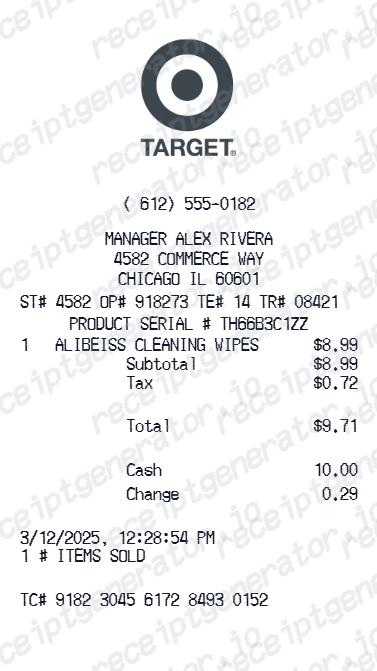
For records, returns, or reimbursement, a Target receipt should show:
- the store location (or "Target.com" for online)
- the date of purchase
- each item with its price and any discounts
- subtotal, sales tax, and total paid
- the payment method used
Using a Target Receipt for Reimbursement or Returns
Target receipts are common in expense reports for office and supply purchases, and they're the smoothest path for returns and price adjustments. Either way, the itemized record — not just the card charge — is what gets accepted.
Need a Structured Target Record?
If you've confirmed the original purchase details and want a cleaner version for your files, use the Target Receipt Generator.
Open the Target Receipt Generator
Create a structured Target-style receipt using the verified details from your purchase.
Related Guides
Final Takeaway
Start with the record that matches how you paid — your account order history, the app Wallet, or a Guest Services lookup. Once the details are confirmed, you can organize them into a clean receipt record for your files if needed.
FAQ
Online orders are in your Target.com or Target app order history under Account → Orders.
In-store purchases tied to Target Circle or saved to Wallet appear in the app; otherwise Guest Services can look up a receipt using the card you paid with and the approximate date.
A receipt or order record makes returns far smoother and is often required after the standard window.
If you used a RedCard or Target Circle, Target can frequently locate the purchase even without the paper slip.