Free Target Receipt Generator
Create Free Target Receipts Online - Add Items, RedCard Savings, Circle Deals & Barcode. Preview free; watermark-free PDF export requires a paid plan.
Create a Target-style receipt with Circle savings, RedCard discount, taxes, and payment details. Download a PDF for returns or expense records.

Choose
Target Receipt selected

Customize
Fill in your details

Download
Save or share receipt
Edit the details once and the preview updates instantly.
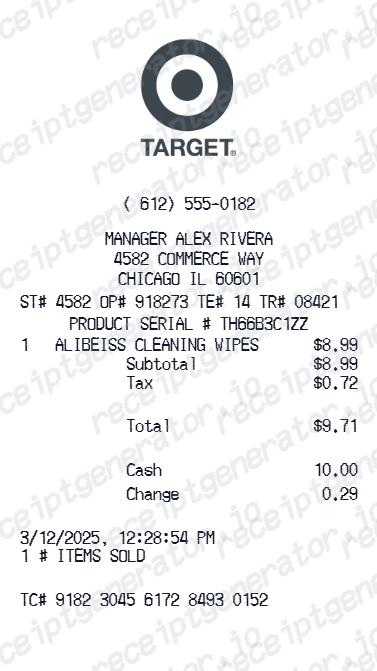
Quick summary
Target receipt template overview
Create Target Receipts Online - Add Items, RedCard Savings, Circle Deals & Barcode. Preview the layout before choosing a PDF export plan.
What Is on a Real Target Receipt?
Target receipts follow a distinct structure built around DPCI item codes and the Target Circle loyalty and payment ecosystem. A credible recreation should match the original field for field.
DPCI code on every item line
Each product prints with a DPCI (Department-Class-Item) code in XXX-XX-XXXX format to the left of the item description - Target's internal product identifier, distinct from the barcode UPC and useful for price-match or return lookups.
Target Circle Card 5% discount line
The former RedCard is now the Target Circle Card (debit, credit, or Mastercard). Purchases made with it show a 5% discount as its own deduction line, separate from any Target Circle offer savings.
Target Circle offer savings itemized separately
Personalized Target Circle deals and % or $ off offers applied at checkout print as individual savings lines under the qualifying item, followed by a Target Circle earnings summary at the bottom for members.
Purchases sync to the Target app automatically
Any purchase made with a Target Circle Card or a scanned Target Circle barcode automatically appears under Orders in the Target app - functioning as an always-available digital receipt and return record.
Return barcode for 90-day no-original-receipt returns
Even without the paper receipt, most items can be returned within 90 days if the store can look up the purchase by payment card and photo ID - the register then prints a return barcode used in place of the original receipt.
Store number and register metadata
The header shows the specific store number and address, and the footer carries the date, time, register number, and a transaction ID - the details Guest Services uses to trace a sale.
Print-ready Target store receipts
Edit the layout, watch it update live, then print, download PDF, or email.
Live Target receipt preview
Watch the receipt update as you add items and savings.
One-click print
Print your Target receipt from the browser.
Download as PDF
Export a clean Target receipt PDF for records.
Mobile-friendly editor
Create Target receipts from any device.
Get Your Original Target Receipt First
If you used a Target Circle Card or scanned your Target Circle barcode, open the Target app and check Orders - the purchase and its receipt details are stored automatically. For other cards, Guest Services can look up the transaction with your payment method and photo ID and print a return barcode. Use this template when the original is unavailable - a cash purchase, an account that was never linked, or a purchase older than the lookup window.
Target return documentation
Create Target receipts for product return at any Target store.
Expense reimbursement
Submit Target receipts for household or business expense claims.
Target Circle savings tracking
Document Target Circle deals and total savings with receipt.
Insurance purchase documentation
Create Target receipts for household insurance purchase claims.
Target Receipt Types
Choose the Target receipt format for your purchase documentation.
Target Standard Receipt
Target store receipt with items, tax, and payment.
Target Circle Savings Receipt
Target receipt with Circle offers and savings applied.
Target RedCard Receipt
Target receipt with RedCard 5% discount deduction.
Related Guides
Explore related guides to understand the receipt details, lookup steps, and documentation workflows.
More free receipt templates for grocery and retail expense records.




Target Receipt FAQ - Store Purchase & Return Documentation
Learn how to create Target receipts with Target Circle savings, RedCard discount, store number, and PDF export for returns, expense claims, and purchase documentation.
Choose the Target receipt template, add store number, items, prices, Target Circle savings, RedCard discount, taxes, and payment. Download as PDF.
Yes. Add Target RedCard 5% discount applied at checkout as a deduction line item on the receipt.
Yes. Download a clean PDF for expense reimbursement, return documentation, insurance claims, or personal purchase records.
A real Target receipt shows the store number and address, a DPCI code (Department-Class-Item, formatted like XXX-XX-XXXX) printed to the left of each item description, any Target Circle offer savings as deduction lines, a 5% Target Circle Card discount line if used, sales tax, the payment method, and a barcode at the bottom used for scanning returns.
Yes. Add Target Circle offer savings and personalized deals as separate deduction line items - matching the standard Target receipt format.
Yes. Target allows returns with receipt for 90 days - create a Target receipt PDF to simplify the return process.
If you paid with a Target Circle Card or scanned your Target Circle barcode, open the Target app and check the Orders tab - purchase history and receipts are stored there automatically. For third-party Visa, Mastercard, American Express, or Discover cards used in-store without a Circle account, bring the card and a valid photo ID to Guest Services, and staff can look up the transaction and print a return barcode.
Yes, within limits. If you paid by card or have a Target Circle account, staff can usually look up the purchase with your payment method and ID. Without any lookup, Target allows up to $100 in merchandise returns without a receipt per 365 days, scanning your ID for each no-receipt return.
Receipt Generator · Receipt Maker · 300+ Free Templates
Create your Target receipt
Use the editable Target receipt generator to add items, tax totals, and payment details, then export a clean PDF.