GOAT Receipt Generator Guide
Ready to create your own? Use our free receipt generator — no account needed.
Generate GOAT Receipt →On this page
When buying and selling on the secondary sneaker market, provenance is everything. Whether you are organizing your digital collection, providing proof of origin to a local buyer, or replacing a lost email confirmation, having a clean record of your GOAT purchase is highly valuable. Here is everything you need to know about GOAT receipts, their authentication process, and how to create a replica for your own records.
Quick Answer
GOAT does not typically include paper retail receipts in the box. Your official receipt is the Order Confirmation email and your in-app order history. If you lost these, you can generate a clean replica using our GOAT Receipt Generator.
Understanding GOAT's Proof of Purchase
Unlike traditional retail stores (like Foot Locker or Nike), GOAT operates as a marketplace connecting buyers and sellers. When you buy from GOAT, the seller ships the shoes to GOAT's authentication center. Once verified, GOAT ships the shoes to you.
Because of this workflow, you will not receive a standard store receipt. Instead, your proof of purchase consists of two things:
- Digital Order Confirmation: An email summarizing your purchase.
- Physical Authentication Materials: A GOAT verification tag attached to the shoe and an authentic card inside the box.
How to Find Your Original GOAT Receipt
If you need your official GOAT receipt, you have two primary methods to retrieve it:
Method 1: Email Search (Best for PDFs)
GOAT automatically emails an order confirmation immediately after your payment is processed.
- Open your email provider (Gmail, Apple Mail, Outlook)
- Search for:
from:[email protected]orsubject:"GOAT Order Confirmation" - Locate the email matching your shoe.
- To save as PDF: Open the email, click the Print icon (or
Ctrl+P/Cmd+P), and select "Save as PDF".
Method 2: The GOAT App
If you deleted the email, your order history remains permanently attached to your GOAT account.
- Open the GOAT app
- Tap the Profile icon in the bottom right corner
- Tap Orders
- Tap on the specific shoe to view the order details.
- Take a screenshot for your records. (Note: The app view looks different from the email confirmation, but contains the same data).
GOAT's own support documentation routes order follow-up through the Order section in the app, which supports the idea that your primary record is the digital order history rather than a paper slip in the box. See GOAT Support: Where can I select how I'd like to proceed with order issues?.
Lost Your Email Confirmation?
Generate a pristine GOAT-style digital receipt for your records in seconds.
What a Real GOAT Order Confirmation Looks Like
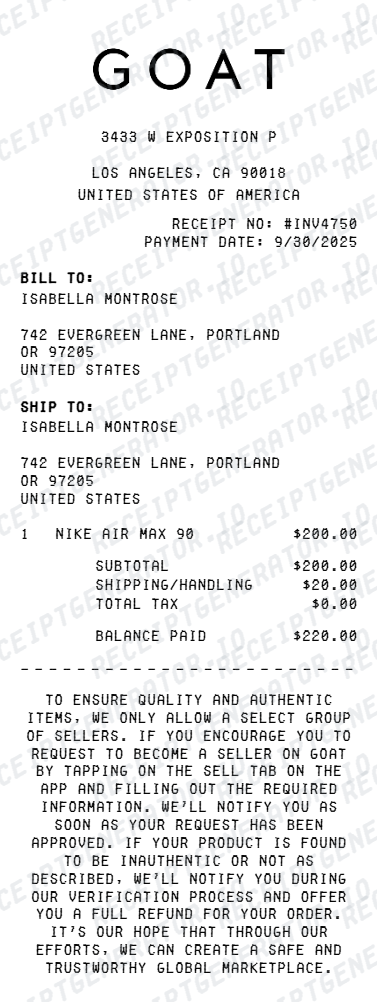
To ensure your records look accurate, you need to know what data points GOAT includes on their official documents. A genuine GOAT email confirmation features a clean, minimalist design with a white background and mostly black text.
Key Elements of a GOAT Receipt:
GOAT Receipt Sections
| Feature |
|---|
Crucial Detail: GOAT explicitly lists the Condition of the shoe. Whether it's "New", "Used", or missing the original box, this is always stated on the confirmation.
GOAT Authentication: The Tag vs. The Receipt
In the sneaker community, the physical GOAT tag often carries more weight than a piece of paper. GOAT uses a proprietary black punch-card tag attached via a zip-tie to the shoe's eyelet.
Why is the tag important? The tag physically links the specific pair of shoes to GOAT's authentication process. While a receipt can easily be manipulated or paired with fake shoes, the GOAT tag is designed to be tamper-evident. If you cut the zip-tie, the authentication guarantee is considered void by most secondary buyers.
Best Practice for Resale: If you plan to resell shoes bought from GOAT on a local platform like Facebook Marketplace, provide the buyer with both the intact GOAT tag on the shoe AND a copy of your digital order confirmation.
How to Recreate a Lost GOAT Receipt
If your account was closed, your email was deleted, or you simply want a clean, printable version of your GOAT purchase for an inventory binder, you can generate a replica.
- Gather your purchase information: You will need the exact shoe name, the size, the price you paid, and the approximate order date.
- Find the Style Code: Look up the shoe on StockX or GOAT to find the official SKU (e.g.,
DZ5485-612), as this adds authenticity to your records. - Use a Generator: Navigate to the GOAT Receipt Generator.
- Input the Data: Select the "GOAT" layout option. Enter your item name, price, shipping ($14.50 is standard), and tax.
- Download: Export your clean digital replica as a PDF or JPG.
Disclaimer: Generating a replica receipt should only be used for personal inventory management, prop use, or replacing lost documentation for legitimate purchases. Using generated receipts to deceive buyers into purchasing counterfeit items is illegal and unethical.
Managing Your Sneaker Receipts
If you are a serious collector or reseller, losing track of what you paid for a pair of shoes can hurt your profitability.
- Create a Dedicated Email Folder: Set up a rule in Gmail to automatically route all emails from
[email protected]and[email protected]into a "Sneaker Receipts" folder. - Use a Spreadsheet: Track the Shoe Name, Purchase Date, Purchase Price (including fees and shipping), and Platform (GOAT).
- Backup Immediately: Every time you make a purchase, download the PDF confirmation and save it to a cloud drive (Google Drive, Dropbox) alongside a photo of the shoes when they arrive.
By treating your sneaker purchases with the same organizational rigor as business expenses, you'll always know the true value of your collection.
Related:
- Sneaker Receipt Generator: Create a Clean Replica for Nike, Jordan & Supreme
- StockX Replacement Receipt: How to Recover Your Proof of Purchase
- Keeping Records for Luxury Resale
Generate a GOAT Receipt | StockX Receipt | Nike Receipt Generator
FAQ
GOAT sends order confirmations via email. Search your inbox for 'GOAT Order Confirmation'.
You can also view your purchase history in the GOAT app under Profile → Orders.
Usually, NO. GOAT focuses on digital records and includes a GOAT authentication card or tag, rather than a traditional paper retail receipt.
Your digital order confirmation email acts as your official receipt.
Every item purchased on GOAT goes through their authentication process. Passing items are shipped with a GOAT punch-card tag or sticker.
This tag is proof that GOAT's experts verified the item's authenticity.
Many buyers on local marketplaces (like Facebook Marketplace or OfferUp) ask for proof of purchase. A GOAT order confirmation serves as strong proof of origin.
However, platforms like eBay and StockX still require their own authentication regardless of your receipt.
It should show the GOAT logo, order number, exact shoe name, size, condition (e.g., New/Used), item price, shipping cost, taxes, and total amount.
It should also include the buyer's shipping address and the payment method used.