How to Get a Replacement StockX Receipt
Ready to create your own? Use our free receipt generator — no account needed.
Generate StockX Receipt →On this page
StockX receipts are easily retrievable — your full order history is stored in your account and backed up to your email. Before creating a personal backup, check these sources in order: your StockX account, your email, and the StockX mobile app.
Quick Answer
Log into StockX → Account → Order History → select the order → Download Receipt. If the email is lost, StockX support can resend it with your order number.
Important Notice
Personal receipt replicas are for your own records only — not for resale listings, returns, insurance claims, or disputes. For those, you need the official StockX document.
How to Find Your Original StockX Receipt
In your StockX account:
- Log into stockx.com
- Click your profile icon → Account
- Go to Order History (Buying) or Sold (Selling)
- Select the order
- Click Download Receipt or View Receipt
In your email:
Search for from:stockx.com or "Your StockX order" or the order number (starts with SO-). StockX sends a confirmation email for every purchase.
In the StockX app:
- Tap Profile → Purchase History
- Select the order and tap to view or share the receipt
If none of these work, contact StockX support at stockx.com/help with your order details (approximate date, item, account email) and they can locate the transaction.
That matches StockX's own marketplace model: buyers manage purchase history from account records, while sellers use selling and payout views for the other side of the transaction. See Buying on StockX and How do I sell on StockX?.
Why You Might Need a StockX Receipt Replacement
- Lost original: The email was deleted or filtered to spam
- Personal collection records: Tracking the purchase history of your sneaker or streetwear collection
- Resale documentation: Showing purchase history to private buyers (not as proof of authenticity)
- Gift documentation: Showing the market value of a gift
- Organization: Creating a clean PDF library of your StockX purchase history
What a StockX Receipt Includes
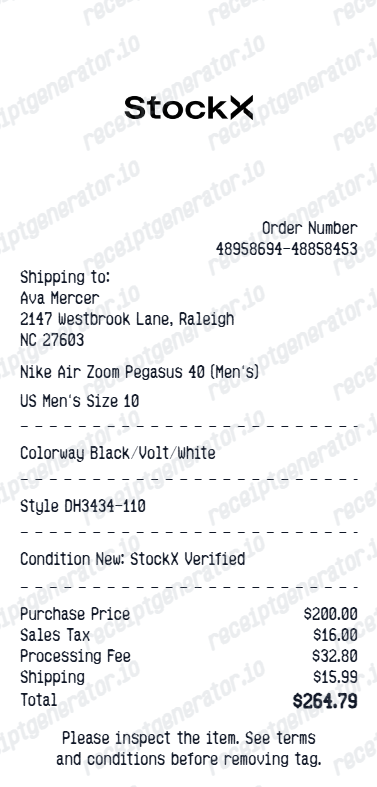
StockX receipts are different from traditional retail receipts — they're marketplace transaction documents:
StockX Receipt Fields
| Feature |
|---|
StockX Order Confirmation vs. StockX Receipt
These are two entirely different documents that serve distinct purposes in the lifecycle of a purchase:
- Order confirmation — sent immediately after your purchase is secured. It shows the accepted bid price, the item, and the estimated delivery window. This does not mean the item has passed authentication yet.
- Receipt/invoice (Proof of Purchase) — sent only after the item has arrived at a StockX authentication center, passed verification, and shipped to you. It shows the final, all-inclusive charges including any duties or taxes.
For expense documentation, personal recordkeeping, or resale documentation, the official receipt (not just the initial confirmation) is the more complete and accepted document because it proves the transaction was fully completed and authenticated.
StockX Payout Receipt for Sellers
If you are a high-volume sneaker or streetwear seller on StockX, you need detailed payout documentation for your tax filings (Schedule C). To access this:
- Log into StockX → navigate to Profile → Selling → Sold.
- Select the specific sale.
- View the payout breakdown: sale price, your transaction fee (dependent on your seller level), payment processing fee, and the final net payout.
StockX also sends a concise payout confirmation to your email when the payment is actually processed to your bank or Hyperwallet. If you're a high-volume seller, simply rely on the annual 1099-K tax forms and earnings summaries provided by StockX rather than saving individual payout receipts.
How to Generate a Personal StockX Receipt Backup
If the original is genuinely unavailable, create a personal backup with the details you have:
Step 1: Gather Your Information
- Item name and size
- Order number (from confirmation email if available)
- Purchase date
- Price paid (from bank/card statement)
- Your shipping address
Step 2: Use the Generator
- Visit the StockX Receipt Generator
- Enter your order details
- Preview for accuracy — especially the totals and order number format
- Download as PDF
Need a StockX Receipt Backup?
Lost your StockX confirmation? Quickly generate a personal backup receipt that looks identical to the real output.
Step 3: Store It
- Save to a folder organized by year or brand
- Label files clearly (e.g.,
stockx-aj1-2024-03-15.pdf)
Tips for Managing StockX Receipts Long-Term
- Create an email filter: Route all
@stockx.comemails to a dedicated folder - Export quarterly: Download a batch of receipts from Order History every 3 months
- Use the StockX app: Mobile app stores purchase history even if email is cleared
- Screenshot orders at purchase: A quick screenshot when the order is confirmed is a reliable backup method
- For sellers: Download payout confirmations monthly during active selling periods
Related:
- How to Get a StockX Receipt
- StockX Receipt for Resale Records
- StockX Receipt vs Order Confirmation
- Sneaker Receipt Generator: Nike, Jordan & Supreme Formats
- Keeping Records for Luxury Resale
Related Tools & Guides
Sneaker & Resale Platform Generators:
- StockX Receipt Generator
- GOAT Receipt Generator
- Nike Receipt Generator
- Jordan Receipt Generator
- Adidas Receipt Generator
- Grailed Verified Purchase Receipt Generator
Authentication & Collection Guides:
- GOAT Receipt Generator: Create a Clean Replica for Sneakers & Apparel
- How to Get a StockX Receipt
- StockX Seller Payout Receipt
- Printable StockX Receipt PDF
- Sneaker Receipt Generator: Nike, Jordan & Supreme
- Sneaker Resale Documentation Guide
- Amazon Return Receipt: How to Get Proof of Return
Browse All Templates:
FAQ
Yes — log into your StockX account and go to Order History. You can view and download your original receipt there.
If you can't access the receipt, contact StockX support via the Help Center with your order number.
No. StockX has a strict sales policy — all sales are final. Returns require action through StockX's own platform, not a receipt.
StockX order numbers typically start with 'SO-' followed by alphanumeric characters.
Find it in your order confirmation email or under Order History in your StockX account.
Yes — sellers receive a payout confirmation showing the sale price, your transaction fee, and the net payout.
Find it in your StockX account under Selling → Sold.
A personal receipt replica is fine for your own records.
Never present a replica as an official StockX document to a buyer or third party.
For personal use, match your original as closely as possible using your bank statement and order confirmation email.
These are for documentation purposes only and have no official value.