Lost Lyft Receipt: How to Recover It

Ready to create your own? Use our free receipt generator — no account needed.
Generate Lyft Receipt →On this page
If you lost your Lyft receipt, do not assume it is gone for good. Most missing Lyft receipts can still be recovered from the app or the email attached to your account. The key is to check those sources in the right order before you do anything else.
Quick Answer
If your Lyft receipt is missing, check the Lyft app ride history first, then search your email. Those two sources solve most lost Lyft receipt problems.
Important
If you need the record for reimbursement, use the official Lyft receipt first. A backup copy should only come after you confirm the original ride details.
Step 1: Check the Lyft App First
The Lyft app is usually the fastest way to recover a lost receipt because it is connected directly to your trip history.
Basic process:
- Open the Lyft app
- Go to your ride history
- Find the trip by date
- Open the ride details
- Review the trip summary and receipt-related information
This is the best place to start for:
- recent rides
- work travel
- airport rides
- conferences and client visits
- personal spending records
If the ride is in your history, you are already most of the way there.
Step 2: Search Your Email
Lyft usually emails a receipt after a trip is completed.
Search your inbox for:
Lyft receiptLyft trip- the date of the ride
- the total charged
Also check:
- spam or junk folders
- Promotions or Updates tabs
- a different inbox if you changed your account email
Many people think the receipt is missing when it is really just buried in the wrong folder.
Lyft's help docs confirm that receipts are emailed automatically and that Ride History is the main backup source when the inbox copy is missing:
Step 3: Confirm You Are Using the Right Lyft Account
If the ride does not appear where you expect, make sure you are checking the correct account.
Common issues:
- old email still tied to the ride account
- personal and work email confusion
- family or shared ride account mix-ups
If the wrong account is the problem, no amount of inbox searching will help until you fix that first.
What a Recovered Lyft Receipt Should Show
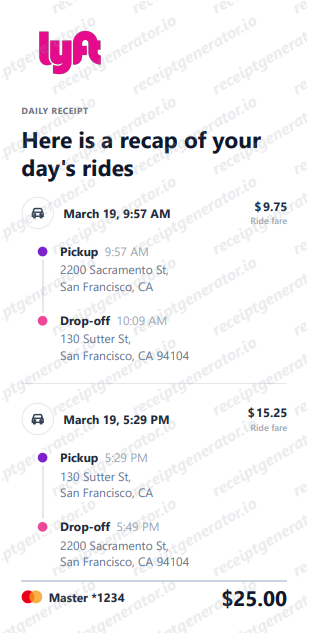
Once you find the ride, confirm that the receipt includes:
- ride date
- pickup and drop-off details
- total amount charged
- fare breakdown
- tip if applicable
That is usually enough for:
- reimbursement
- travel records
- accounting support
- internal expense tracking
Related: How to Get a Lyft Receipt
Lyft Receipt Recovery for Reimbursement
If you lost the original email but recovered the official ride details in the app, that is usually the version you should use for reimbursement support.
For work travel, the most important parts are usually:
- when the ride happened
- where it started and ended
- how much was charged
That is why official Lyft ride records are stronger than a handwritten or reconstructed note.
What If the Lyft Receipt Still Can’t Be Found?
If you checked the app, checked email, and confirmed the correct account, the next best step is to gather the verified ride details you still have:
- card statement date
- amount charged
- likely pickup and drop-off
- business purpose if relevant
If needed, you can then organize that verified information into a structured personal record.
Need a Backup Lyft Receipt Record?
If the trip details are confirmed and you want a cleaner version for your files, use the Lyft Receipt Generator to organize the ride information into a structured receipt-style layout.
That is best for personal recordkeeping or internal organization after the ride details are verified.
Open the Lyft Receipt Generator
Create a Lyft-style receipt using the verified details from your trip.
Related Guides and Tools
- How to Get a Lyft Receipt
- Lyft Receipt Generator
- How to Get an Uber Receipt: From the App, Email, or a Backup Copy
- Uber Bill vs Receipt: How to Download the Right Copy
- Airport Ride Receipt Generator
Final Takeaway
If you lost your Lyft receipt, the app and your email are still the two places most likely to recover it. Check those first, confirm the trip details, and only then create a backup record if you still need a cleaner copy for your files.
Official Lyft References
FAQ
Start by checking the Lyft app ride history and the email connected to your Lyft account.
Those two places recover most missing Lyft receipts.
Yes. Older ride details are often still available in your Lyft trip history.
If the email is gone, the app is the next best place to check.
It may be in spam, promotions, or tied to a different email address than the one you are currently checking.
Ride history in the Lyft app is often easier to verify than inbox search alone.
Yes, if you can recover the official ride details from the app or account history.
Official trip records should come first before creating any personal backup.
Once you confirm the trip details, you can organize them into a structured Lyft-style receipt for personal recordkeeping.
That works best after the original data is verified.