Free Rolex Receipt Generator
Create Free Rolex Watch Purchase Receipts Online - Add Model, Serial Number & Price. Download PDF Instantly.
Create a Rolex-style receipt with watch model, serial, retailer, price, and payment details. Download a PDF for documentation or records.

Choose
Rolex Receipt selected

Customize
Fill in your details

Download
Save or share receipt
Edit the details once and the preview updates instantly.
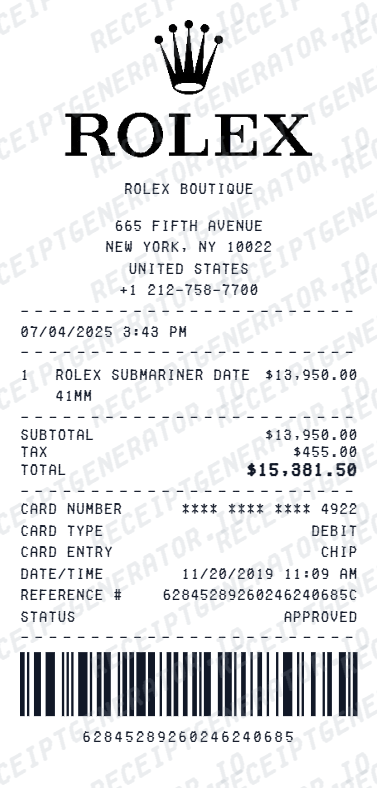
Quick summary
Rolex Receipt template overview
Use this Rolex Receipt template to build a clean, editable receipt record with the merchant, date, line items, tax, totals, and payment details already laid out for faster review.
What Is on a Real Rolex Receipt?
Knowing exactly what comes with a genuine Rolex purchase helps you document your own watch properly - and recognize gaps when a resale listing claims to have 'full set' papers.
The receipt comes from the dealer, not Rolex
Rolex sells only through authorized dealers, so the receipt is the dealer's own sales invoice with the dealer's name, address, and letterhead. There is no such thing as a receipt issued directly by Rolex for a retail purchase.
Model reference and serial number
A proper dealer invoice records the watch's model name, its case reference number (like 126610LN), and the unique serial number. On a resale listing, the serial on the paperwork should match the serial engraved on the watch.
The warranty card matters as much as the receipt
Since 2020, every new Rolex ships with a green credit-card-style warranty card containing an NFC chip. It carries the reference number, serial number, and purchase date, completed by the dealer at the point of sale - the buyer's name is no longer printed on it.
Purchase date starts the warranty clock
The date on the receipt and warranty card marks the start of Rolex's five-year international guarantee. For insurance and service records, this date is the single most important field to preserve.
Price, tax, and payment details
The invoice shows the actual price paid, sales tax or VAT, and the payment method. Authorized dealers sell new watches at list price, so paperwork showing steep discounts on sought-after models deserves extra scrutiny.
A 'full set' means matching documents
In resale, a complete set is the watch, the warranty card, the box, and the original dealer receipt - all with matching reference and serial details. Any mismatch between these documents and the watch itself is a warning sign.
How to Create a Rolex Receipt
Follow these steps to build a Rolex-style dealer purchase receipt.
- 1
Add the dealer name
Enter the authorized dealer name - Rolex receipts come from the dealer, not Rolex directly.
- 2
Add model reference and serial number
Add the model reference number and serial number matching the watch.
- 3
Add the purchase date
Enter the purchase date, since this is what starts the warranty clock.
- 4
Add price, tax, and payment details
Enter the price, applicable tax, and payment method.
- 5
Review the live preview
Check that the model, reference, and serial details match before exporting.
- 6
Download as PDF
Export the finished Rolex receipt for insurance, warranty, or resale documentation.
Print-ready Rolex watch receipts
Edit the layout, watch it update live, then print, download PDF, or email.
Live Rolex receipt preview
See the watch receipt update instantly as you enter model, serial, and price details.
One-click print
Print the Rolex receipt directly from your browser.
Mobile-friendly editor
Create and export Rolex receipts from any device.
Get Your Original Rolex Receipt First
Your receipt comes from the authorized dealer who sold the watch, so start there: most dealers keep sales records and can reissue an invoice if you provide the purchase date and the watch's serial number. The green warranty card completed at the point of sale is your other key document. Use this template when the original is unavailable - for example, documenting a watch for insurance when the selling dealer has closed or the invoice is lost.
Insurance documentation
Create a Rolex receipt for luxury watch insurance appraisal or coverage.
Warranty registration
Document Rolex purchase details for official warranty registration.
Rolex Receipt Types
Choose the Rolex receipt format that fits your documentation need.
Standard Watch Purchase Receipt
Basic Rolex receipt with model, price, retailer, and payment summary.
Detailed Purchase Documentation
Receipt with model, serial number, warranty, and retailer details.
Insurance Appraisal Receipt
Formatted receipt with all fields required for luxury watch insurance documentation.
Receipt Guides
Read the supporting Rolex guides to recover purchase details, organize proof of purchase, and keep luxury watch records cleaner.
Related Other Receipt Templates
Browse our collection of receipt templates for various purposes.

Rolex Receipt FAQ - Watch Purchase Documentation & Insurance
Learn how to create Rolex watch purchase receipts with model details, serial numbers, and PDF export for insurance and documentation.
Choose the Rolex receipt template, add retailer name, watch model, reference number, serial number, purchase price, taxes, and payment method. Preview and download as PDF in seconds.
Yes. Enter retailer name, authorized dealer ID, address, and salesperson details - matching the format of an official Rolex purchase receipt.
Yes. Include warranty period, warranty card number, and service dates for a complete luxury watch ownership record.
It is an authorized dealer's own sales invoice, not a Rolex document - it shows the dealer's name and address, the date, the watch's model name, reference number, and serial number, the price paid, tax, and payment method. Since 2020 the purchase also comes with a green credit-card-style warranty card carrying the reference and serial number, completed by the dealer at the point of sale.
Add the store name, purchase date, line items, totals, tax, payment method, and any optional notes you need on your Free Rolex template.
Yes. Include watch model name, case reference number, serial number, and dial color for a complete luxury watch purchase record.
Yes. Luxury watch owners use Rolex receipt templates to document purchases for insurance appraisal, warranty registration, and high-value item coverage.
Rolex does not sell watches directly - your receipt comes from the authorized dealer who sold it. Contact that dealer and ask for a copy of the sales invoice; most keep transaction records and can reissue one, especially if you know the approximate purchase date and the watch's serial number. See our full guide for a complete step-by-step walkthrough.
No. Receipts and even warranty cards are routinely faked in watch resale scams, and a genuine receipt can be presented alongside a counterfeit or franken watch. Authentication depends on inspecting the watch itself - movement, case, serial engraving - ideally by a watchmaker or the dealer. Never rely on paperwork alone when buying pre-owned.
Receipt Generator · Receipt Maker · 300+ Free Templates
Create professional receipts online in seconds
Use the Receipt Generator editor with ready-made templates. Compare pricing or start generating print-ready PDF receipts in your browser no account required.