Walmart Receipt Lookup: Find Your Receipt Online or In Store
Ready to create your own? Use our free receipt generator — no account needed.
Generate Walmart Receipt →On this page
Walmart is one of the easiest retailers to recover a lost receipt from — your full purchase history is stored in the app and online account, and the service desk can reprint receipts from your card number. Here's every method ranked from fastest to slowest.
If recovery isn't an option, use the Walmart Receipt Generator to create a clean personal backup from your verified purchase details — for expense records or reimbursement prep.
Quick Answer
Open the Walmart app → Account → Purchase History. Tap any purchase to view or share the receipt. For in-store purchases paid by card, the service desk can also reprint it on the spot.
Walmart's Help Center confirms that eligible store purchases paid with a saved card can appear in Purchase History and that Walmart Pay or scanned app receipts stay visible there. See Walmart Help: View Store Purchases and Find Receipts.
Method 1: Walmart App Purchase History (Fastest)
The Walmart app stores every purchase linked to your account — in-store digital receipts, pickup orders, delivery, and ship-to-home.
- Open the Walmart app
- Tap the Account icon (bottom right)
- Tap Purchase History
- Find your purchase — filter by store, online, or delivery
- Tap the order to view the receipt
- Tap Share or Download to save as PDF
In-store digital receipts are added automatically when you pay with a credit or debit card linked to your Walmart account (or when you scan the Walmart Pay QR code at checkout).
Walmart's Help Center confirms that store purchases paid with a saved card can be added to your online Purchase History, and that scanned Walmart app receipts and Walmart Pay purchases stay visible there.
Method 2: walmart.com Purchase History
- Go to walmart.com and sign in
- Click Account → Purchase History
- Select In-Store Purchases or Online Orders
- Click the order to view receipt details
- Use Ctrl+P / Cmd+P → Save as PDF to download
This works for all purchase types including grocery pickup and site-to-store orders.
Method 3: Duplicate Receipt at the Service Desk
If you didn't have a linked Walmart account at the time:
- Go to the Customer Service desk at any Walmart
- Provide the credit or debit card you used to pay
- Provide the approximate date of purchase and the store location
- The associate can pull up and reprint the receipt using the card number
This works for purchases made within approximately 180 days. Cash purchases cannot be reprinted.
Method 4: Check Your Email
Search your email for:
from:@walmart.comsubject:Your Walmart receiptsubject:Your order
Walmart sends digital receipts automatically for:
- Online purchases (always)
- In-store purchases with Walmart Pay
- Ship-to-home and delivery orders
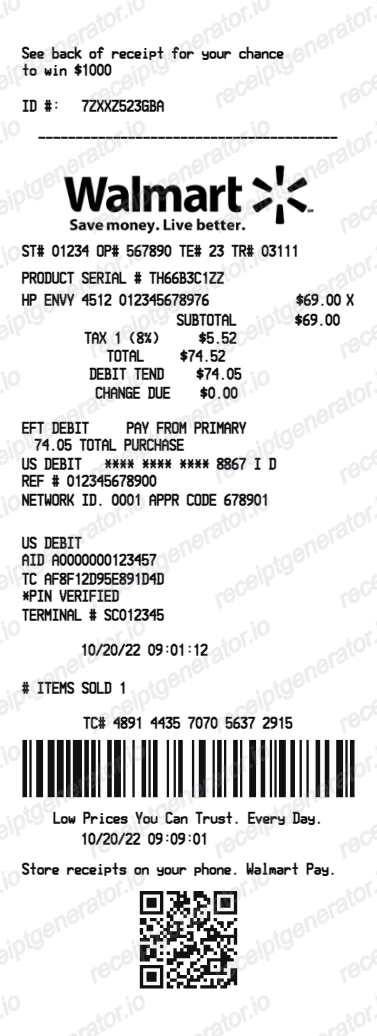
Walmart Receipt Contents
Walmart Receipt Fields
| Feature |
|---|
The TC# (transaction code) is Walmart's receipt identifier — useful for service desk lookups and online return tracking.
Walmart Returns Without a Receipt
If the receipt is lost and unavailable:
No-receipt return policy:
- Up to $25 in store credit per return, up to 3 times per year
- Requires a government-issued photo ID
- The amount posts to a Walmart gift card
Higher-value no-receipt returns:
- Discretionary — requires manager approval
- Depends on item category (electronics are stricter)
- Items with visible wear or damage are usually refused
Original receipt returns:
- Up to 90 days for most items
- Up to 30 days for electronics (monitor, TV, laptop)
- Items must be in original or sellable condition
For the live policy details and eligibility windows, use Walmart's official help pages:
How to Get a Walmart Receipt for Taxes or Expense Reports
For personal purchases, the Walmart app or website provides downloadable receipts in PDF format via the Purchase History section.
For Walmart Business accounts:
- Enhanced invoicing with itemized lists, taxes, and purchase totals
- Multi-buyer access with approval workflows
- CSV export of all transactions for accounting integration
Related:
- Lost Walmart Receipt
- Walmart Return Receipt
- Walmart Receipt for Reimbursement
- Walmart Receipt vs Invoice
- How to Make a Receipt for Taxes: IRS Requirements Explained
- Amazon Return Receipt: How to Get Proof of Return
- Gas Receipt for Taxes: IRS Requirements & How to Recreate One
How to Generate a Walmart Receipt Backup
If the original receipt is genuinely unavailable and you need a personal record:
- Gather item names and prices from your card/bank statement
- Find the store name and address (Walmart store locator)
- Use your purchase date and transaction code if known
- Build the receipt using the Walmart Receipt Generator
A personal backup is for your own records only — not for returns, insurance claims, or reimbursements.
Generate a Walmart Receipt Backup
Also see:
Tips for Never Losing a Walmart Receipt Again
- Link your card to your Walmart account — this enables automatic digital receipts for every in-store purchase
- Enable Walmart Pay — the QR code at checkout guarantees a digital receipt
- Check Purchase History monthly — download receipts for large purchases as soon as they appear
- Forward email receipts to a dedicated folder (filter for
@walmart.comautomatically) - Use Walmart Business for work purchases — professional invoicing and bulk receipt management
Official Walmart References
- Walmart Help: View Store Purchases and Find Receipts
- Walmart Help: Walmart Standard Return Policy
- Walmart Help: Start an Online Return
FAQ
Open the Walmart app → tap your account icon → Purchase History. All store and online purchases are listed there.
You can also go to walmart.com → Account → Purchase History to view and download past receipts (digital and ship-to-home orders).
Yes — if you paid by credit or debit card, a Walmart customer service associate can reprint a receipt using your card number and the approximate purchase date.
You'll need to visit the customer service desk and have the card you used.
Yes — Walmart's no-receipt return policy allows returns of up to $25 in store credit per return, up to 3 times per year, verified by a government-issued ID.
Higher-value returns without a receipt may require manager approval.
Yes — if your Walmart account is set up with an email, digital receipts are automatically sent after in-store purchases when paying with a linked card.
For pickup and delivery orders, order confirmations and receipts are always emailed.
If you use a Walmart Business account, invoices and receipts are available for download in the account dashboard.
For personal accounts, download the receipt from Purchase History in the Walmart app or walmart.com.
Walmart keeps online order history indefinitely in your account.
In-store purchase history via digital receipts is available going back 12 months in the Walmart app.