Walmart Receipt Lookup
Find the original Walmart receipt through Purchase History or card-based receipt lookup first. If it is unavailable, rebuild a documented purchase record with items, tax, payment, and TC details.
Find a Walmart receipt through Purchase History or official card lookup, then recreate a documented purchase record only when the original is unavailable.

Choose
Walmart Receipt selected

Customize
Fill in your details

Download
Save or share receipt
Edit the details once and the preview updates instantly.
Design options
Choose a Walmart receipt design
Select a receipt layout while keeping one authoritative Walmart landing page.
Quick summary
How to find a Walmart receipt
Start with Walmart Purchase History or the official receipt lookup for debit and credit card purchases. Recreate a receipt-style record only after confirming the original purchase details and when the original receipt cannot be recovered.
What Is on a Real Walmart Receipt?
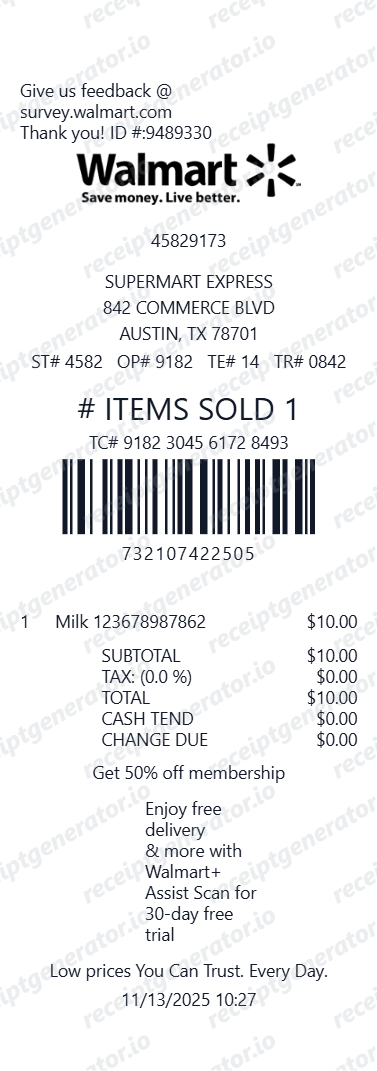
Before you rebuild a Walmart receipt, it helps to know exactly what the register prints. Walmart receipts follow a consistent structure, and a credible replacement copy should match it field for field.
Store header with manager name
The top of a Walmart receipt shows the store address and phone number along with the store manager's name - a detail most other retailers do not print.
The ST#/OP#/TE#/TR# line
One line identifies the whole transaction: ST# is the store number, OP# is the cashier's operator ID, TE# is the register terminal, and TR# is the transaction number for that register.
Tax code letters next to prices
Each item price carries a letter such as N (non-taxable), X (taxable), or O (non-taxable sale item), and the totals section splits sales tax into Tax 1 and Tax 2 lines because general merchandise and food or drug items are often taxed at different rates.
Item lines with UPC codes
Every item prints as an abbreviated product name followed by its 12-digit UPC, so the same product always shows the same code across stores.
The # ITEMS SOLD count
Above the barcode, Walmart prints '# ITEMS SOLD' with the total unit count of the transaction - a quick integrity check that the item lines add up.
TC# transaction code and barcode
Near the bottom sits the TC# - a long transaction code encoded in the receipt barcode. It is the reference Walmart uses for returns, receipt lookup, and scanning the receipt into the Walmart app.
How to Create a Walmart Receipt
Follow these steps to build a Walmart-style receipt with the real register fields.
- 1
Add the store header
Enter the store number and the ST#/OP#/TE#/TR# line shown at the top of a Walmart receipt.
- 2
List items with UPC codes
Add each item with its UPC code, price, and the tax code letter next to the price.
- 3
Add the item count and subtotal
Enter the # ITEMS SOLD count along with subtotal, tax, and total.
- 4
Add the payment method and TC#
Enter how the purchase was paid and the TC# transaction code shown near the barcode.
- 5
Review the live preview
Check the item lines and totals before exporting.
- 6
Download as PDF
Export the finished Walmart receipt for returns, expense records, or reimbursement.
Create a print-ready Walmart store receipt
Edit the layout, watch it update live, then print, download PDF, or email.
Live Walmart receipt preview
Watch the receipt update as you add items and store details.
One-click print
Print your Walmart receipt from the browser.
Download as PDF
Export a clean Walmart receipt PDF for records.
Mobile-friendly editor
Create Walmart receipts from any device.
Get Your Original Walmart Receipt First
If you paid by card in the last 90 days, Walmart's receipt lookup tool can retrieve the original: enter the store's ZIP code or city, the purchase date, the receipt total, and the card type with its last 4 digits. In-store purchases also land automatically in the app's Purchase History when you use Walmart Pay or a card saved to your account. Use this template when the original is unavailable - a cash purchase, an expired 90-day lookup window, or a receipt someone else holds.
Purchase documentation
Keep a Walmart-style receipt on file for itemized household, grocery, or retail purchase records.
Reimbursement support
Use Walmart receipts to support reimbursable office, travel, or supply-related purchases.
Return and exchange reference
Keep a structured purchase record available when you need transaction details for a return workflow.
Budget and household tracking
Archive itemized Walmart receipts for budgeting, family spending reviews, and purchase history.
Walmart Receipt Formats
Choose the Walmart-style receipt layout that best fits your purchase and documentation needs.
Walmart grocery receipt
An itemized receipt layout for groceries, pantry items, and household essentials.
Walmart mixed-cart receipt
A receipt format for carts that include groceries, apparel, household goods, and other departments.
Walmart transaction receipt
A clearer transaction-focused layout with store details, TC number, taxes, and payment summary.
Receipt Guides
Read the supporting Walmart guides to recover purchase details, handle reimbursement records, and keep store documentation cleaner.
Walmart Receipt Lookup
Learn the fastest ways to find a Walmart receipt in Purchase History, email, or at the service desk.
Read guideWalmart Return Receipt
See what a Walmart return receipt should include and how return-related purchase details are usually recovered.
Read guideWalmart Online Receipt
Find where Walmart online receipts live in Purchase History and which order details to save first.
Read guideHow to Get a Grocery Receipt
Learn where grocery receipts usually come from and which details matter most for budgeting or reimbursement.
Read guideRelated Templates
Browse our collection of receipt templates for various purposes.

Walmart Receipt FAQ
Common questions about building a Walmart-style receipt for purchase records, reimbursement support, and return-related documentation.
Choose the Walmart receipt template, add store number, items, prices, Rollback savings, Walmart+ discount, cashier ID, TC number, taxes, and payment. Download as PDF.
Yes. Mark SNAP/EBT eligible items and add EBT payment as a separate payment method - matching Walmart's standard receipt format.
Yes. Download a clean PDF for product return, expense reimbursement, insurance claims, or personal purchase records.
Yes. For a Walmart+ or app e-receipt, keep the same itemized format and add the order date and payment method; the template works for both printed and digital-style purchase records.
Yes. You can add the barcode and the access code (ATRN) area that Walmart prints near the bottom, which is the reference normally used to pull up a transaction for returns or records.
A real Walmart receipt shows the store address, phone number, and store manager name at the top, an ST#/OP#/TE#/TR# line identifying the store, cashier, register, and transaction, item lines with abbreviated names and UPC codes, a tax code letter such as N, X, or O next to each price, separate Tax 1 and Tax 2 lines, an '# ITEMS SOLD' count, and a TC# transaction code printed above the barcode at the bottom.
Add the store name, purchase date, line items, totals, tax, payment method, and any optional notes you need on your Walmart Receipt Lookup template.
Yes. Add Walmart store number, store manager, cashier ID, register number, and TC (transaction code) number for a complete authentic receipt.
Yes. Add Rollback prices, Walmart+ member discounts, and price-match savings as deduction line items.
Yes. Self-checkout receipts use the same Walmart layout - add the store number, register/lane number, items, taxes, card payment, and TC number just as you would for a staffed register.
Yes. For an online order, add the order number, item list, shipping or pickup details, tax, and payment so the receipt reads like a complete Walmart.com purchase confirmation.
For card purchases made in the last 90 days, use Walmart's receipt lookup tool at walmart.com/receipt-lookup: enter the store's ZIP code or city and state, the purchase date, the receipt total, and the card type with its last 4 digits, then download the copy. In-store purchases also appear automatically in the app's Purchase History if you paid with Walmart Pay or a card saved to your Walmart account. Cash purchases cannot be looked up. See our full guide for a complete step-by-step walkthrough.
Usually yes. The service desk can often pull up the purchase by swiping the card you paid with, and otherwise Walmart accepts no-receipt returns with a valid government-issued photo ID. Refunds without a receipt are cash for items under $10 and a Walmart shopping card for items $10 and over, and repeated no-receipt returns can be declined by the verification system.
Receipt Generator · Receipt Maker · 300+ Free Templates
Create professional receipts online in seconds
Use the Receipt Generator editor with ready-made templates. Compare pricing or start generating print-ready PDF receipts in your browser no account required.