Motel 6 Receipt Generator
Create a Motel 6-style receipt with guest details, room nights, taxes, and payment summary. Export a clean PDF for travel records or reimbursement in seconds.
Create a Motel 6-style receipt with stay dates, room charges, taxes, and payment summary. Download a PDF for travel or lodging records.

Choose
Motel 6 Receipt selected

Customize
Fill in your details

Download
Save or share receipt
Edit the details once and the preview updates instantly.
Quick summary
Motel 6 Receipt template overview
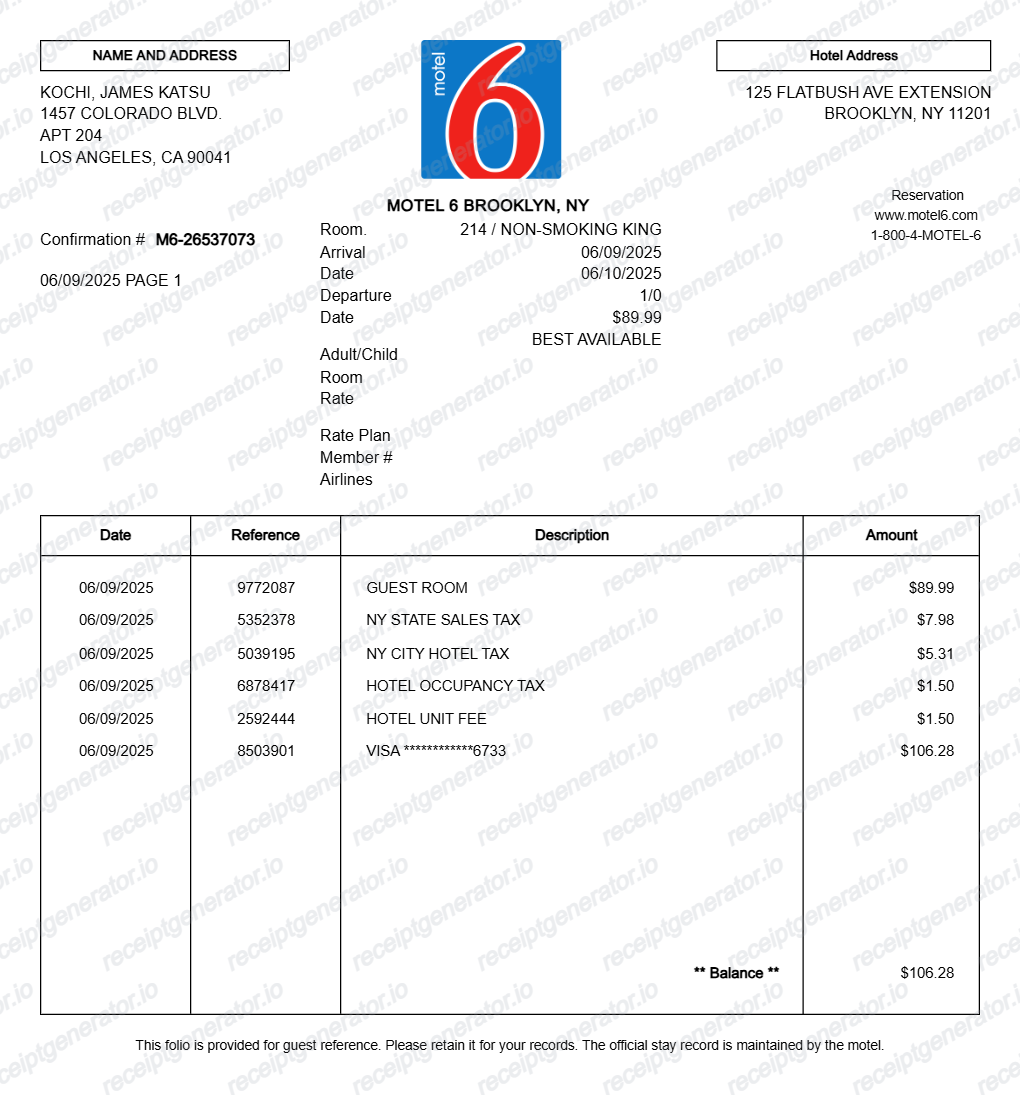
Use this Motel 6 Receipt template to build a clean, editable receipt record with the merchant, date, line items, tax, totals, and payment details already laid out for faster review.
What Is on a Real Motel 6 Receipt?
Before you rebuild a Motel 6 receipt, it helps to know what the original folio contains. Motel 6 issues a folio-style statement at checkout, and a credible replacement copy should match that structure.
Property identification in the header
Motel 6 locations are individually numbered properties, and the folio header shows that specific location's name, street address, and phone number - not a generic corporate address. The property identity is how the front desk finds your stay later.
Room number and per-night room charges
The folio lists the room number and posts the room charge at the nightly rate for each night of the stay, so a three-night stay shows the nightly charges rather than one unexplained lump sum.
State and local taxes as separate lines
Lodging taxes are itemized - state sales tax, city or county occupancy tax, and any local unit fees each get their own line, because rates differ by jurisdiction. A folio with one blended tax number looks wrong to expense reviewers.
Arrival and departure dates
The stay block shows check-in and check-out dates, number of guests, and the rate plan - the details reviewers use to match the folio against the travel dates on an expense report.
Payment posted as the closing line
The card type and settlement amount appear as the final line that brings the balance to zero. A folio showing an open balance means the stay was not fully paid.
Issued at checkout or by the property
Motel 6 folios are printed or emailed at checkout, and there is no central online receipt lookup - a copy after the fact comes from contacting the property directly, or through your My6 account if you booked with one.
Print-ready Motel 6 folios
Edit the layout, watch it update live, then print, download PDF, or email.
Live folio preview
See the Motel 6 receipt update as you change guest, stay, and charge details.
One-click print
Print the folio directly from the browser.
Download as PDF
Export a Motel 6-style hotel receipt as a PDF.
Editable sections
Customize guest info, header, charges, and footer from any device.
Get Your Original Motel 6 Receipt First
If you just checked out, ask the front desk to print or email the folio - that is the official copy. After you leave, call the property where you stayed with your name, stay dates, and the card used, and they can locate the folio and send a duplicate at no charge; Motel 6 guest services can help if you cannot reach the location, and My6 account bookings are recorded in the account too. Use this template when the original is unavailable - the property cannot locate the stay, the folio email never arrived, or the trip was booked by someone else.
Travel reimbursement
Generate a Motel 6-style receipt for work travel or reimbursement records.
Personal travel records
Keep an organized PDF copy of motel stays and payment details.
Expense documentation
Document motel lodging charges with itemized line items and totals.
Reference folio recreation
Recreate a motel statement layout for testing, demos, or design reference.
Motel 6 Receipt Types
Choose the Motel 6-style folio format that matches your travel documentation needs.
Motel Stay Folio
Classic motel statement with room charge, taxes, and payment summary.
Travel Expense Receipt
Motel receipt format for reimbursement and expense tracking.
Guest Copy Statement
Printable motel folio with guest address and itemized stay details.
Motel 6 Receipt Guides
Use the supporting Motel 6 guides to recover missing folios, prepare reimbursement records, and save printable PDF copies.
How to Get a Motel 6 Receipt
Learn the fastest ways to request a Motel 6 folio after checkout and which details to send when asking for a copy.
Read guideHotel Receipt Generator
Compare this branded Motel 6 folio template with the broader hotel receipt generator for more general lodging documentation needs.
Read guideTravel Receipt for Reimbursement
Review which travel fields finance teams usually want before submitting a trip record.
Read guideHotel Folio vs Receipt
Understand when a folio is stronger than a simple hotel receipt for reimbursement.
Read guideRelated Other Receipt Templates
Browse our collection of receipt templates for various purposes.
Motel 6 Receipt FAQ - Hotel Folio & Travel Documentation
Learn how to create a Motel 6-style hotel receipt with room charges, taxes, guest details, and PDF export for travel documentation.
Choose the Motel 6 receipt template, add guest details, motel address, room information, taxes, and payment line items. Preview the folio and download it as a PDF.
Yes. Download a clean PDF for reimbursement, travel records, audit files, or personal expense documentation.
A real Motel 6 receipt is a folio-style statement: the specific location's name, street address, and phone number at the top, then the guest name, room number, arrival and departure dates, a room charge posted for each night, state and local occupancy taxes as separate lines, and a closing payment line showing the card type and the amount that settles the balance.
Add the store name, purchase date, line items, totals, tax, payment method, and any optional notes you need on your Motel 6 template.
Yes. Add the room charge, state tax, city tax, occupancy tax, unit fee, and final payment line to match a motel folio layout.
Contact the Motel 6 property where you stayed and give the front desk your name, check-in and check-out dates, and the card used at check-in - they can pull the folio and print or email a duplicate at no charge. If you cannot reach the location, Motel 6 guest services can route the request, and stays booked through a My6 account are recorded there as well. See our full guide for a complete step-by-step walkthrough.
The folio is the running statement of your stay - every room charge, tax, fee, and payment posted by date. The receipt is essentially the settled folio you get at checkout, showing a zero balance. Expense teams usually prefer the folio because it itemizes nightly charges and taxes instead of showing only a card total.
Both. You can use these templates for reimbursements, bookkeeping prep, and internal documentation workflows.
Receipt Generator · Receipt Maker · 300+ Free Templates
Create professional receipts online in seconds
Use the Receipt Generator editor with ready-made templates. Compare pricing or start generating print-ready PDF receipts in your browser no account required.