Sprouts Receipt Example
See exactly what a Sprouts Farmers Market receipt looks like — including organic items, bulk bin PLU codes, weekly sale savings, and Sprouts app deals.
A real Sprouts Farmers Market receipt lists the store number, organic and natural product names, bulk bin items with PLU codes and per-pound weight, weekly sale savings lines, Sprouts app-exclusive deals, item count, subtotal, sales tax, total, and payment method. This page explains every section of a Sprouts grocery receipt and lets you generate one for your own records.

Choose
Sprouts Receipt Example selected

Customize
Fill in your details

Download
Save or share receipt
Edit the details once and the preview updates instantly.
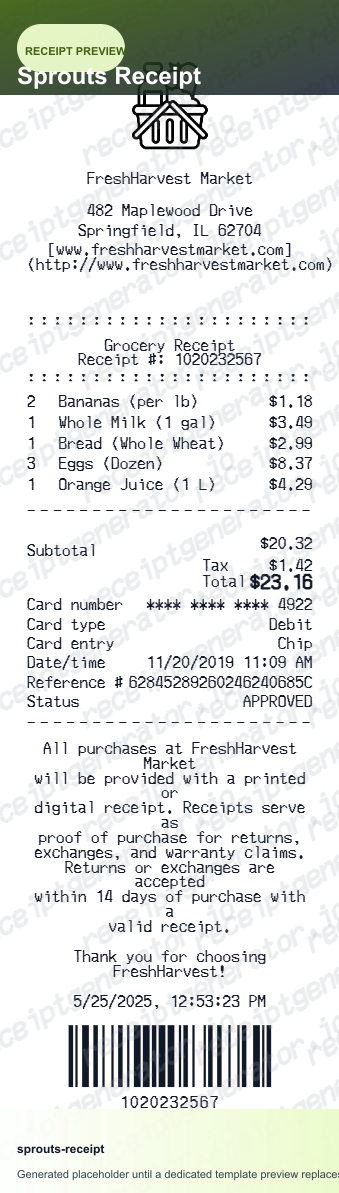
Quick summary
What Does a Sprouts Receipt Look Like?
A Sprouts Farmers Market receipt reflects the store's natural and organic focus with detailed line items and clear savings breakdowns. Here's what you'll find on a real Sprouts receipt:
What's on a Sprouts Receipt?
A Sprouts Farmers Market receipt reflects the store's focus on natural and organic products, with detailed line items for bulk bin purchases and a clear breakdown of weekly sale and app deal savings. Here are the key sections you'll find on a real Sprouts receipt.
Store Number and Header
The Sprouts receipt begins with the Sprouts Farmers Market logo, store number, street address, city, state, and phone number. The cashier number, register number, transaction number, and date and time of purchase are also printed in the header, giving you a complete reference for any customer service inquiries.
Organic and Natural Item Names
Each grocery item appears on its own line with the full product name and price. Organic items are often labeled with an 'O' or 'Organic' tag in the product name itself, reflecting Sprouts' emphasis on natural and certified organic products. Items on weekly sale show a 'S' or 'SALE' indicator next to the price.
Bulk Bin Items with PLU Code and Weight
Bulk bin purchases are itemized with the PLU code, descriptive product name, weight measured at the scale, and the price per pound. The calculated total for the bulk item is shown on the same line, and any sale price per pound replaces the regular price for items in the weekly bulk bin promotion.
Weekly Sale Savings and Sprouts App Deals
Savings lines appear directly under each promoted item, showing the amount discounted from the regular shelf price for both weekly circular sales and Sprouts app digital coupons. A total savings summary at the bottom of the receipt shows the combined discount from all sale and app deal items in the transaction.
Item Count, Tax, and Payment
The receipt footer shows the total number of items purchased, the subtotal before tax, the taxable item subtotal, the tax amount, and the grand total. Payment method — credit, debit, or cash — is recorded along with any change given, and a transaction ID is printed for reference.
Generate a Sprouts Receipt Instantly
Edit the layout, watch it update live, then print, download PDF, or email.
Organic and Natural Item Lines
Add organic groceries, natural pantry staples, and specialty products just as they appear on a real Sprouts receipt, with proper item naming conventions.
Bulk Bin PLU and Weight Fields
Enter a PLU code, product name, weight in pounds, and price per pound to generate accurate bulk bin line items that match the real Sprouts format.
Sale Savings and App Deal Lines
Add weekly sale discounts and Sprouts app deal savings as separate lines under each item, with a total savings summary at the bottom of the receipt.
Itemized Tax and Store Header
Include the store number, address, transaction details, and a proper tax breakdown that separates taxable from non-taxable grocery items.
Why People Look Up Sprouts Receipts
Sprouts shoppers often review their receipts to verify bulk bin prices, confirm app deal savings, track organic grocery spending, and document FSA-eligible health purchases.
Grocery Budget Tracking
Use your Sprouts receipt to track spending on organic and natural groceries, comparing weekly sale prices against regular prices to understand your actual savings.
FSA and HSA Reimbursement
Some Sprouts items like vitamins, supplements, and eligible health products can be reimbursed through FSA or HSA accounts using your itemized Sprouts receipt as documentation.
Price Matching and Return Reference
Your Sprouts receipt serves as proof of purchase for returns and exchanges, and the transaction number helps customer service locate your order quickly.
Meal Planning Cost Analysis
Reviewing your Sprouts receipts over time lets you identify which organic products offer the best value through weekly sales and app deals, helping you plan future shopping trips more efficiently.
Types of Sprouts Receipts
Sprouts receipts vary depending on whether you purchased from the bulk bins, used the Sprouts app for digital deals, or bought a mix of regular and sale-priced grocery items.
Standard Grocery Receipt
A typical Sprouts receipt covers packaged organic and natural groceries, produce, and pantry items, with weekly sale savings lines and a tax breakdown for any taxable items.
Bulk Bin Purchase Receipt
Shoppers who buy from Sprouts' extensive bulk bin section receive receipts with PLU codes, weights, and per-pound prices for each bulk item alongside any packaged groceries.
Sprouts App Deal Receipt
Members who use the Sprouts app receive receipts that show both regular sale savings and personalized app deal discounts, with a combined savings total at the bottom.
Grocery Receipt Guides
Learn more about grocery receipts, natural food store documentation, and how to maximize savings using your receipt data.
How to Read a Grocery Store Receipt
A line-by-line guide to understanding every item on a grocery receipt, from unit pricing and PLU codes to tax lines and savings summaries.
Read guideUsing Grocery Receipts for FSA and HSA Claims
Which items on your grocery receipt qualify for FSA or HSA reimbursement and how to document them correctly when submitting a claim.
Read guideHow Bulk Bin Pricing Works on a Receipt
An explanation of PLU codes, weight-based pricing, and how bulk bin purchase totals are calculated and displayed on natural grocery store receipts.
Read guideHow to Get a Grocery Receipt
Learn where grocery receipts usually come from and which details matter most for budgeting or reimbursement.
Read guideGrocery Receipt Template
Use the right fields and structure when organizing a cleaner grocery purchase record.
Read guideGrocery Receipt for Reimbursement
See what finance teams usually need from a grocery receipt for reimbursable purchases.
Read guidePrintable Grocery Receipt PDF
Check what a printable grocery receipt PDF should include before saving or printing it.
Read guideRelated Other Receipt Templates
These related receipt examples cover other popular grocery chains — from premium natural food stores to everyday supermarkets — so you can compare formats side by side.
Sprouts Receipt FAQ
Common questions about what a Sprouts Farmers Market receipt looks like, how bulk bin and sale items appear, and how to read your savings.
A Sprouts receipt lists the store number and address at the top, followed by each item purchased with its price. Organic items are typically marked with an indicator, bulk bin items show a PLU code and weight, and any weekly sale or Sprouts app discounts appear as savings lines below the item price. The bottom of the receipt shows item count, subtotal, tax, total, and payment method.
Yes, Sprouts Farmers Market receipts display weekly sale savings as a separate discount line immediately below the regular item price, showing exactly how much you saved on each promoted item. Items purchased with Sprouts app deals appear as an additional savings line, so you can see both the shelf sale price and the app discount separately.
Sprouts follows state tax laws, which means most fresh produce and grocery items are tax-exempt in states that don't tax unprepared food. Taxable items — such as prepared foods, vitamins, supplements, and non-food products — are clearly marked on the receipt, and the tax section at the bottom shows the taxable subtotal and tax amount separately.
Add the store name, purchase date, line items, totals, tax, payment method, and any optional notes you need on your Sprouts Receipt Example template.
Bulk bin items appear on a Sprouts receipt with a four-digit PLU code that identifies the product, along with the weight in pounds and the price per pound used to calculate the total. For example, a bulk bin item might read '4152 Rolled Oats 0.75 lb @ $1.49/lb — $1.12' giving you full transparency on how the price was calculated.
Sprouts app deals are personalized digital coupons available through the Sprouts Farmers Market mobile app, and they appear on your receipt as a discount line labeled with 'App Deal' or 'Digital Coupon.' These savings are applied automatically when you scan your app barcode or enter your phone number at checkout.
Your Sprouts store number appears near the top of the receipt, typically printed just below the Sprouts Farmers Market logo and store address. It is a four-digit number that identifies the specific location where you shopped, and you may need it when contacting customer service or referencing a transaction.
Both. You can use these templates for reimbursements, bookkeeping prep, and internal documentation workflows.
Receipt Generator · Receipt Maker · 200+ Free Templates
Create Your Own Sprouts Receipt
Generate a professional Sprouts Farmers Market receipt with organic item names, bulk bin PLU codes, sale savings, and a complete tax breakdown — ready to download instantly.