Gas Receipt Generator
Create a gas station receipt with gallons, fuel type, pump number, price per gallon, and payment details. Download a free PDF for mileage reimbursement or fuel expense logs.
Create a gas receipt with gallons, fuel type, pump details, and totals. Download a PDF for mileage logs, reimbursements, or fuel records.

Choose
Gas Receipt selected

Customize
Fill in your details

Download
Save or share receipt
Edit the details once and the preview updates instantly.
Quick summary
Gas receipt template overview
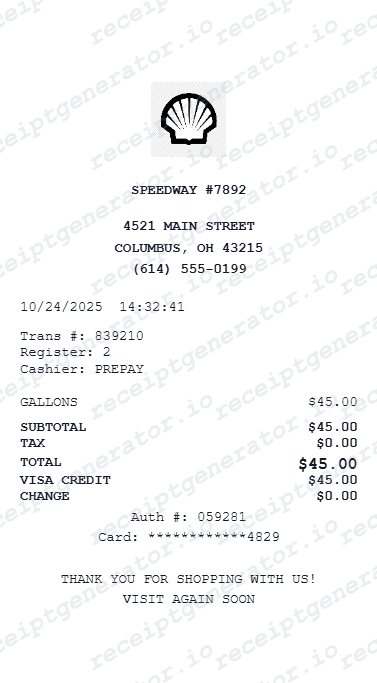
Use this gas receipt template to create a fuel station receipt with gallons, fuel type, price per gallon, pump number, station details, tax, and payment summary.
What Is on a Real Gas Station Receipt?
Pump-printed receipts follow a surprisingly consistent format across brands. A credible replacement copy should match these fields, because finance teams and mileage apps look for them.
Pump number and site ID
Every pump receipt names the pump that dispensed the fuel (Pump 04) plus a station identifier - a site, store, or dealer number - along with the station's street address. These two numbers tie the purchase to a specific dispenser at a specific location.
Gallons to three decimals
US pumps meter fuel to thousandths of a gallon, so a real receipt reads 11.482 GAL, not 11.5. A volume rounded to one decimal place is the fastest tell that a receipt was not printed at a pump.
Price per gallon and product grade
The receipt shows the per-gallon price to three decimals (with the familiar 9/10 cent) and the product grade - Regular 87, Midgrade 89, Premium 91/93, or Diesel. Volume times rate must equal the fuel total exactly.
Card authorization code
Pay-at-the-pump receipts print the card type, the last 4 digits, and an authorization or approval code from the card network. Many also add an invoice or sequence number the station uses to find the transaction later.
Date and time stamp
The exact date and time of the sale is printed near the top or bottom. Expense reviewers cross-check this timestamp against the card statement, so it should match the real transaction.
Fuel tax handling
US pump prices already include federal and state fuel excise taxes, so most gas receipts show one total without a separate sales tax line. A separate tax line usually appears only for in-store items like a car wash or snacks.
Print-ready fuel receipts
Edit the layout, watch it update live, then print, download PDF, or email.
Live gas layout match
See header, gas details, and totals update as you edit.
One-click print
Send ready layout straight to your printer.
Export PDF
Download a gas-style PDF for expenses or approvals.
Email-ready file
Save and share without needing the original receipt.
Get Your Original Gas Station Receipt First
If you are still at the station, the original is easy: most pumps can reprint the receipt until the next customer starts a transaction, and the cashier can reprint it from the register if you show the card you paid with and the approximate time. Fuel cards and station apps (fleet cards, brand loyalty apps) also keep transaction history you can export. Use this template when the original is unavailable - a pump that was out of paper, a faded thermal slip, or a fill-up from weeks ago that the station can no longer reprint.
Lost fuel receipt
Recreate PDF when original isn't accessible.
Missing transaction details
Replace missing confirmation with a fresh export.
Company vehicle fueling
Generate receipts without needing corporate account access.
Tax documentation
Build receipts for tax deductions when originals are unavailable.
Fuel Station, Gas & Payment Receipt Support
Choose the fuel receipt style you need, from detailed fuel purchase breakdowns to payment confirmations.
Gas Receipt
Recreate full fuel purchase layout with date, volume, and totals.
Gas Pump Receipt
Show tax, subtotal, fuel type, and payment lines.
Payment Receipt
Display payment type for expense or audit use.
Receipt Guides
Read the supporting gas guides to recover fuel details, handle reimbursement records, and keep vehicle documentation cleaner.
Related Other Receipt Templates
Browse our collection of receipt templates for various purposes.
Gas Receipt FAQ - Generate, Download & Print
Get help with creating gas station receipts including pump details, fuel type, and export for expenses
Yes. Enter volume and rate-subtotals and tax recalculate automatically.
Preview live and download a clean PDF for expense reports.
Yes. Include driver name, vehicle license plate, and fleet ID for complete fleet fuel expense documentation.
A real pump receipt shows the station name and address, a site or store number, the pump number, the date and time, the product grade (87, 89, 93, or diesel), gallons to three decimal places, the price per gallon, the fuel total, and - for card payments - the card type, last 4 digits, and an authorization code.
Add the store name, purchase date, line items, totals, tax, payment method, and any optional notes you need on your Gas template.
Yes. Add multiple fills or products (e.g., fuel plus car wash) in one receipt.
Yes. Add separate line items for regular, premium, and diesel fuel purchases on the same gas receipt.
Go back to the station and ask the cashier - most point-of-sale systems can reprint a recent transaction if you show the card you paid with and the approximate date and time. If you used a fleet card or a station brand app, download the transaction record from that account instead. Stations generally cannot reprint receipts from weeks or months back. See our full guide for a complete step-by-step walkthrough.
It depends on your deduction method. The IRS standard mileage rate only requires a mileage log, not fuel receipts. The actual expense method does require receipts for gas, oil, repairs, and other vehicle costs. Employer reimbursement policies vary - many require a receipt for any fuel purchase charged to a company card.
Receipt Generator · Receipt Maker · 300+ Free Templates
Create professional receipts online in seconds
Use the Receipt Generator editor with ready-made templates. Compare pricing or start generating print-ready PDF receipts in your browser no account required.