Family Dollar Receipt Generator
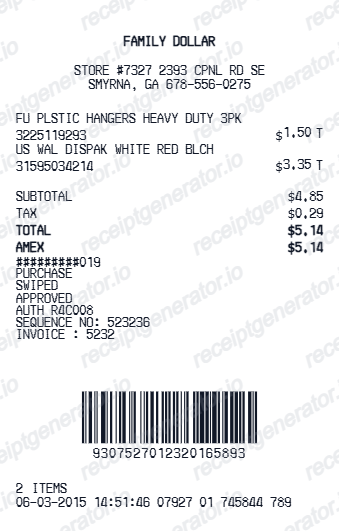
Create a Family Dollar-style thermal receipt with editable store details, item codes, totals, card approval text, barcode, and footer metadata.
Create a Family Dollar-style receipt with item codes, purchase totals, card payment details, approval lines, barcode, and store footer information.

Choose
Family Dollar Receipt selected

Customize
Fill in your details

Download
Save or share receipt
Edit the details once and the preview updates instantly.
Quick summary
Family Dollar receipt template overview
Use this Family Dollar-style receipt template to build a compact retail receipt with editable item codes, totals, card approval text, barcode, and bottom footer metadata.
What Is on a Real Family Dollar Receipt?
Family Dollar receipts pack a lot of operational detail into a narrow thermal strip. Matching the store identifiers, coupon lines, and survey footer is what makes a recreation look right.
Store number and transaction footer
Every receipt prints the store number, register, associate ID, transaction number, and date and time. These are the exact values Family Dollar's RateFD customer survey asks you to key in, so they always appear clearly near the bottom.
Smart Coupons discount lines
Digital Smart Coupons are clipped in the Family Dollar app or website and tied to your phone number at checkout. Each redeemed coupon prints as its own discount line, and the receipt summarizes total savings from coupons and sale prices.
Survey invitation at the bottom
Receipts carry an invitation to the RateFD.com satisfaction survey with a sweepstakes prize (up to $1,000 in cash). The survey requires the transaction ID, store number, date, and time straight off the receipt, usually within a limited window after purchase.
SKU numbers and tax flags
Item lines show a numeric SKU alongside the short description, and taxable general merchandise is flagged separately from food items, which are exempt from sales tax in many states. The tax line reflects only the flagged items.
Return policy tied to the receipt
Family Dollar refunds to the original payment method within the return window when you have the receipt. Without one, stores typically offer only an even exchange or store credit at the lowest advertised price, which is why the transaction barcode matters.
Transaction barcode
A scannable barcode at the bottom encodes the transaction so associates can pull it up for returns and exchanges without manually typing the store, register, and transaction numbers.
Create a print-ready Family Dollar receipt
Edit the layout, watch it update live, then print, download PDF, or email.
Live Family Dollar receipt preview
See the receipt update instantly as you edit item codes, totals, payment details, and footer text.
PDF download
Export a clean Family Dollar-style receipt PDF for digital or printed records.
Mobile-friendly editor
Create and edit Family Dollar receipts from desktop, tablet, or phone.
Item codes and barcode support
Use dedicated item code fields and a barcode block with editable digits for a realistic dollar store receipt layout.
Get Your Original Family Dollar Receipt First
For in-store purchases, the paper receipt is the primary record - Family Dollar does not centrally email in-store receipts, though your Smart Coupons account keeps a history of redeemed offers and FamilyDollar.com orders have receipts in your online order history. If a receipt is lost, the store may locate a recent transaction from the card used. Use this template when the original is unavailable - a lost paper slip, a faded thermal print, or a purchase made with cash.
Personal purchase records
Recreate a receipt-style record for Family Dollar purchases.
Expense documentation
Prepare a retail receipt record for reimbursement or bookkeeping.
Lost receipt recreation
Build a replacement receipt-style document from your item, date, and payment details.
Family Dollar Receipt Formats
Use the Family Dollar-style format that best matches your retail recordkeeping needs.
Standard Family Dollar Receipt
A compact Family Dollar-style retail receipt with item codes and card approval text.
Item Code Receipt
A receipt format focused on editable item names, product codes, taxable markers, and totals.
Card Approval Receipt
A Family Dollar-style receipt with card ending, approval status, auth code, sequence number, and invoice number.
Grocery Receipt Guides
Read supporting guides for retail receipts, dollar store records, and expense documentation.
Grocery Receipt for Reimbursement
See what expense teams require from a retail receipt for reimbursement approval.
Explore Grocery Receipt for ReimbursementDollar Tree Receipt for Reimbursement
See how dollar store receipts are used for expense documentation and reimbursement.
Explore Dollar Tree Receipt for ReimbursementRelated Other Receipt Templates
More free receipt templates for dollar stores, retail shopping, and expense records.

Family Dollar Receipt FAQ
Common questions about creating Family Dollar-style receipts with item codes, card approval details, barcode, and footer metadata.
Open the Family Dollar receipt template, edit the store header, item names, item codes, totals, card approval lines, barcode, and footer details, then download the receipt as a PDF.
Yes. You can create and preview Family Dollar-style receipts for free. Watermark-free PDF downloads are available with paid plans.
In-store purchases produce a paper receipt only, so keep it - there is no central digital receipt lookup for walk-in transactions. Orders placed on FamilyDollar.com appear in your online account's order history, and Smart Coupons redemptions are logged in your app account. For a lost in-store receipt, visit the store with the card you paid with and ask if they can locate the transaction.
Yes, but on limited terms. With a receipt, Family Dollar refunds to the original payment method within the return window. Without one, stores generally offer an even exchange or merchandise credit at the item's lowest advertised price, and an ID may be required to track no-receipt returns.
Both. You can use these templates for reimbursements, bookkeeping prep, and internal documentation workflows.
Yes. The Family Dollar template keeps product or item codes separate from item names, so each code can be edited independently.
Yes. After editing the receipt details, preview and download the Family Dollar-style receipt as a clean PDF for records or expense documentation.
A real Family Dollar receipt shows the store address and store number at the top, item lines with SKU numbers and tax flags, Smart Coupons and sale discounts as separate lines, the tax and total block, the payment method with card approval details if applicable, then a footer with store, register, associate, and transaction numbers, a survey invitation for RateFD.com, and a transaction barcode.
Add the store name, purchase date, line items, totals, tax, payment method, and any optional notes you need on your Family Dollar template.
This tool creates an editable Family Dollar style layout for documentation. It is not issued by the original merchant or brand system.
Receipt Generator · Receipt Maker · 300+ Free Templates
Create your Family Dollar receipt
Use the editable Family Dollar receipt generator to add item codes, totals, card approval details, and barcode, then export a clean PDF for your records.