Itemized Receipt Template & Generator
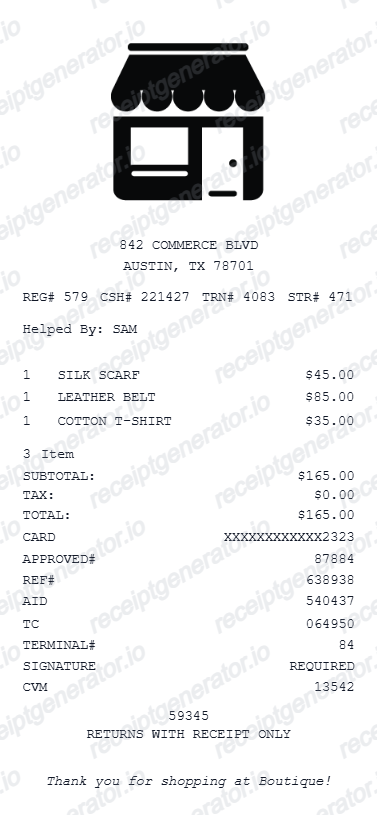
An itemized receipt shows each product or service separately. This template helps you document known transactions with a description, quantity, unit price and line total, followed by the subtotal, tax and payment total.
Create an itemized receipt with quantities, unit prices, discounts and tax. Preview the editable template; watermark-free PDF export uses a paid plan.

Choose
Itemized Receipt selected

Customize
Fill in your details

Download
Save or share receipt
Edit the details once and the preview updates instantly.

Quick summary
Itemized Receipt template overview
An itemized receipt shows each product or service separately. This template helps you document known transactions with a description, quantity, unit price and line total, followed by the subtotal, tax and payment total.
Fields in the itemized receipt template
An itemized receipt shows each product or service separately. This template helps you document known transactions with a description, quantity, unit price and line total, followed by the subtotal, tax and payment total.
Describe each item or service
Use one row per product or service so readers can see what the total covers. A card-payment slip that only shows a total is not an itemized record.
Check quantities and unit prices
Multiply the quantity by the unit price for each line. Record discounts separately where needed, then check the subtotal before adding tax.
Separate the tax and payment total
Copy the applicable tax amounts from the confirmed transaction. The final total should reconcile with the amount paid.
Keep the original receipt with your record
A template can organise your records, but it does not replace independent merchant or provider documentation when that is required.
Itemized receipt example
Demo amounts in USD: subtotal $40.00, illustrative tax $3.20, total $43.20. The 8% example is not a tax-rate recommendation.
| Description | Quantity | Unit price | Line total |
|---|---|---|---|
| Notebook | 2 | $5.00 | $10.00 |
| Desk lamp | 1 | $30.00 | $30.00 |
How to use the itemized receipt template
Start with confirmed transaction information, then check the preview before export.
- 1
Enter the transaction details
Use one row per product or service so readers can see what the total covers. A card-payment slip that only shows a total is not an itemized record.
- 2
Review the individual charges
Multiply the quantity by the unit price for each line. Record discounts separately where needed, then check the subtotal before adding tax.
- 3
Check the totals and preview
Compare the completed record with the known transaction details and correct any differences.
- 4
Choose your export option
Creating and previewing is free. Review the available plan before downloading a watermark-free PDF.
Print-ready itemized receipts
Edit the layout, watch it update live, then print, download PDF, or email.
Live itemized receipt preview
Watch the receipt update as you add items and tax details.
One-click print
Print your itemized receipt from the browser.
Download as PDF
Export a clean detailed receipt PDF for records.
Mobile-friendly editor
Create itemized receipts from any device.
Get Your Original Itemized Receipt First
A template can organise your records, but it does not replace independent merchant or provider documentation when that is required.
Confirmed transaction records
Organise purchase or service information you already know.
Personal budgeting and review
Review itemised costs and keep the original document with your records.
Itemized Receipt Types
Choose the itemized receipt format for your purchase documentation.
Standard Itemized Receipt
Detailed receipt with line items, quantities, and tax breakdown.
Insurance Claim Receipt
Itemized receipt with detailed descriptions for insurance loss claims.
Multi-Category Receipt
Itemized receipt with grouped category headings for organized documentation.
Receipt Creation Guide
Compare editable receipt styles and choose the right level of transaction detail before opening the full builder.
Editable template
Free Online Receipt Maker
Compare itemized, generic, branded, and downloadable receipt formats in one guided overview.
Explore Free Online Receipt MakerReceipt guide
Retail Receipt for Expense Reports
See which fields a store receipt needs to qualify for expense report or reimbursement submission.
Explore Retail Receipt for Expense ReportsRelated itemized and general receipts templates
Explore related receipt layouts for confirmed purchases and personal records.
Itemized Receipt FAQ - Detailed Line Item Documentation
Questions about editing the itemized receipt template, reviewing its fields and obtaining the original transaction record.
Choose the itemized receipt template, add line items with description, quantity, unit price, and tax rate. Set payment details and download the PDF in seconds.
Yes. Add multiple tax rates (e.g., state tax + local tax) as separate line items in the itemized receipt summary.
An itemized receipt names the merchant with contact details, shows the date of sale or service, lists every product or service on its own line with a description, quantity, and unit price, breaks out tax separately from the subtotal, and states the total and payment method. The line-by-line description is what separates it from a summary receipt or card slip that only shows a total.
Yes. You can create and preview the layout for free. Watermark-free PDF exports require a paid plan; review pricing before exporting.
Yes. Add as many individual line items as needed - each with description, quantity, unit price, and optional tax rate.
Ask the merchant directly - pharmacies, clinics, and most retailers can reprint an itemized receipt from their POS system if you provide the date and payment card, and online orders almost always have an itemized invoice in the account's order history. For medical services, request an itemized bill or statement from the provider's billing office; a card statement alone will not qualify.
No. This is an independent editable template for known transaction details. It does not retrieve merchant records or replace merchant-issued evidence.
An itemized receipt lists individual products or services, quantities and prices. A card slip typically confirms a payment total without listing everything purchased. Ask the merchant for its itemized receipt when independent documentation is required.
Receipt Generator · Receipt Maker · 300+ Free Templates
Create your Itemized receipt
Edit the known details in this itemized receipt template and review the preview before choosing a PDF export plan.