Adidas Receipt Generator
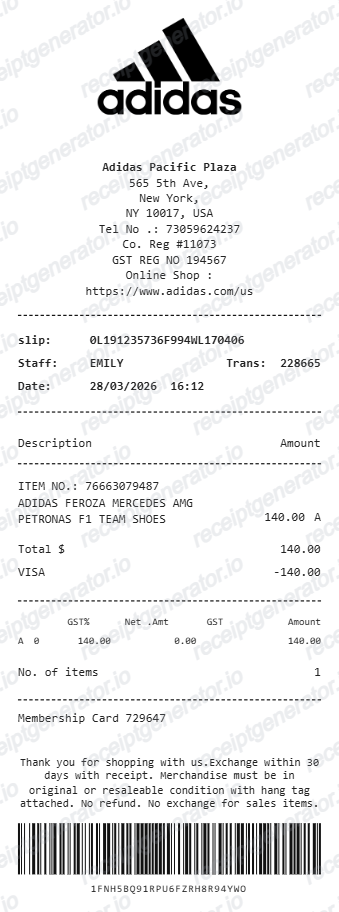
Create an Adidas-style store receipt with product details, GST, barcode, membership info, and payment summary. Export a clean PDF quickly.
Create an Adidas-style receipt with store details, product lines, GST, barcode, and payment info. Download a PDF for purchase records.

Choose
Adidas Receipt selected

Customize
Fill in your details

Download
Save or share receipt
Edit the details once and the preview updates instantly.
Quick summary
Adidas Receipt template overview
Use this Adidas Receipt template to build a clean, editable receipt record with the merchant, date, line items, tax, totals, and payment details already laid out for faster review.
What Is on a Real Adidas Receipt?
Adidas receipts differ by channel - online order confirmations, in-store register slips, and CONFIRMED app drop orders each carry their own details. Knowing the real structure helps you rebuild a credible copy.
adiClub points and membership tie-in
adiClub is Adidas's free loyalty program, earning about 10 points per dollar spent. Members can show their adiClub Pass at checkout so a purchase is linked to their account, and some in-store receipts print a points-earned line tied to that membership.
Style code on every item line
Adidas product codes typically combine two letters with four or five digits (for example DP2644 or IS7462), found on the item's tag and repeated as the article number on the receipt or order confirmation.
Order history and reprints, not paper archives
Adidas does not mail paper reprints on request. Online order confirmations live under Order History in your account, and guest checkouts can be located through the Order Tracker with the order number and email.
CONFIRMED app drop receipts
Limited releases sold through the adidas CONFIRMED app use draw, queue, or invite mechanics. Entrants are only charged if their entry is selected, and the resulting order confirmation looks like a standard online receipt rather than a special raffle format.
Outlet pricing and product differences
Factory outlet stores discount at least 30% year-round on past-season or overstock product, and some outlet-only items are made with different materials and marked accordingly. An outlet receipt's per-item pricing can look different from a mainline store receipt for what appears to be the same model.
Tax and payment breakdown
Sales tax is calculated from the delivery or store address and shown as its own line, and the payment section records the method used with the last digits of the card rather than just a single total.
Create a print-ready Adidas store receipt
Edit the layout, watch it update live, then print, download PDF, or email.
Live Adidas receipt preview
Watch the receipt update instantly as you edit store, product, and payment details.
One-click print
Print the Adidas receipt directly from the browser.
Download as PDF
Export a clean PDF in the Adidas retail receipt format.
Mobile-friendly editor
Create and edit Adidas receipts from desktop or mobile.
Get Your Original Adidas Receipt First
If the order still exists in your account, sign in and check Order History for the confirmation, or use the Order Tracker with your order number and email for a guest checkout. In-store purchases linked to an adiClub membership are easier for a store associate to trace later. Use this template when the original is unavailable - a guest order you can't locate, a deleted account, or a purchase made by someone else.
Purchase records
Document Adidas footwear or apparel purchases for your records.
Sneaker documentation
Create an Adidas receipt layout with item and barcode details for sneaker-related documentation.
Retail mockups
Use the Adidas receipt format for design, demo, or presentation mockups.
Adidas Receipt Formats
Choose the Adidas-style receipt layout that best matches your purchase and documentation needs.
Single Item Adidas Receipt
A compact Adidas retail receipt for one product purchase.
GST Breakdown Receipt
An Adidas receipt with editable GST table values and totals.
Barcode Retail Receipt
An Adidas receipt with membership details, policy text, and barcode output.
Related Guides
Explore related guides to understand the receipt details, lookup steps, and documentation workflows.
Adidas Return Policy and Receipt Requirements
What information from your Adidas receipt you need to complete a free return online or in-store.
Read guideHow to Read an Adidas Order Receipt
A field-by-field walkthrough of the Adidas order confirmation email, from order number to adiClub points confirmation.
Read guideRelated Other Receipt Templates
Browse our collection of receipt templates for various purposes.

Adidas Receipt FAQ
Common questions about creating an Adidas-style store receipt for purchase records and retail documentation.
Choose the Adidas receipt template, add store details, item description, GST values, payment method, and barcode. Preview the receipt live and download it as a PDF in seconds.
Yes. Add the item number, product description, amount, tax code, GST percentage, net amount, GST amount, and total amount.
Yes. Download a clean Adidas receipt PDF for documentation, purchase records, or presentation purposes.
An online order confirmation shows the order number, each item's full product name, its two-letter-plus-numeric style code, size, and price, plus shipping and tax as separate lines and the payment method used. An in-store receipt adds the store address, register and transaction number, date and time, and - if you're an adiClub member - your points balance for that purchase.
Add the store name, purchase date, line items, totals, tax, payment method, and any optional notes you need on your Adidas template.
Yes. You can edit the store name, address, telephone, company registration, GST registration, slip number, staff name, transaction number, date, and time.
Yes. The Adidas receipt template includes editable membership card and barcode fields to match the receipt format.
Sign in to your adidas account and open Order History to view or resend the confirmation for any online order. If you checked out as a guest, use the Order Tracker with your order number and email to pull it up instead. For an in-store purchase, the receipt is issued at the register; if adiClub was linked at checkout, the purchase is also recorded against your adiClub membership, which can help a store associate look it up later.
No. A receipt is just paperwork and can be recreated or altered; a genuine receipt can even be paired with a counterfeit item. Authenticating an Adidas product means examining the item itself - stitching, materials, the style code on the tag, and box labeling - rather than relying on a receipt alone.
Receipt Generator · Receipt Maker · 300+ Free Templates
Create professional receipts online in seconds
Use the Receipt Generator editor with ready-made templates. Compare pricing or start generating print-ready PDF receipts in your browser no account required.