How to Read an Adidas Order Receipt
Ready to create your own? Use our free receipt generator — no account needed.
Generate Adidas Receipt →On this page
An Adidas order record helps you match a purchase to its products and charges. First identify whether you are reading a store receipt, an order confirmation or a shipment email; those documents can describe different stages of the same purchase.
Quick Answer
Check the order reference and the items included in the specific document, then compare the prices, discounts and final charge with your original records. Keep the original email or receipt.
Find the Original Online Record
Adidas US explains its invoice email: the shipment confirmation includes an order number and an itemized list of shipped products. When an order has separate shipments, check the corresponding emails instead of assuming one email covers every item.
That source describes US orders. For a UK purchase, use Adidas UK's help or contact the retailer that supplied the item for its original receipt or invoice.
Read the Reference and Item Lines
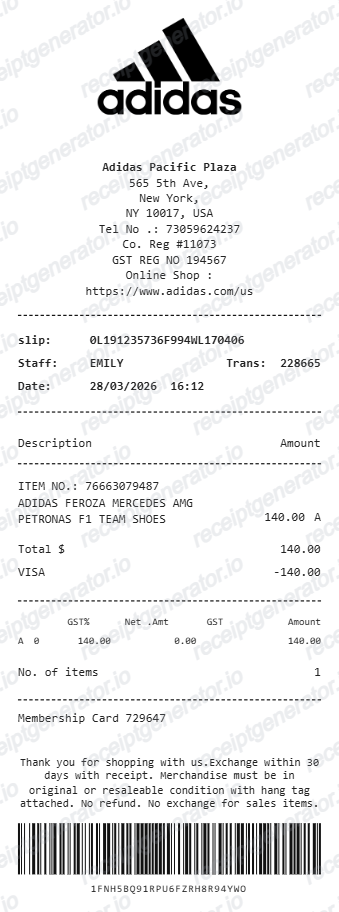
Start with the order or store reference and date. Match each product description, size, quantity and price with the items you bought. If the document covers a shipment, check which items were shipped before treating its item list as the complete order.
Keep the reference visible in your saved record so you can identify the purchase when contacting the seller.
Reconcile the Charges
Review the item amounts, discounts, delivery charges and tax fields that actually appear on your original document. Compare the resulting total with the relevant payment record. Tax labels and whether prices include tax can differ by market; a template's sample labels are not evidence of your transaction's tax treatment.
If an amount or item does not match, ask the seller to explain the original record. Do not change a copy to hide the discrepancy.
Keep an Editable Copy Alongside the Original
The Adidas receipt template provides editable product, quantity, price and payment fields for details you have verified. Review its sample tax labels before using it for a US or UK record. Preview is free; PDF export requires a paid plan. The template does not access an Adidas account or authenticate a purchase.
Open the Adidas Receipt Template
Organize verified item and payment details in an editable preview.
FAQ
Adidas US says its shipment confirmation email includes the order number and an itemized list of shipped products. Check the email for the shipment you need to document.
No. Use the original Adidas or retailer record to verify the purchase. A template is an editable copy for organizing details you already know.