Free T-Mobile Receipt Generator
Create Free T-Mobile Store Receipts Online - Add Phone, Accessories & Plan Activation. Download PDF Instantly.
Create a T-Mobile-style receipt with device, activation fees, taxes, and payment details. Download a PDF for insurance or device records.

Choose
T-Mobile Receipt selected

Customize
Fill in your details

Download
Save or share receipt
Edit the details once and the preview updates instantly.
Quick summary
T-Mobile Receipt template overview
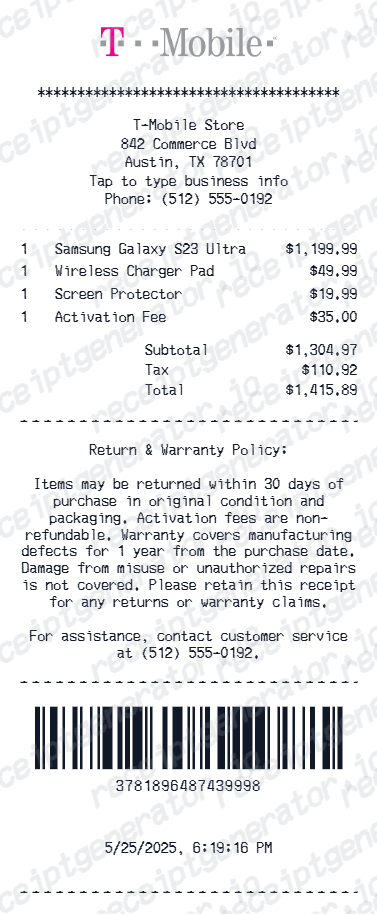
Use this T-Mobile Receipt template to build a clean, editable receipt record with the merchant, date, line items, tax, totals, and payment details already laid out for faster review.
What Is on a Real T-Mobile Receipt?
A T-Mobile phone purchase produces a store receipt at the point of sale plus an ongoing monthly bill, and they carry different information. Here is what the real store receipt includes.
Store receipt vs. monthly bill
The device down payment appears only on the in-store receipt and your card statement - it never shows on the monthly T-Mobile bill, which is why insurers and expense reviewers ask for the store receipt specifically.
EIP terms printed at purchase
Financed phones show the Equipment Installment Plan on the receipt: the full device price, the down payment, the number of monthly installments (commonly 24), and the monthly amount. The signed EIP agreement is stored with your account documents.
IMEI on device lines
T-Mobile records the IMEI of each phone sold, so device receipts identify the exact handset - the number insurance claims and trade-ins are verified against.
Sales tax on the full device price
In most US states, T-Mobile collects sales tax upfront on the phone's full retail price at the time of sale, even when the device is financed on an EIP - so the tax line can look large next to a small down payment.
Store, rep, and transaction identifiers
Real receipts name the T-Mobile store and store number, the sales rep, and a transaction ID that support teams use to pull up the sale later.
Documents hub in My T-Mobile
T-Mobile stores recent transaction documents, including in-store receipts and EIP agreements, in the account documents section of My T-Mobile (t-mo.co/documents10), so the paper slip is not the only copy.
Print-ready T-Mobile receipts
Edit the layout, watch it update live, then print, download PDF, or email.
Live T-Mobile receipt preview
Watch the receipt update as you add phone and plan details.
One-click print
Print your T-Mobile receipt from the browser.
Download as PDF
Export a clean phone purchase receipt PDF for records.
Mobile-friendly editor
Create T-Mobile receipts from any device.
Get Your Original T-Mobile Receipt First
T-Mobile keeps recent transaction documents, including in-store receipts and EIP agreements, in your My T-Mobile account documents (t-mo.co/documents10), and monthly statements live in billing history - the T-Mobile app also shows each line's installment plan under the Bill tab. Use this template when the original is unavailable - an older transaction that has dropped out of the document center, a closed account, or a purchase made on someone else's line.
Device insurance documentation
Create a T-Mobile receipt for phone insurance claims.
Business device expense
Submit T-Mobile receipts for company device expense reimbursements.
Warranty registration
Document phone purchase for T-Mobile device warranty.
Resale proof of purchase
Generate a T-Mobile receipt for phone resale documentation.
T-Mobile Receipt Types
Choose the T-Mobile receipt format for your phone purchase.
Phone Purchase Receipt
T-Mobile receipt for a phone purchase with activation.
Accessories & Plan Receipt
T-Mobile receipt for accessories and plan upgrade.
Trade-In & Upgrade Receipt
T-Mobile receipt with trade-in credit and new device details.
Related Guides
Explore related guides to understand the receipt details, lookup steps, and documentation workflows.
How to Find an Apple Receipt
Learn where Apple order and store receipts usually come from and which device details matter most.
Read guideiPhone Receipt Template
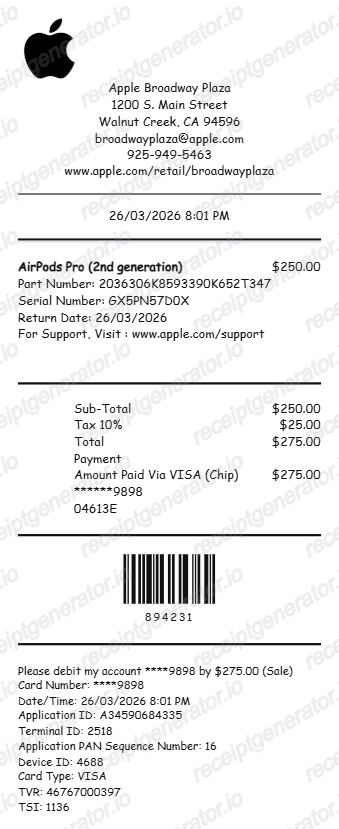
Review which device, serial, and payment fields belong on an Apple-style phone receipt record.
Read guideMac Receipt Template
See which product and payment details make a device purchase record easier to review later.
Read guideRelated Other Receipt Templates
Browse our collection of receipt templates for various purposes.

T-Mobile Receipt FAQ - Phone Documentation & Insurance Records
Learn how to create T-Mobile receipts with device details, plan fees, and PDF export for phone insurance and expense documentation.
Choose the T-Mobile receipt template, add phone model, accessories, activation fees, device protection, taxes, and payment method. Preview and download as PDF.
Yes. Add plan activation fee, T-Mobile Protection plan, and autopay discount as separate line items.
Yes. Download a clean PDF for device insurance, business expense reimbursement, or personal phone purchase records.
A real T-Mobile store receipt shows the store name and number, the sales rep and a transaction ID, the device with its model and IMEI, accessories as separate lines, any down payment and the EIP terms (total device price, number of monthly installments, and monthly amount), sales tax, and the payment method.
Add the store name, purchase date, line items, totals, tax, payment method, and any optional notes you need on your Free T-Mobile template.
Yes. Include device name, model number, IMEI, color, and storage for complete phone purchase documentation.
Yes. T-Mobile receipts are used for device insurance claims, warranty registration, and proof of purchase documentation.
Sign in to My T-Mobile and open the account documents page (t-mo.co/documents10), where recent transaction documents including in-store receipts and EIP agreements are stored. Monthly statements sit in your billing history, and EIP balances are in the T-Mobile app under Bill, then View by line, then Equipment installment plans. For older store receipts, ask the store of purchase or T-Mobile support.
The store receipt documents the point-of-sale transaction - device price, down payment, taxes paid that day, and the EIP terms you signed. The monthly bill shows recurring charges: plan fees and the monthly EIP installment. The down payment never appears on the monthly bill, so insurance and expense claims for a device purchase usually need the store receipt or card statement.
Receipt Generator · Receipt Maker · 300+ Free Templates
Create professional receipts online in seconds
Use the Receipt Generator editor with ready-made templates. Compare pricing or start generating print-ready PDF receipts in your browser no account required.