Free Best Buy Receipt Generator
Create Free Best Buy Electronics Receipts Online - Add Products, Geek Squad Services & Tax. Preview free; watermark-free PDF export requires a paid plan.
Create a Best Buy-style receipt with electronics, SKU numbers, taxes, and payment details. Download a PDF for warranty or expense records.

Choose
Best Buy Receipt selected

Customize
Fill in your details

Download
Save or share receipt
Edit the details once and the preview updates instantly.
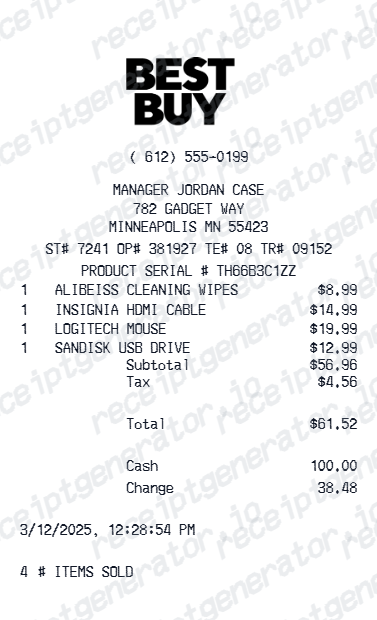
Quick summary
Best Buy receipt template overview
Create Best Buy Electronics Receipts Online - Add Products, Geek Squad Services & Tax. Preview the layout before choosing a PDF export plan.
What Is on a Real Best Buy Receipt?
Before you rebuild a Best Buy receipt, it helps to know what the register actually prints. Best Buy receipts follow a consistent structure, and a credible replacement copy should match it field for field.
Store, register, and transaction numbers
The header block shows a 4-digit store number, a 3-digit register number, and a transaction number printed just before the date and time. These three numbers are how Best Buy locates a specific sale in its system.
Val # validation code
Best Buy receipts carry a long validation code labeled Val # near the top. It is used to verify the purchase for returns, price matches, and customer-survey entries, and reviewers expect to see it on a genuine register receipt.
SKU and serial number on item lines
Each product line shows Best Buy's internal SKU with the item description, and major electronics like TVs, laptops, and phones also print the unit's serial number - the detail insurance and warranty reviewers check first.
Geek Squad and protection plans as separate lines
Geek Squad setup, installation, and Best Buy Protection or AppleCare plans appear as their own line items with separate prices, never bundled into the product price.
My Best Buy member summary
Purchases tied to a My Best Buy account show the membership in the footer, which also links the sale to your online Purchase History. Plus and Total members get an extended 60-day return window in place of the standard 15 days.
Return window printed by product type
Best Buy's standard return period is 15 days for most products and 14 days for activatable devices like phones, and the receipt footer states the return deadline. Returns without proof of purchase may be denied or limited.
Print-ready Best Buy receipts
Edit the layout, watch it update live, then print, download PDF, or email.
Live Best Buy receipt preview
Watch the receipt update as you add electronics products and prices.
One-click print
Print your Best Buy receipt from the browser.
Download as PDF
Export a clean electronics receipt PDF for insurance or warranty records.
Mobile-friendly editor
Create Best Buy receipts from any device.
Get Your Original Best Buy Receipt First
If the purchase can still be traced, the original is always better: sign in to your Best Buy account and open Purchase History, where online orders and member store purchases have printable receipts. In-store purchases without an account can be looked up at customer service using the payment card, your phone number or email, or the product's serial number. Use this template when the original is unavailable - a cash purchase with no membership, a closed account, or a receipt lost before it could be recorded.
Electronics insurance documentation
Create a Best Buy receipt for electronics insurance claims or coverage.
Warranty registration
Document electronics purchases for manufacturer warranty registration.
Business expense reimbursement
Submit a Best Buy receipt for hardware or office tech expense reimbursements.
Proof of purchase documentation
Generate a Best Buy receipt for return, repair, or resale proof of purchase.
Best Buy Receipt Types
Choose the Best Buy receipt format for your electronics purchase.
Single Electronics Purchase
Best Buy receipt for one electronics product with SKU and payment.
Multi-Item Tech Receipt
Itemized Best Buy receipt for multiple electronics, accessories, and services.
Geek Squad Service Receipt
Best Buy receipt with Geek Squad services and protection plan fees.
Related Guides
Explore related guides to understand the receipt details, lookup steps, and documentation workflows.
Receipt guide
How to Find an Apple Receipt
Learn where Apple order and store receipts usually come from and which device details matter most.
Explore How to Find an Apple ReceiptReceipt guide
iPhone Receipt Template
Review which device, serial, and payment fields belong on an Apple-style phone receipt record.
Explore iPhone Receipt TemplateEditable template
Mac Receipt template
Explore this editable receipt layout and its fields before opening the editor.
Explore Mac Receipt templateMore free receipt templates for electronics and retail expense records.




Best Buy Receipt FAQ - Electronics Documentation & Insurance Records
Learn how to create Best Buy receipts with product SKUs, Geek Squad services, and PDF export for electronics warranty and insurance documentation.
Choose the Best Buy receipt template, add product names, SKUs, prices, Geek Squad services, taxes, and payment method. Preview and download as PDF in seconds.
Yes. Best Buy receipt templates are commonly used to document electronics purchases for insurance claims, warranty registration, and proof of purchase.
Yes. Download a clean PDF for insurance records, warranty registration, business expense reimbursements, or personal electronics documentation.
A real Best Buy register receipt shows the store number, register number, and transaction number near the top, a long validation code labeled Val #, each item with its SKU and description, serial numbers for major electronics, any Geek Squad or protection plan fees as separate lines, sales tax, the payment method with the last 4 digits, and a My Best Buy member summary in the footer.
Yes. Add Geek Squad setup, installation, protection plan, or repair services as individual line items with prices.
Yes. Add My Best Buy points earned and redeemed as a loyalty summary line - matching the Best Buy receipt footer format.
Sign in to your Best Buy account and open Purchase History - online orders and store purchases tied to your My Best Buy membership both appear there with printable receipts. For in-store purchases without an account, customer service can look up the transaction using the credit or debit card you paid with, your phone number or email, or the product's serial number.
Sometimes. Best Buy's standard return window is 15 days for most products (60 days for My Best Buy Plus and Total members, and 14 days for activatable devices like phones). Without proof of purchase, the store can try to find the transaction through your member account, payment card, or serial number - but returns lacking proof of purchase may be denied or limited, and sales tax is not reimbursed.
Receipt Generator · Receipt Maker · 300+ Free Templates
Create your Best Buy receipt
Use the editable Best Buy receipt generator to add items, tax totals, and payment details, then export a clean PDF.