H-E-B Receipt Generator
Create a H-E-B-style grocery receipt with editable item rows, Sales Tax summary, My H-E-B, and payment details. Export a clean PDF in minutes.
Create a H-E-B-style receipt with grocery items, Sales Tax-inclusive totals, My H-E-B, payment, and footer text. Download a PDF for records.

Choose
H-E-B Receipt selected

Customize
Fill in your details

Download
Save or share receipt
Edit the details once and the preview updates instantly.
Quick summary
H-E-B receipt template overview
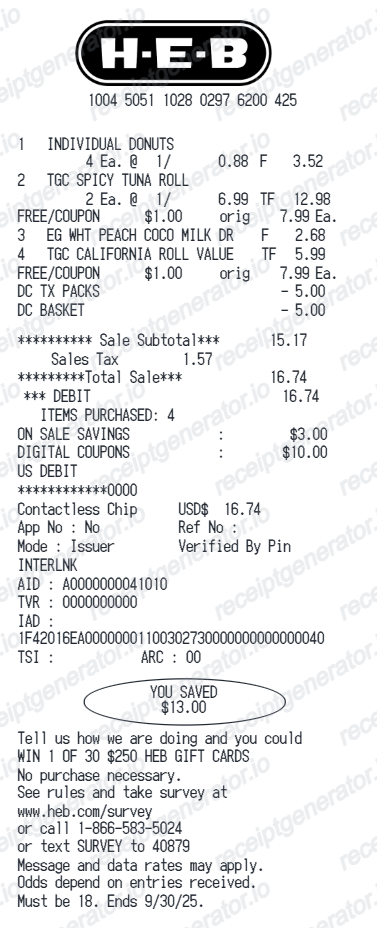
Use this H-E-B-style receipt template to build a compact United States receipt with editable items, Sales Tax-inclusive totals, My H-E-B, barcode, and footer text.
What Is on a Real H-E-B Receipt?
H-E-B receipts reflect the quirks of Texas grocery retail - mostly tax-exempt food, in-store coupon culture, and heavy own-brand penetration. These are the details that make an H-E-B-style receipt ring true.
Store, register, and transaction identifiers
The receipt header and footer identify the store number and location, the register or lane, the cashier, and a transaction number with date and time - the standard trail H-E-B uses to locate a purchase for returns.
Texas grocery tax exemptions
Most unprepared food is exempt from Texas sales tax, while items like soft drinks, candy, paper goods, and prepared foods are taxable. Real H-E-B receipts flag taxable items with a tax code, so the tax line is often small relative to a grocery-heavy total.
In-store yellow coupon savings
H-E-B is known for its yellow in-store coupons and Combo Loco deals ('buy this, get that free'), which print as discount lines tied to the qualifying items. The receipt tallies total savings from coupons and promotions.
Own-brand item names
A large share of lines on a typical receipt are H-E-B private labels - H-E-B brand, Hill Country Fare, Central Market - and item descriptions print in H-E-B's abbreviated all-caps style with unit counts and sizes.
Weighted produce and meat lines
Weighed items print the weight and price per pound above the extended price, a distinctive two-line format for produce, bulk, and butcher counter purchases.
H-E-B Debit and digital account perks
Customers who pay with the H-E-B Debit card earn cash back rewards on H-E-B purchases, and curbside or delivery orders placed through the H-E-B app keep a full digital receipt in the account's order history.
Create a print-ready H-E-B grocery receipt
Edit the layout, watch it update live, then print, download PDF, or email.
Live H-E-B receipt preview
See the H-E-B receipt update instantly as you edit items, totals, Sales Tax, and messages.
PDF download
Export a clean H-E-B-style receipt PDF for digital or printed records.
Mobile-friendly editor
Create and edit H-E-B receipts from desktop, tablet, or phone.
My H-E-B and Sales Tax support
Customise loyalty text, Sales Tax totals, barcode digits, and footer messaging.
Get Your Original H-E-B Receipt First
For curbside, delivery, and heb.com orders, sign in to your H-E-B account and open your order history for an itemized digital receipt. In-store purchases are paper-based - the store's business center can often look up a recent transaction with the card you used, the store number, and the approximate date and time. Use this template when the original is unavailable - a lost paper receipt, a faded thermal print, or a cash purchase with no lookup trail.
Budget tracking
Keep a clear itemised record of H-E-B spending.
Lost receipt recreation
Recreate a H-E-B receipt-style document from your purchase details.
Sales Tax expense documentation
Prepare a receipt record with Sales Tax for reimbursement or bookkeeping.
H-E-B Receipt Formats
Use the H-E-B-style format that best matches your recordkeeping needs.
Standard Receipt
A H-E-B-style receipt with item rows and payment details.
My H-E-B Receipt
A H-E-B receipt layout with loyalty points and promotional footer messaging.
Sales Tax Receipt
A H-E-B-style receipt configured with USD currency and a Sales Tax summary for United States records.
Related Guides
Explore related guides to understand the receipt details, lookup steps, and documentation workflows.
More free receipt templates for United States grocery shopping and retail expense records.
H-E-B Receipt FAQ
Common questions about creating H-E-B grocery receipts for personal records, budgeting, and Sales Tax documentation in United States.
Choose the H-E-B receipt template, edit the store header, add items and prices, set the total and Sales Tax, then download the receipt as a PDF.
Yes. You can create and preview H-E-B receipts for free. Watermark-free PDF downloads are available with paid plans.
Curbside, delivery, and online orders are stored in your H-E-B account - open the app or heb.com, go to your orders, and download the itemized receipt. For in-store purchases, visit the store's business center; with the payment card, store, and approximate date and time, associates can often locate and reprint the transaction.
Texas exempts most unprepared grocery food from sales tax, so on a typical grocery run only flagged items - soft drinks, candy, household supplies, hot prepared foods - are taxed at the local rate. H-E-B receipts mark those items with a tax code so you can reconcile exactly which lines produced the tax amount.
Yes. The totals section includes a Sales Tax-inclusive total to match the format on United States H-E-B receipts.
Yes. After editing the details, preview and download the H-E-B-style receipt as a clean PDF for records or budgeting.
A real H-E-B receipt shows the store address and number, item lines in abbreviated all-caps with tax codes on taxable items, weighted lines with price per pound for produce and meat, yellow coupon and Combo Loco discounts, a small tax line since most Texas groceries are exempt, the payment method, and the store, register, cashier, and transaction identifiers with date and time.
Receipt Generator · Receipt Maker · 300+ Free Templates
Create your H-E-B receipt
Use the editable H-E-B receipt generator to add items, Sales Tax totals, loyalty text, and barcode details, then export a clean PDF.