Academy Sports Receipt Template & Generator
Edit an Academy Sports receipt template with store details, SKU rows, tax and gift/card/cash fields. Preview free; paid plans unlock PDF export.
This editable Academy Sports layout organizes confirmed purchase details. Enter quantity, item description, SKU and unit price for each confirmed item. Preview is free; watermark-free PDF export requires a paid plan.

Choose
Academy Sports Receipt selected

Customize
Fill in your details

Download
Save or share receipt
Edit the details once and the preview updates instantly.
Quick summary
What can I edit in the Academy Sports template?
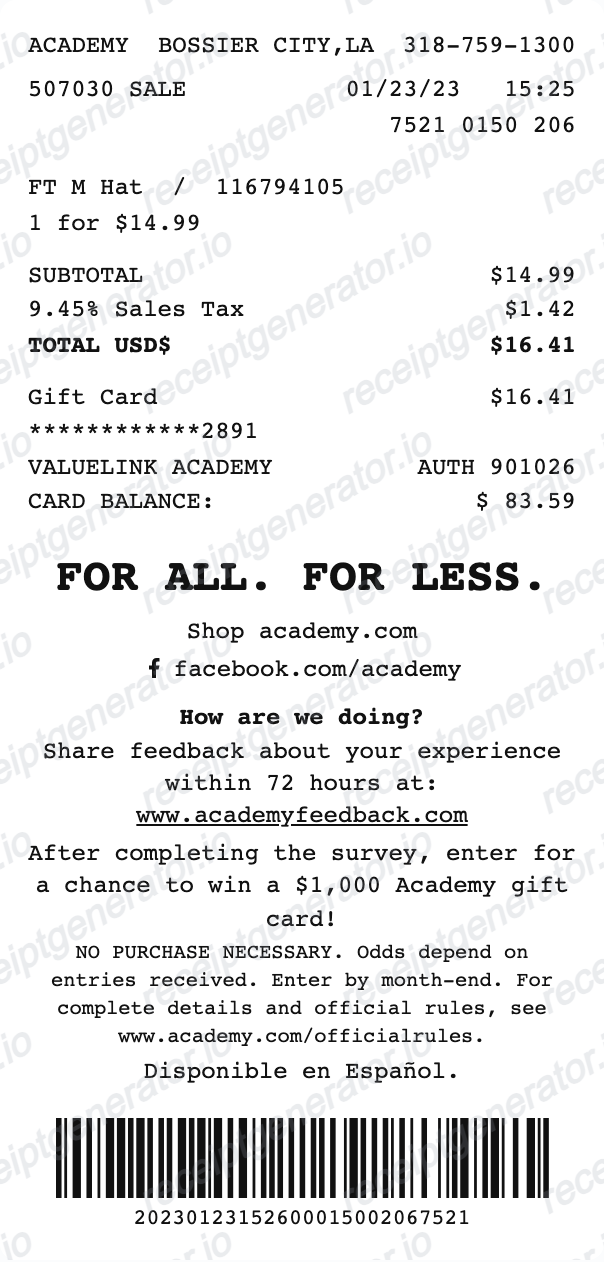
Review the store line, date, time, register and sale reference against the original purchase. Enter quantity, item description, SKU and unit price for each confirmed item.
Editable fields in the Academy Sports receipt template
Review the preview against the original transaction record.
Store and visit details
Review the store line, date, time, register and sale reference against the original purchase.
Sporting-goods items
Enter quantity, item description, SKU and unit price for each confirmed item.
Tax and totals
Review tax rows and adjustments against the original charge before reconciling the total.
Tender and custom footer
Choose the supported gift-card, card or cash fields, and review the footer/custom text. Entered gift-card values cannot redeem a card or check its balance.
Preview the editable Academy Sports layout
Edit the layout, watch it update live, then print, download PDF, or email.
Store and visit details
Review the store line, date, time, register and sale reference against the original purchase.
Sporting-goods items
Enter quantity, item description, SKU and unit price for each confirmed item.
Tax and totals
Review tax rows and adjustments against the original charge before reconciling the total.
Tender and custom footer
Choose the supported gift-card, card or cash fields, and review the footer/custom text. Entered gift-card values cannot redeem a card or check its balance.
Review the original purchase record
Keep the original documentation alongside any editable copy.
Reconcile purchase details
Review tax rows and adjustments against the original charge before reconciling the total.
Keep a personal copy
Choose the supported gift-card, card or cash fields, and review the footer/custom text. Entered gift-card values cannot redeem a card or check its balance.
Academy Sports layout
Open the current editor and review its actual fields.
Academy Sports editable layout
Enter quantity, item description, SKU and unit price for each confirmed item.
Related Guides
Explore related guides to understand the receipt details, lookup steps, and documentation workflows.
Explore related editable layouts for confirmed purchase or service details.
Academy Sports Receipt Template FAQ
Answers about the current fields, original documentation and PDF export.
Open the editor, enter confirmed purchase details and check item amounts, discounts, tax and payment text in the preview.
Check your saved purchase documents and ask the original merchant about the record for that transaction. This template cannot retrieve or verify a purchase.
No. The balance and authorization fields are entered values. Verify the actual balance and payment with the issuer or merchant.
Receipt Generator · Receipt Maker · 300+ Free Templates
Open the Academy Sports receipt template
Enter confirmed details, review the free preview and choose a paid plan for watermark-free PDF export.