Supreme Receipt Generator
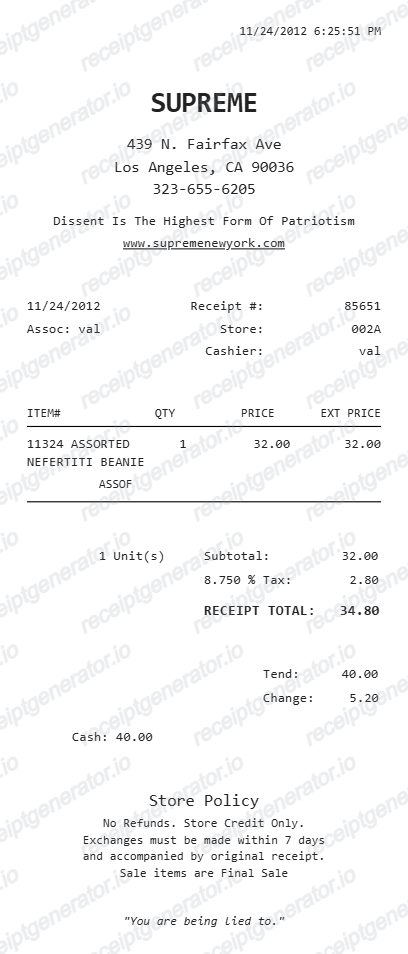
Create a Supreme-style store receipt with item rows, tax, cash details, and payment summary. Export a clean PDF quickly.
Create a Supreme-style receipt with store details, SKU, quantity, price, tax, and tendered cash. Download a PDF for purchase records.

Choose
Supreme Receipt selected

Customize
Fill in your details

Download
Save or share receipt
Edit the details once and the preview updates instantly.
Quick summary
Supreme receipt template overview
Create a Supreme-style store receipt with item rows, tax, cash details, and payment summary. Export a clean PDF quickly.
What Is on a Real Supreme Receipt?
Supreme purchases produce two kinds of proof - a printed register receipt from one of its own stores or an order confirmation from supreme.com - and the resale market leans on both as provenance. Here is what the genuine documents contain.
A store location that actually exists
Supreme operates only a small number of its own stores worldwide, in cities like New York, Los Angeles, London, Paris, and Tokyo. The store name in the receipt header is itself a provenance detail - a register receipt from a city with no Supreme store is an instant red flag.
Item, size, and price as sold at retail
Receipt lines show the product description with size and the retail price paid at the register. On the resale market, the gap between that retail price and the asking price is the whole story, which is why sellers photograph receipts next to the item.
Online orders confirm by email
supreme.com purchases generate an order confirmation email with an order number, and the order history lives in your account. There are no authorized third-party Supreme retailers, so a 'Supreme receipt' from any other store is not proof of a genuine purchase.
A date consistent with the drop calendar
Supreme releases new items in weekly drops during the season, traditionally on Thursday mornings. Resale buyers check whether a receipt's date lines up with the item's release week - a purchase date months before an item dropped does not add up.
Strict return terms
Supreme exchanges online orders for online store credit only, requires returned items back within 7 days of authorization in new condition with tags, and treats t-shirts, hats, skateboards, bags, accessories, shoes, and sale items as final sale. Returns are not accepted in person at retail locations.
A receipt is not authentication
Receipts are among the most commonly faked documents in streetwear resale, and genuine receipts get recycled alongside counterfeit items. Authenticators judge the item itself - neck tag printing, the RN 101837 registration number, stitching, and materials - not the paper that comes with it.
Create a print-ready Supreme store receipt
Edit the layout, watch it update live, then print, download PDF, or email.
Live Supreme receipt preview
Watch the receipt update as you edit the store, products, and payment values.
One-click print
Print the Supreme receipt directly from the browser.
Download as PDF
Export a clean PDF in the Supreme retail receipt format.
Mobile-friendly editor
Create and edit Supreme receipts from desktop or mobile.
Get Your Original Supreme Receipt First
For supreme.com orders, the confirmation email is your receipt - search your inbox for the order number and sign in to your account to view order history. In-store purchases exist only as the paper register slip; Supreme does not reprint them. Use this template when the original is unavailable - a lost register receipt, a deleted email, or a secondhand purchase where the paperwork never changed hands.
Retail mockups
Use the Supreme receipt format in fashion, branding, or presentation mockups.
Streetwear documentation
Create a receipt layout for clothing or accessories purchase records.
Design references
Study or present a Supreme-inspired receipt layout with itemized rows.
Personal records
Archive product, price, and cash payment information in a clean receipt format.
Supreme Receipt Formats
Choose the Supreme-style receipt layout that best matches your purchase and documentation needs.
Single Item Supreme Receipt
A classic Supreme retail receipt for one product purchase.
Multi-item Supreme Receipt
A Supreme receipt with multiple SKU rows and automatic extended prices.
Cash Payment Receipt
A Supreme receipt showing tendered cash and calculated change.
Related Guides
Explore related guides to understand the receipt details, lookup steps, and documentation workflows.
More free receipt templates for store and retail expense records.

Supreme Receipt FAQ
Common questions about creating a Supreme-style store receipt for retail documentation and reference use.
Choose the Supreme receipt template, add store details, cashier info, product SKU, quantity, tax, and payment amounts. Preview and download the receipt as a PDF.
Yes. You can edit the store policy lines and the closing quote shown at the bottom of the receipt.
For online orders, search your email for the supreme.com order confirmation and sign in to your account to view order history - that confirmation is the receipt. In-store purchases have no lookup: the paper register receipt is the only record, and Supreme stores do not reprint past transactions, so keep or photograph the slip at purchase.
No. Receipts are commonly faked, and real receipts are resold or reused alongside counterfeit items, so no serious authenticator treats a receipt as proof. Authentication relies on the item itself - the neck tag, the RN 101837 registration number, stitching, and materials. A receipt supports provenance and price paid, nothing more.
Yes. The generator calculates subtotal, tax amount, receipt total, and cash change automatically from your settings and item values.
Yes. Download a clean PDF for documentation, mockups, or presentation use.
An in-store receipt is a plain register slip showing the store location, date and time, item descriptions with sizes and retail prices, tax, total, and payment details. An online receipt is the supreme.com confirmation email with an order number, item lines, shipping, and the charged total - there is no separate mailed invoice.
Receipt Generator · Receipt Maker · 300+ Free Templates
Create your Supreme receipt
Use the editable Supreme receipt generator to add items, tax totals, and payment details, then export a clean PDF.