Whole Foods Receipt Generator
Create Whole Foods Receipts Online - Add Grocery Items, Tax, Payment Details & Barcode. Download PDF Instantly.
Create a Whole Foods-style receipt with itemized groceries, taxes, card details, and totals. Download a PDF for budgeting or expense records.

Choose
Whole Foods Receipt selected

Customize
Fill in your details

Download
Save or share receipt
Edit the details once and the preview updates instantly.
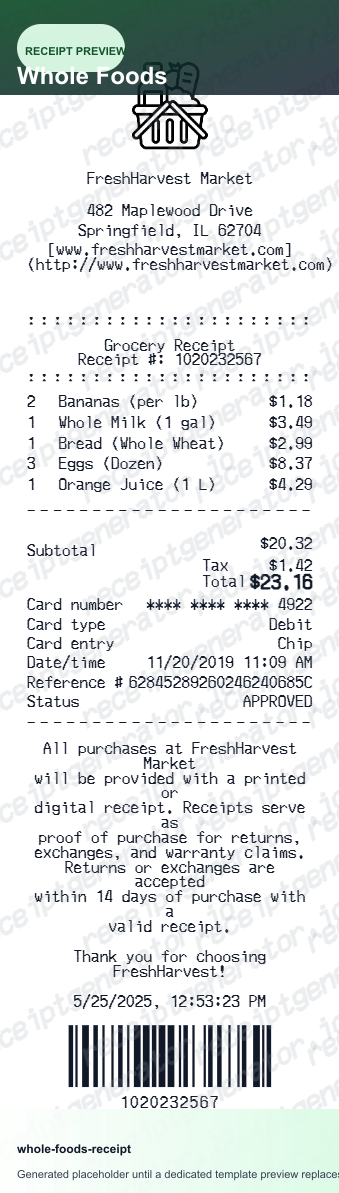
Quick summary
Whole Foods receipt template overview
Use this Whole Foods receipt generator to create authentic itemized receipts with editable products, tax calculations in $, and printable PDF export.
What Is on a Real Whole Foods Receipt?
Since Amazon's acquisition, Whole Foods receipts blend a standard grocery store layout with Amazon-specific loyalty and store-brand details. Knowing what the original contains is what makes a rebuilt copy credible.
Amazon Prime discount shown separately
When a Prime membership is linked at checkout, the Prime member discount on eligible items prints as its own deduction line rather than being folded into the item price, so the receipt shows both the regular price and the Prime savings.
365 by Whole Foods Market store brand
Store-brand items print under the 365 by Whole Foods Market label, Whole Foods' private-label line covering pantry staples, household items, and prepared foods, distinct from national brand items on the same receipt.
Purchases surface in the Amazon app, not a separate portal
In-store purchases paid with a Prime-linked account or Amazon-associated payment method appear under Orders in the Amazon app alongside regular Amazon.com purchases, rather than through a standalone Whole Foods receipt lookup site.
Store location details
The header shows the specific Whole Foods Market store address and phone number for that location.
Itemized grocery list with tax
Every product lists with its price, and subtotals and applicable sales tax are calculated per the store's local tax rate.
Card transaction details
The payment section includes the card type, an authorization code, and the final sale amount, matching a standard grocery register printout.
Accurate Whole Foods Market Receipt Layout
Edit the layout, watch it update live, then print, download PDF, or email.
Real-time updates
See your Whole Foods receipt change instantly as you type.
Authentic layout
Matches the font and spacing of genuine Whole Foods Market receipts.
PDF download
Get a clean PDF file ready for printing or digital submission.
Get Your Original Whole Foods Receipt First
If you paid with a Prime-linked account or an Amazon-associated payment method, the purchase should appear under Orders in the Amazon app or on Amazon.com rather than a separate Whole Foods portal. For purchases without an Amazon account link, the store's customer service desk can often reprint a copy if you have the approximate date and payment card. Use this template when the original is unavailable - a cash purchase, an unlinked payment method, or a receipt someone else holds.
Business grocery expenses
Document food purchases for office supplies or corporate catering events.
Budgeting and tracking
Keep reliable records of your household spending at Whole Foods.
Recreating lost receipts
Generate a replacement for a lost physical receipt using your purchase history.
Whole Foods Receipt Variants
Choose the best format for your grocery documentation needs.
Standard Store Receipt
Standard Whole Foods till receipt layout with item lines, subtotals, tax breakdown, and payment confirmation.
Itemized Detailed Receipt
Expanded layout with product SKU codes, quantity unit rates, discounts, and store register metadata.
Digital Order & Invoice
Clean electronic invoice format with customer reference numbers, transaction IDs, and payment method details in $.
Related Guides
Explore related guides to understand the receipt details, lookup steps, and documentation workflows.
Related Other Receipt Templates
Browse our collection of receipt templates for various purposes.

Whole Foods Receipt FAQ
Learn how to generate professional Whole Foods Market receipts for your records or expense reporting.
Select the Whole Foods receipt template, enter the store address, add your grocery items with prices, specify the tax rate, and enter payment details if needed. Download as a PDF.
Yes. You can customize the barcode value at the bottom of the receipt to match a real Whole Foods Market receipt.
Yes. The generated PDF is a professional document suitable for documenting grocery purchases for business expenses or personal records.
A real Whole Foods receipt shows the specific store address and phone number, an itemized list with 365 by Whole Foods Market store-brand items alongside national brands, a separate Amazon Prime member discount line on eligible items, sales tax based on local rate, and card payment details with an authorization code.
Add the store name, purchase date, line items, totals, tax, payment method, and any optional notes you need on your Whole Foods template.
Yes. You can add as many items as you like. The generator will automatically calculate the subtotal and total based on the tax rate you provide.
Yes. You can create and preview receipts for free. High-quality, watermark-free PDF downloads are available with a paid plan.
If you paid with a Prime-linked account or a payment method tied to Amazon, open the Amazon app or Amazon.com and check Orders - in-store Whole Foods purchases appear there rather than through a separate receipt portal. For purchases without an Amazon account link, bring your payment card and approximate purchase date to the customer service desk for a reprint.
Yes, if it was paid with a Prime-linked account or an Amazon-associated payment method. It will appear under Orders in the Amazon app or website alongside regular online purchases rather than in a separate Whole Foods-specific history.
Both. You can use these templates for reimbursements, bookkeeping prep, and internal documentation workflows.
Receipt Generator · Receipt Maker · 300+ Free Templates
Create your Whole Foods receipt
Use the editable Whole Foods receipt generator to add items, tax totals, and payment details, then export a clean PDF.