Anytime Fitness Receipt Generator
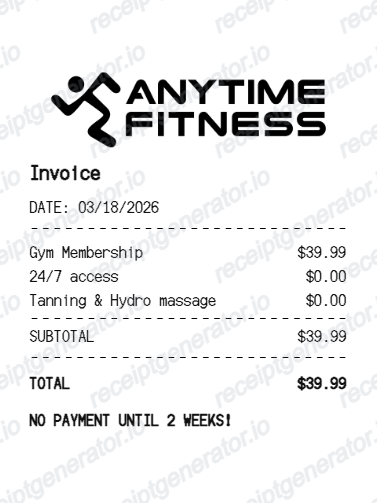
Create an Anytime Fitness-style invoice receipt with logo, membership charges, subtotal, final total, and payment notice.
Create an editable Anytime Fitness-style receipt with gym membership line items, subtotal, final total, and payment notice.

Choose
Anytime Fitness Receipt selected

Customize
Fill in your details

Download
Save or share receipt
Edit the details once and the preview updates instantly.
Quick summary
Anytime Fitness receipt template overview
Create an Anytime Fitness-style invoice receipt with logo, membership charges, subtotal, final total, and payment notice.
What Is on a Real Anytime Fitness Receipt?
Anytime Fitness clubs are independently owned franchises, so billing statements often carry a third-party biller's name rather than the gym's, and separate a one-time key fob charge from recurring dues.
Billing entity may not match the gym name
Many Anytime Fitness locations use an outside billing processor, commonly ABC Financial Services, to collect dues, so a bank or card statement often shows the biller's name instead of 'Anytime Fitness' or the specific club name.
One-time key fob fee vs. recurring dues
The key fob (used for 24/7 door access) is typically a one-time, non-refundable charge of roughly $25 to $50 paid at sign-up, itemized separately from the recurring monthly or bi-weekly membership dues - a lost fob replacement is a separate one-time charge too.
Bi-weekly or monthly billing cycle
Many clubs bill dues every 14 days rather than monthly, so a billing statement period and amount can look different from a simple flat monthly rate.
Franchise location as the billing entity
Because each Anytime Fitness club is independently owned and operated, pricing, add-on fees, and the exact billing entity name vary by location rather than following one national price list.
Add-on service rows
Optional services like tanning, hydro massage, or personal training packages appear as their own line items separate from base membership dues.
Subtotal and total on the statement
A billing statement itemizes each charge (dues, add-ons, prorated amounts) before the final total, which is what a franchise location or ABC Financial Services would confirm if a member disputes a charge.
Create a print-ready Anytime Fitness receipt
Edit the layout, watch it update live, then print, download PDF, or email.
Live Anytime Fitness receipt preview
Watch the receipt update as you edit the logo, date, charges, totals, and footer notice.
Editable fitness invoice layout
Use a compact receipt format with membership charges, divider lines, subtotal, total, and payment text.
Download as PDF
Export a clean Anytime Fitness-style receipt PDF for records, examples, demos, or mockups.
Mobile-friendly editor
Create and edit Anytime Fitness-style receipts from desktop, tablet, or phone.
Get Your Original Anytime Fitness Receipt First
If your membership is still active, the original is always better: check the member portal or app for a billing history, or contact your home club directly since staff can pull statements from the franchise's point-of-sale system. Many clubs bill through ABC Financial Services, so a card or bank statement with an unfamiliar name may actually be your gym charge - contact ABC Financial for an itemized statement if the club can't produce one. Use this template when the original is unavailable - a cancelled membership, a closed club, or a statement needed for expense or HSA/FSA documentation.
Membership receipt examples
Create receipt examples for gym membership charges.
Fitness billing mockups
Generate gym invoice mockups for demos, testing, or account examples.
Service charge records
Show membership and add-on services with subtotal and total rows.
Anytime Fitness Receipt Template Types
Create Anytime Fitness-style receipts for gym memberships, club service charges, and fitness invoice examples.
Gym membership receipt
A receipt for monthly gym membership and club access.
Fitness invoice receipt
A compact invoice-style receipt with membership rows and totals.
Gym payment notice
A fitness receipt layout with payment timing or billing notice text.
Related Guides
Explore related guides to understand the receipt details, lookup steps, and documentation workflows.
Receipt guide
Repair Receipt for Insurance Claims
See which service and payment fields make a repair or service record easier to review.
Explore Repair Receipt for Insurance ClaimsEditable template
Repair Receipt template
Explore this editable receipt layout and its fields before opening the editor.
Explore Repair Receipt templateMore free receipt templates for service and retail expense records.




Anytime Fitness Receipt FAQ
Common questions about creating, editing, and downloading an Anytime Fitness-style receipt.
Open the Anytime Fitness receipt generator, edit the logo, invoice title, date, membership rows, subtotal, total, and payment notice, then preview and download as a PDF.
Yes. The totals section supports editable subtotal and final total rows.
A real Anytime Fitness billing statement shows the billing entity (often ABC Financial Services rather than the club name), the specific club location, the billing period (commonly bi-weekly), membership dues, any add-on services like tanning or personal training, a one-time key fob fee if it's a new membership, subtotal, and total charged.
Yes. You can edit membership, access, tanning, hydro massage, or other gym service rows.
Check the member app or portal for a billing history first. If that doesn't cover it, contact your home club directly, since each location is independently owned and controls its own billing records. Many clubs bill through ABC Financial Services, so you may need to contact ABC Financial for an itemized statement if a charge doesn't match what the club shows.
Anytime Fitness clubs are independently owned franchises, and many use a third-party billing processor - commonly ABC Financial Services - to collect dues. That processor's name, not 'Anytime Fitness,' often appears on card and bank statements.
Receipt Generator · Receipt Maker · 300+ Free Templates
Create your Anytime Fitness receipt
Use the editable Anytime Fitness receipt generator to add items, tax totals, and payment details, then export a clean PDF.