PetSmart Receipt Template & Generator
Edit a PetSmart receipt template with pet supplies, quantities, savings, tax and payment details. Preview free; PDF export requires a paid plan.
PetSmart receipt template for confirmed transaction details. Review store/register numbers, date and transaction reference in the header. Preview the editable layout free; watermark-free PDF export requires a paid plan.

Choose
PetSmart Receipt selected

Customize
Fill in your details

Download
Save or share receipt
Edit the details once and the preview updates instantly.
Quick summary
PetSmart receipt template: what can I edit?
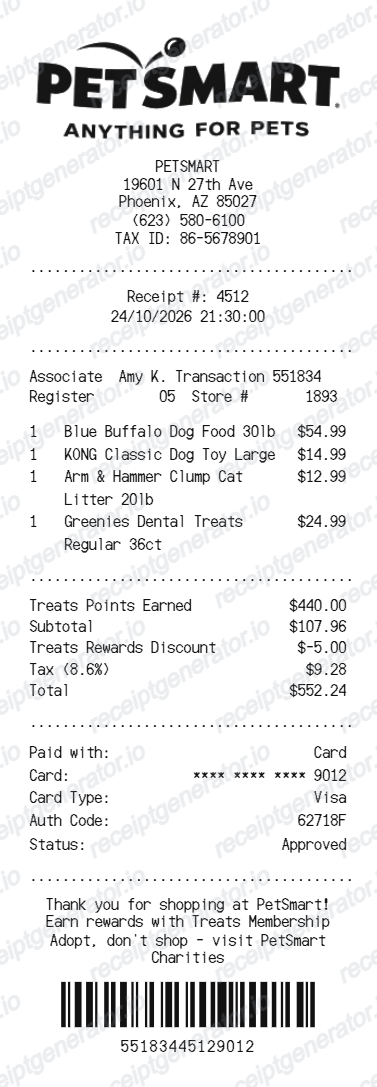
Review store/register numbers, date and transaction reference in the header. Enter product descriptions, UPC values, quantities, amounts and any savings text attached to an item.
Editable fields in the PetSmart receipt template
Review these fields against the source transaction before exporting your personal record.
Store and transaction identifiers
Review store/register numbers, date and transaction reference in the header.
Pet supply item rows
Enter product descriptions, UPC values, quantities, amounts and any savings text attached to an item.
Tax rows and adjustments
Check tax amounts, discounts and the final total against the original purchase rather than assuming current rewards terms.
Payment and original records
Review the payment and footer details. Obtain the store-issued receipt and consult the current return policy when returning an item.
Print-ready PetSmart pet supply purchase receipts
Edit the layout, watch it update live, then print, download PDF, or email.
PetSmart live preview
Review store/register numbers, date and transaction reference in the header.
Review the editable fields
Enter product descriptions, UPC values, quantities, amounts and any savings text attached to an item.
PDF export plans
Preview the layout free; watermark-free PDF export requires a paid plan.
Mobile and desktop editing
Open the same receipt layout on mobile or desktop and check the preview before exporting.
Original PetSmart records and this editable template
Retain the original PetSmart receipt or order record. PetSmart’s current return policy explains its proof-of-purchase requirements; the editable template does not guarantee a return will be accepted.
Receipt retrieval and source guidance
Reconcile confirmed details
Check tax amounts, discounts and the final total against the original purchase rather than assuming current rewards terms.
Review the layout
Review the payment and footer details. Obtain the store-issued receipt and consult the current return policy when returning an item.
PetSmart Receipt Types
Compare this editable layout with the original transaction record.
PetSmart editable purchase record
Enter product descriptions, UPC values, quantities, amounts and any savings text attached to an item.
Original records and related layouts
Use the merchant’s guidance for original documentation and the templates for editable records.
Compare related receipt layouts and their editable fields.

PetSmart Receipt Template: Fields and Original Records
Answers about this layout, confirmed transaction details and the original purchase record.
Open the editor, enter the confirmed transaction details, review pet supply item rows and check the totals in the live preview. Watermark-free PDF export requires a paid plan.
Retain the original PetSmart receipt or order record. PetSmart’s current return policy explains its proof-of-purchase requirements; the editable template does not guarantee a return will be accepted.
No. Savings text is a field in this layout. Use the savings actually recorded on the purchase; the editor does not connect to a rewards account or calculate program eligibility.
Receipt Generator · Receipt Maker · 300+ Free Templates
Edit the PetSmart receipt template
Enter confirmed details, check the free preview and review paid PDF export plans.