Planet Fitness Receipt Generator
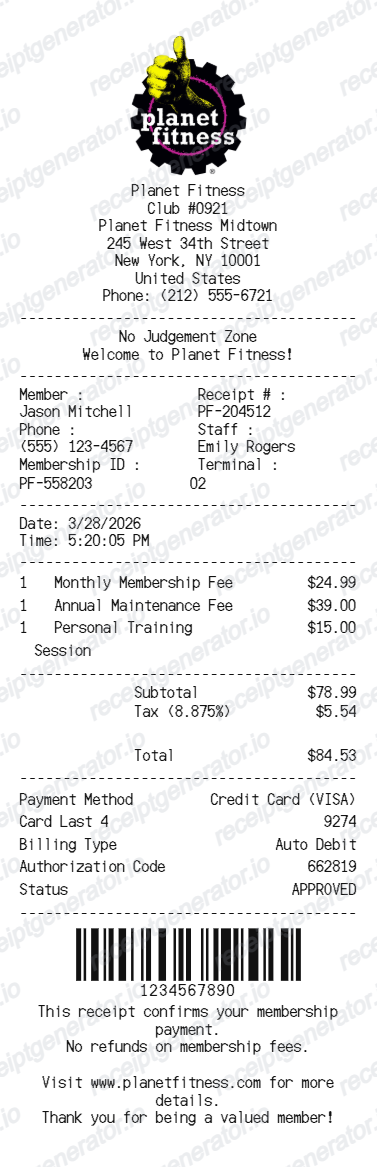
Create a Planet Fitness-style receipt with club details, member details, membership charges, totals, payment details, barcode, and footer message.
Create an editable Planet Fitness-style receipt with club information, member receipt details, itemized membership fees, totals, card payment rows, barcode, and footer notes.

Choose
Planet Fitness selected

Customize
Fill in your details

Download
Save or share receipt
Edit the details once and the preview updates instantly.
Quick summary
Planet Fitness receipt template overview
Use this Planet Fitness receipt generator to create authentic itemized receipts with editable products, tax calculations in $, and printable PDF export.
What Is on a Real Planet Fitness Receipt?
Planet Fitness bills members on two tiers with separate recurring and annual charges, and a real receipt itemizes each one rather than showing a single lump sum.
Classic vs. Black Card membership tiers
Classic membership starts around $15/month and restricts you to your home club. PF Black Card starts around $24.99/month and adds guest privileges, any-club access, and amenities like massage chairs and tanning - the tier name appears as its own line on the receipt.
Annual fee billed separately from monthly dues
Most memberships carry an annual fee (commonly around $49) charged once a year on top of the recurring monthly due - it shows as its own line item, not folded into the monthly charge, and often lands in a different billing cycle than dues.
Startup and annual fees at signup
New members are typically charged a one-time startup or enrollment fee plus the first annual fee at signup, in addition to the first month's dues - a real first receipt usually has more line items than later monthly ones.
No-commitment vs. contract billing
Some memberships bill month-to-month with no long-term commitment, while promotional or locked-in plans carry a contract term with an early-cancellation fee - the billing terms tied to the specific plan affect what a cancellation or proration line looks like.
Club number and location on every receipt
Each Planet Fitness location has its own club number, address, and phone number printed on the receipt header, since dues are billed and administered per home club.
Payment method and last four digits
Recurring dues are billed to a card or bank account on file, and the receipt shows the payment method with the last four digits along with the transaction date - useful for matching a charge on a bank statement.
Create a print-ready Planet Fitness receipt
Edit the layout, watch it update live, then print, download PDF, or email.
Live Planet Fitness receipt preview
Watch the receipt update as you edit club details, member data, fees, totals, payment rows, barcode, and footer text.
Editable gym receipt layout
Use a compact receipt format with dividers, member data, itemized charges, totals, payment approval, and barcode.
Download as PDF
Export a clean Planet Fitness-style receipt PDF for examples, demos, records, or mockups.
Mobile-friendly editor
Create and edit Planet Fitness-style receipts from desktop, tablet, or phone.
Get Your Original Planet Fitness Receipt First
If you're an active member, the original is always better: log in to your account on the Planet Fitness website or app and check billing or payment history for a downloadable statement, or ask staff at your home club for a reprint of a recent charge. Use this template when the original is unavailable - a canceled membership, an old billing cycle no longer shown online, or a receipt you need to rebuild for recordkeeping.
Membership receipt examples
Create Planet Fitness-style receipt examples for membership payments.
Fitness billing mockups
Generate gym receipt mockups for demos, testing, or account examples.
Payment record samples
Show membership fees, taxes, payment details, approval status, and barcode in one receipt.
Planet Fitness Receipt Template Types
Create Planet Fitness-style receipts for membership payments, training fees, and fitness club payment examples.
Membership receipt
A receipt for monthly membership, annual maintenance, and other club fees.
Personal training receipt
A gym receipt with membership items and personal training service rows.
Fitness club payment receipt
A compact receipt with member details, totals, card payment rows, and barcode.
Related Guides
Explore related guides to understand the receipt details, lookup steps, and documentation workflows.
Repair Receipt for Insurance Claims
See which service and payment fields make a repair or service record easier to review.
Explore Repair Receipt for Insurance ClaimsRepair Receipt Lookup
Learn where service receipts usually come from before you create a cleaner backup copy.
Explore Repair Receipt LookupRelated Other Receipt Templates
More free receipt templates for service and retail expense records.

Planet Fitness Receipt FAQ
Common questions about creating, editing, and downloading a Planet Fitness-style receipt.
Open the Planet Fitness receipt generator, edit the logo, club details, member details, membership items, totals, payment rows, barcode, and footer text, then preview and download as a PDF.
Yes. The template supports editable membership fee rows, personal training rows, subtotal, tax, and final total.
Log in to your account on the Planet Fitness website or app and check your billing or payment history, where recent charges are usually listed with dates and amounts. For older charges or a canceled account, contact your home club directly and ask the front desk or billing staff for a reprint.
Planet Fitness bills the annual fee (commonly around $49) once a year on a different cycle than the recurring monthly due, so it can appear as an unexpected extra charge if you're not expecting it. Checking your billing history against your signup date usually explains the timing.
Both. You can use these templates for reimbursements, bookkeeping prep, and internal documentation workflows.
Yes. You can edit member name, phone, membership ID, receipt number, staff name, terminal, date, and time.
Yes. You can update payment method, card last four digits, billing type, authorization code, approval status, and barcode value.
A real Planet Fitness receipt shows the club number and location, the member's name and membership ID, the membership tier (Classic or Black Card), monthly dues and the annual fee as separate lines, any personal training or add-on charges, tax where applicable, the payment method with the last four digits, and the total charged.
Add the store name, purchase date, line items, totals, tax, payment method, and any optional notes you need on your Planet Fitness template.
This tool creates an editable Planet Fitness style layout for documentation. It is not issued by the original merchant or brand system.
Receipt Generator · Receipt Maker · 300+ Free Templates
Create your Planet Fitness receipt
Use the editable Planet Fitness receipt generator to add items, tax totals, and payment details, then export a clean PDF.