Free Barcode Top Receipt Generator
Create Free Receipts with Top Barcode Online - Add Store Details, Items & Loyalty Code. Preview free; watermark-free PDF export requires a paid plan.
Create a top-barcode receipt with store details, items, tax, and payment. Download a PDF for retail billing, scanning, or expense records.

Choose
Barcode Top Receipt selected

Customize
Fill in your details

Download
Save or share receipt
Edit the details once and the preview updates instantly.
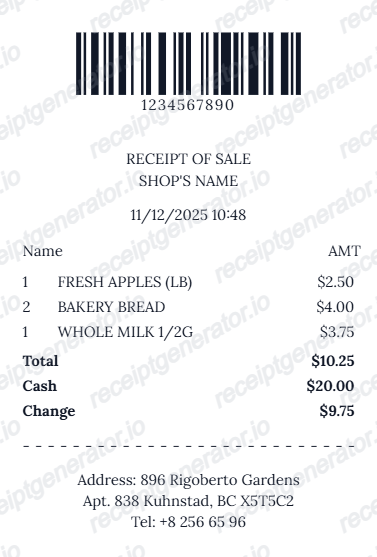
Quick summary
Barcode Top receipt template overview
Create Receipts with Top Barcode Online - Add Store Details, Items & Loyalty Code. Preview the layout before choosing a PDF export plan.
What Is on a Real Top-Barcode Receipt?
When a barcode prints at the top of a receipt, it is almost always a loyalty or member identifier rather than the transaction code. Understanding that distinction is what makes a top-barcode layout look right.
The top barcode is usually a member ID
Supermarkets, pharmacies, and membership stores print the loyalty or member barcode near the header so service desks can scan the customer's account first. It encodes the account number, not the sale - a different job from the return-lookup barcode.
Code 128 or EAN-13 for loyalty numbers
Loyalty barcodes are typically Code 128 (variable-length alphanumeric IDs) or EAN-13/UPC-A when the program uses fixed-length numeric card numbers. The member number repeats in human-readable digits so it can be keyed in manually.
A second barcode may still print at the bottom
The transaction barcode used for returns - encoding store, register, transaction number, and date - conventionally prints after the totals. Receipts that carry both codes are common: top for the member, bottom for the sale.
Store header follows the barcode
Below the top barcode comes the standard header block: store name and store number, street address, phone, then register or lane and cashier IDs, and the date and time of the transaction.
Rewards summary near the loyalty section
Loyalty-linked receipts print points earned on the visit, the running points balance, and member-price savings lines against individual items - the details that confirm the loyalty scan actually registered.
Loyalty scans create the e-receipt trail
When the member barcode is scanned at checkout, the purchase is stored against the account, which is why loyalty retailers can reprint receipts or show e-receipts in their app long after the thermal paper has faded.
Print-ready receipts with top barcode
Edit the layout, watch it update live, then print, download PDF, or email.
Live top barcode preview
See the top barcode on your receipt as you add details.
One-click print
Print your top barcode receipt from the browser.
Download as PDF
Export a clean PDF with top scannable barcode.
Mobile-friendly editor
Create top barcode receipts from any device.
Get Your Original Store Receipt First
A top-barcode receipt almost always means the purchase was loyalty-linked, and that is your best retrieval path: open the retailer's app or account portal and check purchase history or e-receipts, which persist long after thermal paper fades. Service desks can also look up and reprint transactions by the card used, the date, and the store. Use this template when the original is unavailable - a purchase made without scanning the loyalty card, a closed account, or a store that cannot recall the sale.
Loyalty card receipt scanning
Create top-barcode receipts for quick loyalty card scanning at checkout.
Membership store receipts
Top barcode layout for membership or club store receipt documentation.
Customer service reference lookup
Top barcode for quick reference scanning at customer service desks.
Pharmacy loyalty receipts
Top barcode receipt for pharmacy loyalty card and prescription records.
Barcode Top Receipt Types
Choose the top barcode receipt format for your loyalty or retail needs.
Loyalty Card Top Barcode
Receipt with loyalty card barcode at the top for quick scanning.
Member ID Top Barcode
Membership store receipt with member ID barcode at the top.
Reference Code Receipt
Receipt with reference barcode at top for lookup and service.
Related Guides
Explore related guides to understand the receipt details, lookup steps, and documentation workflows.
More free receipt templates for store and retail expense records.




Barcode Top Receipt FAQ - Header Barcode & Loyalty Card Documentation
Learn how to create receipts with a scannable loyalty barcode at the top, and PDF export for retail billing and loyalty documentation.
In this layout, the loyalty card barcode or store reference code appears at the top of the receipt, above the item list - common in supermarket and pharmacy loyalty receipts.
Yes. The top barcode in the downloaded PDF is scannable with standard barcode scanners.
Yes. Download a print-ready PDF with a scannable loyalty barcode at the top for retail or loyalty tracking.
The loyalty or member ID barcode prints first, above or beside the store header, followed by the store name, number, address, register and cashier IDs, the itemized purchase with tax and payment, and often a rewards summary showing points earned and balance near the loyalty section. A separate transaction barcode for returns may still print at the bottom.
Yes. Add a loyalty card barcode or member ID barcode at the top of the receipt for scanning at checkout or customer service.
Yes. Many supermarkets, pharmacies, and membership stores use a top barcode layout for quick loyalty card scanning at service desks.
If the receipt printed a loyalty or member barcode at the top, the purchase is almost certainly tied to your loyalty account - open the retailer's app or account portal and look for purchase history or e-receipts. Otherwise, the service desk can look up the transaction by the card used, the date, and the store, and reprint the receipt.
The top loyalty barcode encodes the customer's member account number - scanning it attaches missed points or pulls up the member profile at a service desk. The transaction barcode encodes the sale itself (store, register, transaction number, date) and is what return counters scan to reload the original purchase. They serve different systems, which is why some receipts carry both.
Receipt Generator · Receipt Maker · 300+ Free Templates
Create your Barcode Top receipt
Use the editable Barcode Top receipt generator to add items, tax totals, and payment details, then export a clean PDF.