Costco Receipt Online: Find, View & Download Your Costco Receipt

Ready to create your own? Use our free receipt generator — no account needed.
Generate Costco Receipt →On this page
Costco is one of the most member-friendly retailers for lost receipts because your entire purchase history — in-warehouse and online — is linked to your membership number. You rarely actually need the paper receipt. Here's how to retrieve it when you do.
If the original receipt isn't available, you can also use the Costco Receipt Generator to create a clean personal backup from your verified purchase details.
Quick Answer
Go to costco.com → sign in → Orders & Purchases → In-Warehouse Purchases. Your full history is there. For returns, you don't even need the receipt — bring the item and your membership card.
Costco's customer service documentation says members can view in-warehouse receipts online in date ranges for up to two years, which makes the online account the strongest first source for a replacement record. See Costco Customer Service: How do I view my receipts for in-warehouse purchases?.
Finding Your Costco Receipt Online
- Go to costco.com and sign in with your account
- Click Account (top right) → Orders & Purchases
- Select In-Warehouse Purchases (for store buys) or Online Orders
- Set the date range — Costco shows up to 2 years of history
- Click the order to view the itemized receipt
- Use Print → Save as PDF from your browser to download
Every item you buy using your membership card in-warehouse is automatically recorded — even if you got a paper receipt and lost it.
Costco's customer service documentation also confirms that verified members can view in-warehouse receipts online in six-month ranges for up to two years, with some exclusions like Travel and most older gas purchases.
Getting a Duplicate Receipt at the Costco Warehouse
- Go to the Member Services desk (usually near the entrance or exit)
- Show your membership card (or provide your membership number)
- Provide the approximate date of purchase
- The associate can pull the transaction and print a duplicate
Member Services can typically access purchases within 2 years. For very old purchases, you may need to call Costco's member services line (1-800-774-2678).
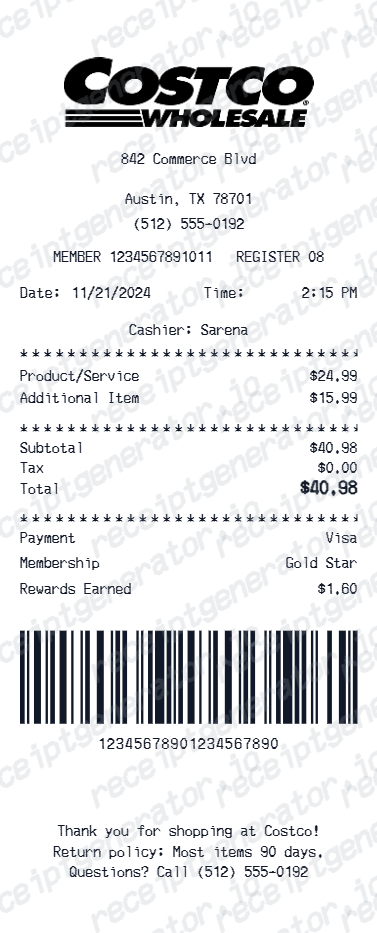
What a Costco Receipt Includes
Costco Receipt Fields
| Feature |
|---|
The 7-digit item number is Costco's key — it's how member services can look up what you bought even without the full receipt.
Costco Returns Without a Receipt
Costco's return policy is famously generous — and it's tied to your membership, not the paper receipt:
Costco Return Windows
| Feature |
|---|
For all returns, just bring the item and your membership card. Costco's system pulls up your purchase history automatically.
Costco Receipt for Business or Tax Purposes
If you need a Costco receipt for business expense documentation:
Costco Business Membership:
- Full purchase history available at business.costco.com
- Filterable by date, category, and item
- Downloadable as PDF reports
- Ideal for accounting and tax recordkeeping
Executive Membership:
- Annual 2% reward summary available as a statement (useful for tax records)
- Complete purchase history online
For general tax deductions — home office supplies, business equipment bought at Costco — the receipt from Orders & Purchases printed as PDF is acceptable IRS documentation. Add a note about the business purpose to your records.
Related:
- Lost Costco Receipt
- Costco Receipt for Reimbursement
- Costco Receipt vs Invoice
- How to Make a Receipt for Taxes: Complete IRS Guide
- Walmart Receipt Lookup: Find, Download & Replace a Lost Receipt
- Amazon Return Receipt: How to Get Proof of Return
- Gas Receipt for Taxes: IRS Requirements & How to Recreate One
Generating a Costco Receipt Backup
For personal records when the original is unavailable:
- Find the transaction on your credit or Costco Anywhere Visa card statement
- Note the date, amount, and Costco location
- Cross-reference with anything you remember about the items purchased
- Use the Costco Receipt Generator to create a clean personal record
A backup is for your own files — not for returns, insurance claims, or any official use. Costco's system has the definitive record.
Generate a Costco Receipt Backup
Also see:
Tips to Never Lose a Costco Receipt Again
- Your membership card IS your receipt tracker — always pay with the card linked to your account
- Bookmark Orders & Purchases — it's your receipts dashboard
- Download receipts for big purchases immediately — electronics, furniture, appliances
- Export your purchase history annually — useful for budgeting and year-end expense summaries
- For business Costco purchases — use a separate Costco Business card to keep purchases separate from personal
Official Costco Reference
FAQ
Sign in to costco.com → Orders & Purchases → In-Warehouse Purchases. Your in-warehouse purchase history is available online for active members.
All items bought with your Costco membership card are tracked automatically — you don't need to keep the paper receipt.
Yes — member services at any Costco warehouse can reprint a receipt if you have your membership card.
They can typically access purchases within the past 2 years.
Costco keeps your complete purchase history available online going back 2 years.
For warranty and return purposes, Costco links all purchases to your membership number — no receipt required for most returns.
Yes — Costco's return policy is tied to your membership, not the paper receipt. Any item you purchased under your membership is in their system.
Simply bring the item and your membership card. The associate can pull the purchase history directly.
Businesses with a Costco Business or Executive membership can download itemized purchase history from costco.com as PDF reports.
For individual purchases, print from the Orders & Purchases page or ask member services to print a receipt copy.
Yes — Costco.com shows your in-warehouse and online order history. Online orders are emailed as order confirmations.
Costco does not send email receipts for in-warehouse purchases but all purchases are stored in your account online.