CVS Receipt Generator
Create a CVS pharmacy receipt with prescriptions, OTC items, ExtraCare Bucks, tax, and payment. Download a free PDF for FSA/HSA reimbursement or expense records.
Create a CVS-style receipt with prescriptions, OTC items, ExtraCare savings, taxes, and payment details. Download a PDF for health records.

Choose
CVS Receipt selected

Customize
Fill in your details

Download
Save or share receipt
Edit the details once and the preview updates instantly.
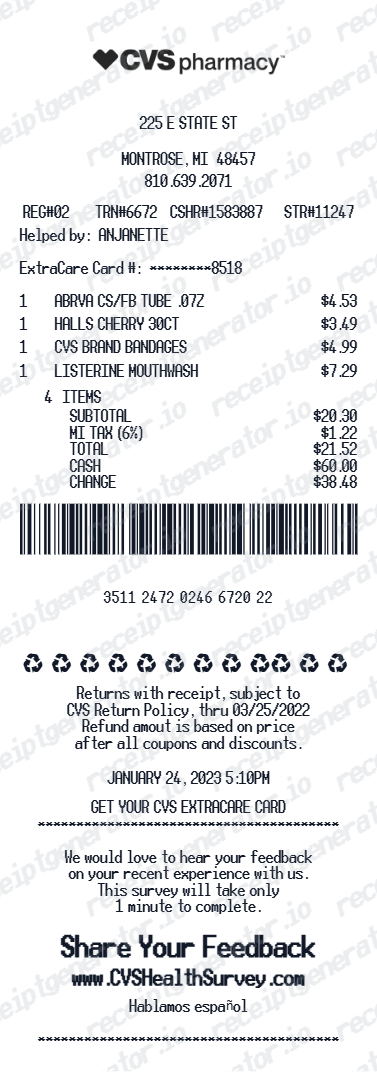
Quick summary
CVS receipt template overview
Use this CVS Pharmacy receipt template to create a pharmacy receipt with prescriptions, OTC items, ExtraCare Bucks, store details, tax, and payment summary.
What Is on a Real CVS Receipt?
Before you rebuild a CVS receipt, it helps to know exactly what the original contains. CVS receipts follow a consistent structure, and a credible replacement copy should match it field for field.
Store number and register number at the top
Every CVS receipt prints the store number, register (till) number, and cashier ID near the header, along with the store address and phone number. These identifiers are what CVS customer service uses to look up a transaction.
ExtraCare Rewards line items
ExtraCare members see ExtraBucks Rewards earned and redeemed printed as their own lines, separate from the item list and the coupon section, alongside any current savings total for the ExtraCare card used.
Rx and front-store receipts print separately
A prescription fill produces its own pharmacy receipt with the Rx number, drug name, quantity, days supply, copay, and insurance adjustment. It does not combine with the front-store receipt for OTC and retail items bought in the same visit - CVS prints two separate slips.
FSA/HSA eligible item marker
CVS flags FSA/HSA-eligible items on the receipt (commonly with an "F" or asterisk next to the line) and totals them in a summary line near the bottom, such as "FSA/HSA ELIGIBLE TOTAL," so the eligible amount doesn't have to be calculated by hand.
Long thermal receipt with coupons
CVS receipts are famously long because ExtraCare coupons, manufacturer offers, and promotional messages print below the transaction total - often extending the receipt well beyond the item list itself.
Tax and payment summary
Sales tax is calculated per item based on local rules (prescriptions and many FSA/HSA-eligible items are typically non-taxed), and the payment section shows the tender type with the last 4 card digits and the change or approval status.
Print-ready CVS Pharmacy receipts
Edit the layout, watch it update live, then print, download PDF, or email.
Live CVS receipt preview
Watch the receipt update as you add prescriptions and ExtraBucks.
One-click print
Print your CVS Pharmacy receipt from the browser.
Download as PDF
Export a clean CVS receipt PDF for FSA/HSA or expense records.
Mobile-friendly editor
Create CVS Pharmacy receipts from any device.
Get Your Original CVS Receipt First
If the purchase is recent, the original is always better: check Digital Receipts in the CVS app or CVS.com for front-store purchases made with an ExtraCare card, or open Prescription History for pharmacy fills. Ask the store to reprint from the register number and date if digital history is unavailable. Use this template when the original is unavailable - a purchase not linked to ExtraCare, an old transaction past the store's lookup window, or a purchase made by someone else.
FSA/HSA reimbursement
Submit CVS Pharmacy receipts for FSA or HSA medical expense reimbursements.
Prescription insurance claim
Document Rx copays and drug costs for insurance reimbursement.
Medical expense tracking
Track CVS prescription costs for IRS medical expense deduction records.
ExtraCare savings documentation
Record CVS ExtraBucks rewards and savings for personal finance tracking.
CVS Pharmacy Receipt Types
Choose the CVS Pharmacy receipt format for your pharmacy visit.
Prescription Rx Receipt
CVS Pharmacy receipt for prescription drug copay and insurance details.
Full Pharmacy Visit Receipt
CVS receipt with OTC products, prescriptions, and ExtraBucks savings.
FSA/HSA Claim Receipt
CVS Pharmacy receipt formatted for FSA/HSA reimbursement submission.
CVS Receipt Guides
Read the supporting CVS guides to understand receipt lookup, prescription records, ExtraCare reprints, and printable PDF workflows.
CVS Receipt Lookup
Find digital CVS receipts, recover older purchases, and understand which lookup method to use first.
Read guideHow to Get a CVS Prescription Receipt
Learn where prescription receipts come from and how to retrieve a pharmacy-specific record.
Read guideCVS Prescription Receipt vs Store Receipt
Understand which CVS receipt type is best for prescriptions, OTC purchases, returns, and reimbursement.
Read guideWhat a CVS Pharmacy Receipt Should Include
Check the fields that matter most for medical records, reimbursement, and pharmacy documentation.
Read guidePrintable CVS Pharmacy Receipt PDF
See what a printable pharmacy PDF should include and how to keep the file readable and useful.
Read guideCVS Prescription History
Understand what CVS prescription history usually shows and when it is more useful than a retail receipt.
Read guideFSA and HSA Receipt Requirements
Review the itemized fields benefit administrators usually expect before submitting a health-expense record.
Read guidePharmacy Receipt for FSA & HSA
Learn which CVS receipt fields matter most for FSA or HSA reimbursement documentation.
Read guideRelated Other Receipt Templates
Browse our collection of receipt templates for various purposes.
CVS Pharmacy Receipt FAQ - Prescription & ExtraCare Documentation
Learn how to create CVS Pharmacy receipts with prescriptions, ExtraBucks savings, and PDF export for FSA/HSA and medical expense documentation.
Choose the CVS Pharmacy receipt template, add store address, items (prescriptions, OTC products, beauty), ExtraBucks, taxes, and payment method. Preview and download as PDF.
Yes. Add ExtraBucks Rewards earned and redeemed - matching the CVS Pharmacy ExtraCare receipt format.
Yes. CVS Pharmacy receipts with prescription and OTC item details are commonly required for FSA/HSA reimbursement submissions.
For front-store purchases, sign in to the CVS app or CVS.com and check Digital Receipts if you used your ExtraCare card at checkout, or call the store with the date and approximate total for a manual lookup. For prescriptions, use Prescription History in the CVS app or CVS.com, which lists every fill with Rx number, drug name, and copay - this is separate from the retail purchase history. See our full guide for a complete step-by-step walkthrough.
Yes, but the receipt needs to show which items are eligible. CVS receipts print an FSA/HSA-eligible summary line with the qualifying dollar total, which is the figure most FSA/HSA administrators want. Some administrators also require the itemized product names, not just the eligible total.
Yes. Add prescription drug name, copay amount, insurance savings, and days supply as individual line items.
Yes. Add over-the-counter medications, vitamins, cosmetics, and household items as receipt line items.
Yes. Download a clean PDF for FSA/HSA claims, prescription insurance documentation, or medical expense tracking.
A real CVS receipt shows the store number and register number at the top, each item with its price, an "F" or asterisk marker next to FSA/HSA-eligible items, an ExtraBucks Rewards earned/redeemed line, sales tax, the payment method with last 4 card digits, and a long tail of ExtraCare coupons and promotional offers printed below the total.
Add the store name, purchase date, line items, totals, tax, payment method, and any optional notes you need on your CVS template.
Receipt Generator · Receipt Maker · 300+ Free Templates
Create professional receipts online in seconds
Use the Receipt Generator editor with ready-made templates. Compare pricing or start generating print-ready PDF receipts in your browser no account required.