How to Get an Ola Receipt

Ready to create your own? Use our free receipt generator — no account needed.
Generate Ola Receipt →On this page
Need an Ola receipt? Start with the Ola app and your email before doing anything else. In most cases, the original trip details are still recoverable, and that is the best source for reimbursement or travel records.
Quick Answer
To get an Ola receipt, check the ride inside your Ola trip history first, then search your email for the receipt sent after the ride.
Where Ola Receipts Usually Live
Most Ola receipts can be recovered from:
- the Ola app ride history
- the email attached to your Ola account
That covers the majority of cases for office reimbursement and personal ride tracking.
How to Get an Ola Receipt From the App
- Open the Ola app
- Go to your past rides
- Select the trip you need
- Review the ride details and fare breakdown
This is the fastest option for:
- office cab claims
- airport rides
- client meetings
- GST-linked travel records
Ola's own ecosystem uses the term "invoice" for ride documentation, including corporate ride invoice downloads and customer-facing offer pages that ask riders to show the trip invoice or receipt. That supports treating the ride history and emailed trip record as the primary source. See Ola Corporate: Download Invoice and Olacabs blog: show your ride invoice.
How to Find an Ola Receipt in Email
Search your inbox for:
Ola receiptOla trip- the ride date
- the trip amount
If it is missing, check spam or confirm you are using the same email address linked to the trip.
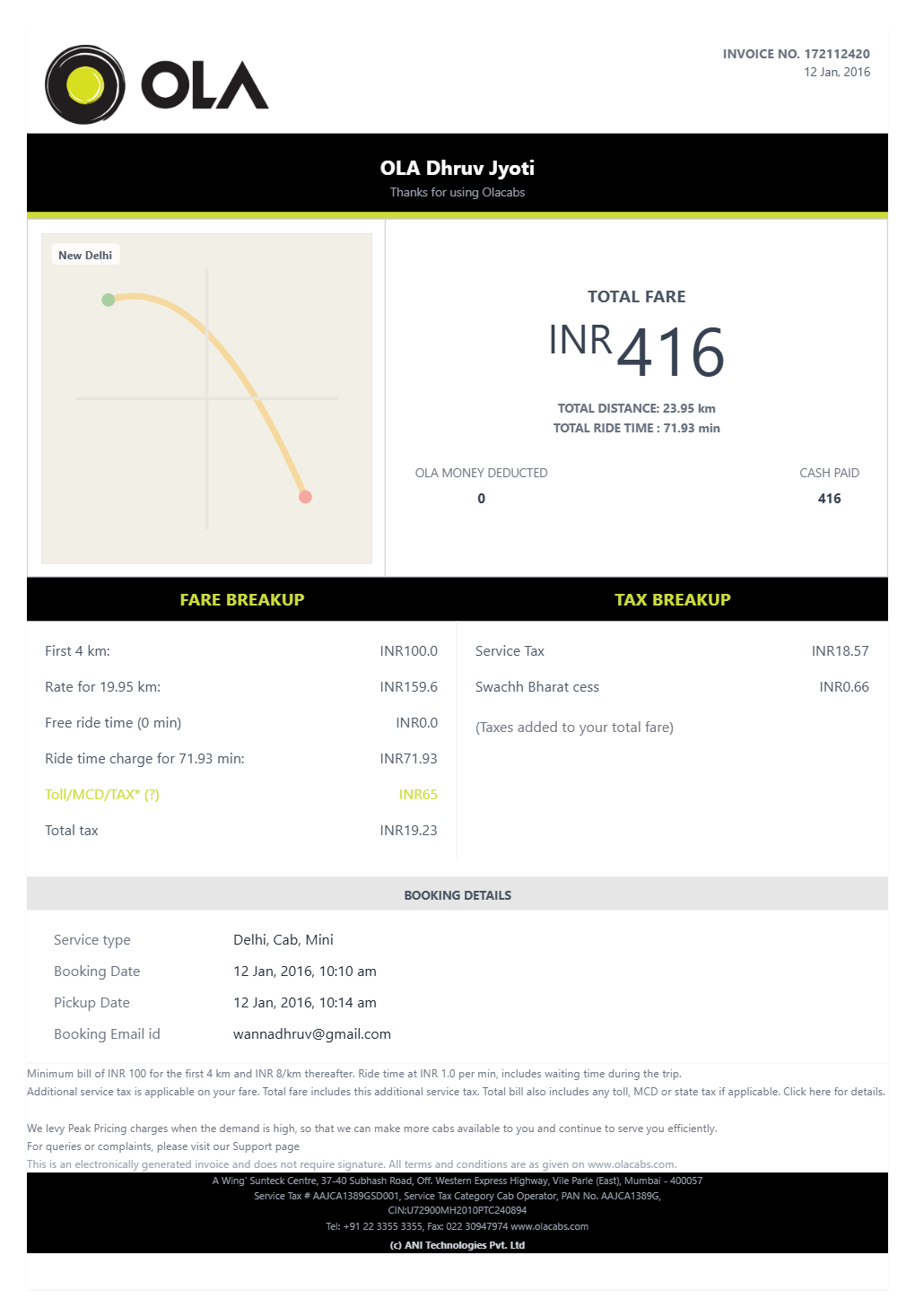
What an Ola Receipt Should Include
A useful Ola receipt usually includes:
- trip date
- pickup and drop-off
- cab category
- fare breakdown
- convenience fee
- GST where relevant
- total paid
That is usually enough for business travel and office cab allowance documentation.
Need a Structured Ola Record?
If you verified the ride details and want a cleaner version for your files, use the Ola Receipt Generator.
Open the Ola Receipt Generator
Create a structured Ola-style receipt using the verified details from your trip.
Related Guides
- Ola Receipt Generator
- How to Get a Lyft Receipt
- How to Get an Uber Receipt: From the App, Email, or a Backup Copy
Final Takeaway
If you need an Ola receipt, check the app and email first. In most cases, the original ride record is still there and should be your first source for reimbursement or trip documentation.
FAQ
Open the Ola app, go to your past rides, select the trip, and review the trip details or receipt information there.
You can also search your email for the trip receipt sent after the ride.
Yes. Ola usually sends a trip receipt or ride summary after the booking is completed.
If you cannot find it, check spam or the email linked to the correct Ola account.
Yes. Older trip details are often still accessible through your Ola ride history.
If email is missing, the app history is the next place to check.