Free Thermal Receipt Template Generator - Create 80mm POS Receipts Online
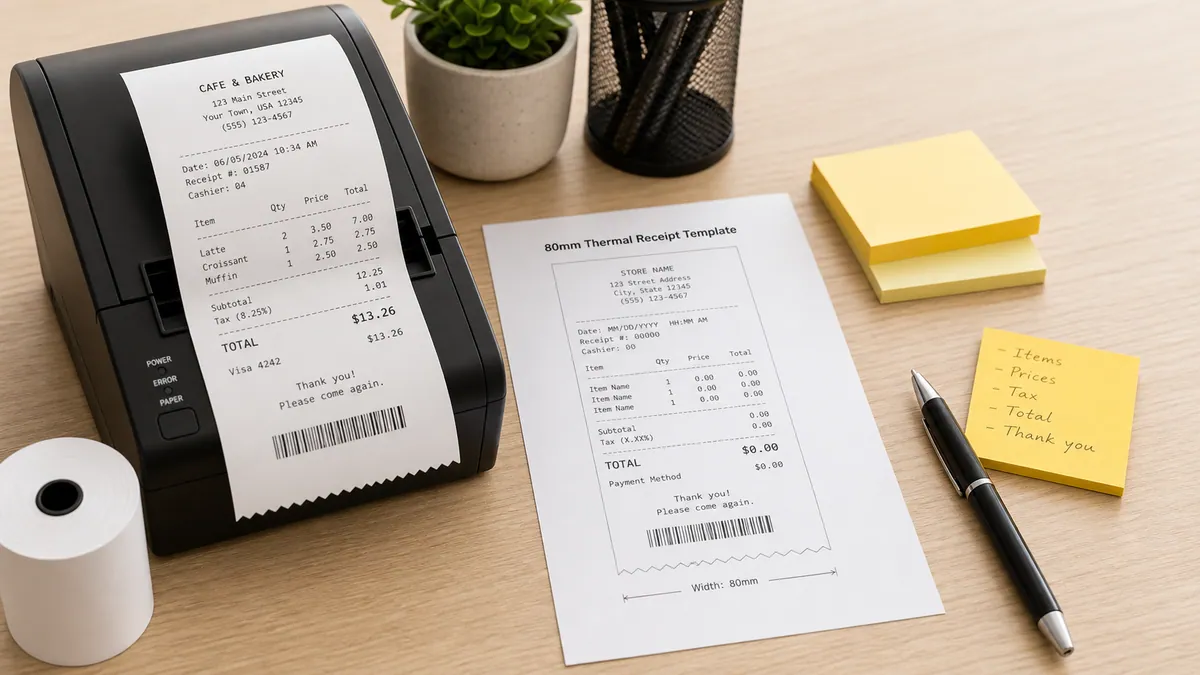
Ready to create your own? Use our free receipt generator — no account needed.
Browse Receipt Templates →On this page
Thermal receipts are the narrow paper strips printed by point-of-sale systems in stores, restaurants, cafes, and market stalls worldwide. If you need to create one without a full POS system — for a pop-up shop, market stall, small business, or record-keeping — this guide covers everything you need.
Quick Answer
A thermal receipt template creates an 80mm-width POS-style receipt with business name, items, tax, and total. You can print directly from your browser or download as PDF.
What is a Thermal Receipt?
Thermal receipts are printed using heat rather than ink — a thermal printhead applies heat to special paper, creating the text and graphics. This is why:
- Thermal receipts fade over time when exposed to heat or sunlight
- They cannot be photocopied reliably (the copy comes out blank or faded)
- They feel slightly waxy compared to regular paper
- They are the most common receipt format in retail, hospitality, and food service
The standard width is 80mm — this is the paper roll size used by the vast majority of thermal POS printers worldwide.
What a Thermal Receipt Template Should Include
| Section | Fields |
|---|---|
| Header | Business name, address, phone, website |
| Transaction info | Date, time, receipt number, cashier ID |
| Items | Item name, quantity, unit price, line total |
| Subtotal | Sum of all items |
| Discounts | Any promotional or loyalty discounts |
| Tax | Tax rate and tax amount |
| Total | Final amount due |
| Payment | Payment method and amount |
| Footer | Return policy, thank you message, social handles |
Available Thermal Receipt Template
Cafe Thermal Receipt
Coffee shop layout with drink and food items, barista name, loyalty points, and custom footer for WiFi or social handles.
→ Cafe Thermal Receipt Generator
How to Print a Thermal Receipt from Your Browser
- Open the thermal receipt generator and fill in your details
- Preview the receipt — check that all items, totals, and business info are correct
- Click Print — your browser's print dialog will open
- Select your thermal printer from the printer list
- Set paper size to 80mm roll (or Custom: 80mm width)
- Disable headers and footers in print settings
- Click Print
For standard printers, leave the paper size as A4 or Letter — the narrow receipt will print centered on the page.
Open the Cafe Thermal Receipt Generator
Create an 80mm POS thermal receipt for cafe orders, coffee shop items, tax, payment, and loyalty details.
Related Guides
- POS Receipt Generator Guide
- How to Print a Thermal Receipt
- Thermal vs Standard Receipt: What's Different
Final Takeaway
Thermal receipt templates let any small business or vendor create professional POS-style receipts without a dedicated system. Choose the template that matches your business type, fill in your details, and print or download in seconds.
FAQ
A thermal receipt template is a narrow-format receipt designed to match 80mm POS thermal printer output — the standard paper width used by most point-of-sale printers.
It includes fields for business name, items, tax, and total in a compact layout suitable for thermal paper rolls.
Yes. You can download as PDF and print on standard paper, or use the print option in your browser to print to any connected printer.
The narrow format also works well for digital receipts sent by email or SMS.
Retail stores, restaurants, cafes, food trucks, market stalls, pop-up shops, kiosks, and any small business using a point-of-sale system.