Free Olive Garden Receipt Generator
Create Free Olive Garden Purchase Receipts Online - Add Pasta, Entrees, Server Details & Payment. Preview free; watermark-free PDF export requires a paid plan.
Create an Olive Garden-style receipt with pasta, entrees, breadsticks, server details, table number, tax, and payment. Download a PDF for expense records or purchase documentation.

Choose
Olive Garden Receipt selected

Customize
Fill in your details

Download
Save or share receipt
Edit the details once and the preview updates instantly.
Quick summary
Olive Garden receipt template overview
Create Olive Garden Purchase Receipts Online - Add Pasta, Entrees, Server Details & Payment. Preview the layout before choosing a PDF export plan.
What Is on a Real Olive Garden Receipt?
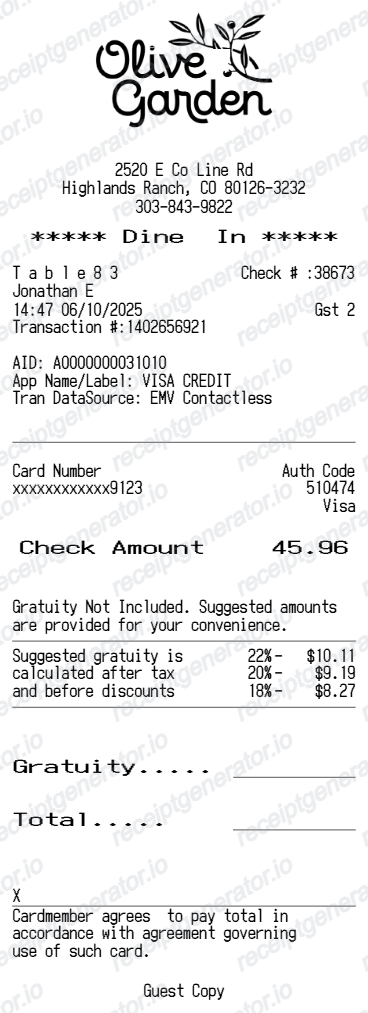
Before you rebuild an Olive Garden receipt, it helps to know exactly what the original contains. As a Darden Restaurants brand, Olive Garden's dine-in slips follow a consistent structure, and a credible replacement copy should match it field for field.
Server name and table number
Dine-in checks print the server's name, table number, and party (guest) count near the top, since Olive Garden runs full table service rather than counter ordering. A check number also appears for the server to reference when closing out the table.
Never Ending Soup, Salad & Breadsticks isn't usually its own line
Unlimited breadsticks and the soup, salad & breadsticks combo are bundled into the price of qualifying entrees rather than billed as a separate item, so a real receipt typically shows the entree price with the combo noted in the item name, not a standalone breadsticks charge.
Olive Garden is a Darden Restaurants brand
The receipt header or footer may reference Darden Restaurants, Inc., Olive Garden's parent company, alongside the specific restaurant location's name, address, and phone number.
eClub, not a points-based rewards program
Olive Garden does not run a points-based loyalty program like some competitors. Instead, the Olive Garden eClub sends email-based coupons and birthday offers that a server applies manually to the check when a guest mentions their membership - it does not print as a points balance on the receipt.
Gratuity and tax lines
Below the item list, the check shows subtotal, sales tax based on the restaurant's local rate, a suggested gratuity guide for larger parties, and the total. To-go and delivery orders show pickup or delivery details in place of table and server information.
Payment split by card or cash
The bottom of the receipt shows the payment method and amount, with split-check details printed separately when a table divides the bill across multiple cards.
Print-ready Olive Garden restaurant receipts
Edit the layout, watch it update live, then print, download PDF, or email.
Live Olive Garden receipt preview
Watch your receipt update as you enter food and server details.
One-click print
Print your Olive Garden receipt directly from the browser.
Download as PDF
Export a clean Olive Garden dine-in receipt PDF.
Mobile-friendly editor
Create Olive Garden receipts from any device.
Get Your Original Olive Garden Receipt First
If the order is recent, the original is always better: dine-in guests can ask their server for a reprinted check using the table number or approximate time, and To Go or delivery orders placed through the Olive Garden app or website show up in your account order history. Olive Garden eClub members should also check confirmation emails for online orders. Use this template when the original is unavailable - a cash dine-in visit with no digital record, a lost paper check, or a purchase made by someone else.
Expense documentation
Generate Olive Garden receipts for meal expense reports and business dining reimbursements.
Group dining records
Document large party meals with table number, server, and itemised orders.
To Go order records
Create Olive Garden To Go receipts with order number and pickup time.
Catering records
Document Olive Garden catering orders with bulk item details and delivery info.
Olive Garden Receipt Types
Choose the Olive Garden receipt format for your dining purchase.
Dine-In Receipt
Olive Garden table-service receipt with server name, table number, entrees, and gratuity.
To Go Receipt
Olive Garden To Go receipt with order number, items, and pickup details.
Catering Receipt
Olive Garden catering receipt with bulk order details and delivery information.
Related Guides
Explore related guides to understand the receipt details, lookup steps, and documentation workflows.
Editable template
Restaurant Receipt Generator template
Explore this editable receipt layout and its fields before opening the editor.
Explore Restaurant Receipt Generator templateReceipt guide
Restaurant Receipt for Taxes
Review the restaurant receipt fields that matter most for business meal documentation.
Explore Restaurant Receipt for TaxesMore free receipt templates for restaurant and retail expense records.




Olive Garden Receipt Generator FAQ - Restaurant Purchase Documentation
Learn how to create Olive Garden receipts with server details, table number, gratuity, and PDF export for expense and purchase records.
Choose the Olive Garden receipt template, add restaurant location, server name, table number, pasta and entree items, drinks, tax, gratuity, and payment. Preview and download as PDF.
Yes. Add suggested gratuity percentages (15%, 18%, 20%), custom tip amount, and total with gratuity for a complete restaurant receipt.
Yes. Include Olive Garden eClub promotional offers and birthday rewards on your receipt.
A real Olive Garden dine-in check shows the restaurant location, server name, table number, and party size, each entree or combo item with its price, sales tax, a suggested gratuity guide, and the total with payment method. To Go and delivery receipts show an order number and pickup or delivery details instead of table and server information.
Yes. Include server name, table number, party size, and check number matching a real Olive Garden dine-in receipt.
Yes. Download a clean Olive Garden receipt PDF for expense records or personal documentation.
For a recent dine-in visit, ask your server for a reprinted check using the table number and approximate date - most locations can pull it up in the POS system for a short window after the visit. To Go and delivery orders placed through the Olive Garden app or website appear in your online order history, and eClub members can check confirmation emails for online orders.
Yes. Olive Garden receipts showing the itemized order, tax, gratuity, and total are commonly accepted for business dining expense reports, provided the meal was a genuine business expense. Keep the original check or online order confirmation as supporting documentation.
Receipt Generator · Receipt Maker · 300+ Free Templates
Create your Olive Garden receipt
Use the editable Olive Garden receipt generator to add items, tax totals, and payment details, then export a clean PDF.